Your data team is drowning.
They spend 80% of their time on repetitive reporting and only 20% on strategic analysis. You hired them to be analysts, but they’re stuck being report builders. Every Monday morning is the same: pull the numbers, update the spreadsheet, format the email, send it out. Rinse and repeat.
Meanwhile, the questions that actually matter—why did conversions drop, which campaigns should we double down on, where are we leaving money on the table—sit in a backlog because there’s no time to dig in.
I’ve seen this pattern at dozens of companies. The problem isn’t your team. The problem is that you’re asking humans to do work that shouldn’t require humans anymore.
Meet Your Current Analytics Team
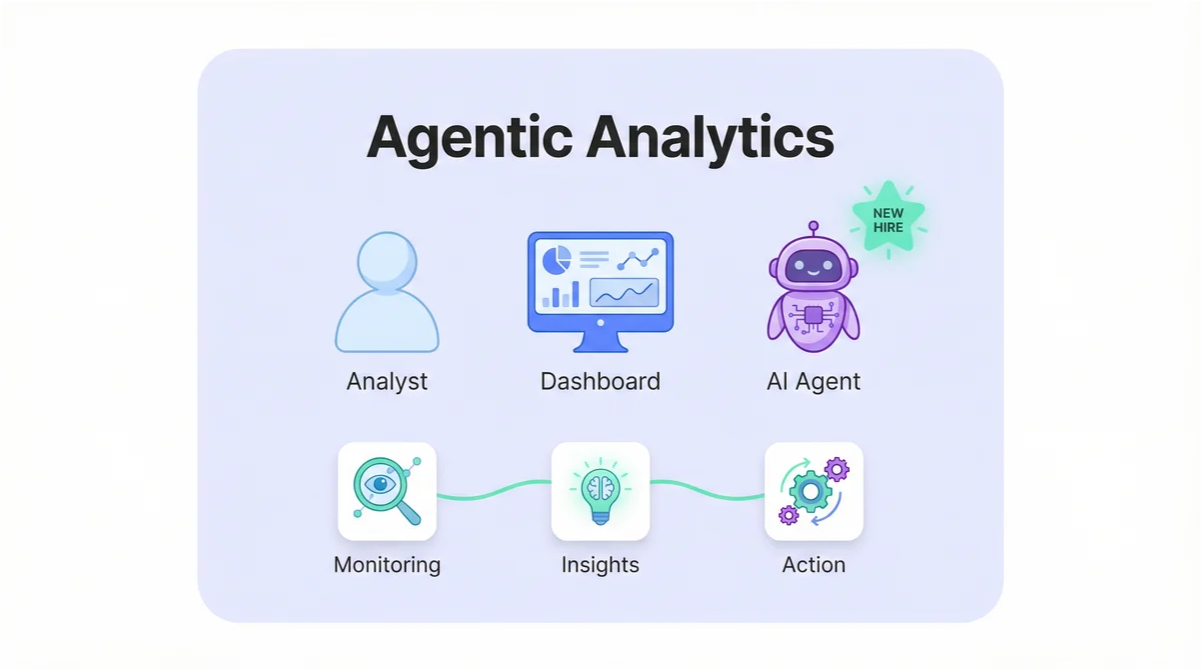
Most companies have some version of these three roles handling their data:
The Human Analyst. Strategic, creative, understands the business context. But they’re slow (because they’re human), expensive (because they’re skilled), and quickly become a bottleneck when everyone needs answers at the same time. They should be doing high-level strategy work, but they’re stuck cleaning CSVs and building the same reports every week.
The BI Dashboard. Fast at displaying data, always available, never complains. But it’s static—it shows you what you asked for when someone built it, nothing more. It can’t answer follow-up questions. It can’t tell you why something changed. And it definitely can’t do anything about what it shows you.
The AI Copilot. The newer addition. Tools like ChatGPT or Claude that help analysts write SQL faster or summarize data. Genuinely useful, but still requires a human driver. Someone has to prompt it, review the output, and take action. It’s a better tool, but it’s still just a tool.
Here’s the gap: there’s a massive space between what dashboards can show and what analysts have time to investigate. This is where business opportunities go to die. The anomaly no one noticed. The trend no one connected. The problem that festered for weeks because everyone was too busy building reports.
What if you could hire someone to work in that gap?
The New Hire: Your AI Agent
What if you could add a new type of team member? One that never sleeps, can monitor every metric simultaneously, and executes tasks with perfect consistency.
That’s an AI agent. And unlike a copilot that waits for instructions, an agent works autonomously toward goals you define.
Think of it this way:
| Role | Strength | Limitation |
|---|---|---|
| Human Analyst | Strategic thinking, context | Slow, expensive, bottleneck |
| BI Dashboard | Always on, fast display | Static, can’t act, no “why” |
| AI Copilot | Speeds up human work | Still needs human driver |
| AI Agent | Autonomous, 24/7, can act | Needs clear rules and goals |
The AI agent isn’t replacing your analyst. It’s handling the work your analyst shouldn’t be doing anyway—the monitoring, the routine diagnostics, the “check if anything’s broken” tasks that eat up hours every week.
Here’s how I’d write the job description:
Job Title: Autonomous Analytics Agent
Core Responsibilities:
- Continuous Monitoring: Watch key business metrics 24/7 without getting tired or distracted
- Anomaly Detection: Proactively flag when something is going unusually right or wrong
- Root Cause Analysis: Automatically dig into the data to understand why something changed
- Task Execution: Trigger workflows in other business systems when conditions are met
Reports To: Your business rules and thresholds
Salary: A fraction of a junior analyst
What this means in practice: Your analyst stops being the bottleneck for routine questions. The agent handles the “is anything broken?” checks automatically, so your human can focus on “what should we do about it?”
The AI Agent’s Playbook: Three Plays That Change How You Operate
Instead of getting into technical architecture, let me show you the specific “plays” an AI agent can run. These are patterns I’ve seen work repeatedly.
Play 1: The “What Changed?” Play
When to run it: A key metric suddenly moves and you need to know why.
The old way: Someone notices the drop in a dashboard (if they’re looking). They ping the analyst. The analyst spends an hour segmenting the data by geography, product, channel, time period. They build a summary. They send it over. By then, half the day is gone.
The agent way: The agent detects the change automatically and runs the diagnostic immediately. Within minutes, you get a message:
“Revenue dropped 15% compared to yesterday. Biggest driver: 40% decrease in the North region for Product X, starting around 2 PM. No changes detected in other regions or products.”
That’s the analysis your human analyst would have done—delivered before anyone even noticed there was a problem.
Why this matters: You’re not paying for the diagnosis anymore. You’re starting the conversation at “okay, why did the North region drop?” instead of “wait, something seems off.”
Play 2: The “What’s Working?” Play
When to run it: You want to find out what’s working, and double down on it.
The old way: You review campaign performance weekly (if you have time). You notice a high performer, but by the time you reallocate budget, the moment may have passed. Or worse, you never notice at all because you’re focused on fixing problems.
The agent way: The agent continuously scans for outperformance against your benchmarks. When it finds something, you hear about it:
“The ‘West Coast Creatives’ ad set is running at 3.2x your target ROAS over the past 48 hours—significantly above the account average of 1.4x. This audience segment is outperforming others by 128%. Consider increasing budget allocation.”
Why this matters: Most teams are good at firefighting. They’re terrible at capitalizing on wins because wins don’t send emergency alerts. An agent fixes that asymmetry.
Play 3: The “Take Action” Play
When to run it: The situation is clear enough that you don’t need a human to decide—you just need something to execute.
The old way: Your ad traffic from a campaign suddenly stops. Hours later, someone notices. They dig in and find a broken UTM link. They fix it. But you’ve already wasted budget and lost data.
The agent way: The agent detects the traffic anomaly within the hour. It identifies the source campaign, finds the broken link, and immediately:
- Sends a Slack alert with the specific broken URL
- Pauses the campaign to stop the bleeding
- Logs the incident in your system for future reference
You wake up to a message that says “Issue detected and handled”—not a fire drill.
Why this matters: This is the leap from “analytics” to “agentic.” The agent didn’t just observe and report. It made a decision and executed. Your job is to review and approve the logic, not to be in the loop on every action.
What Makes This Possible
Running these plays requires more than just access to data. The agent needs authority to act—which means your platform has to support two-way communication.
Most business intelligence and analytics tools are “readers.” They let AI look at the data, but that’s it. The agent can tell you what happened, but it can’t do anything about it. It’s stuck at Play 1 forever.
To run Play 3—to actually take action—you need a platform that’s also a “writer.” The agent needs to be able to push data back into the system, trigger workflows, and log what it did.
This is why we built Databox the way we did. Our MCP server supports both reading and writing, which means agents can complete the full loop: observe, analyze, decide, act, and record. Without that foundation, you’re just building a smarter alert system.
If you want to understand the technical architecture behind this, our guides to Headless BI and Conversational Analytics explain it in more detail. But the short version is: the infrastructure finally exists to make AI agents practical for mid-size teams, not just enterprises with dedicated data engineering staff.
Building Your Agent Team
Here’s the progression I recommend:
Start with monitoring. Pick 3-5 metrics that matter most to your business. Set up an agent to watch them and alert you to anomalies. This is low-risk and builds trust.
Add diagnostics. Once you trust the alerts, configure the agent to run Play 1 automatically—segment the data and tell you why something changed, not just that it changed.
Graduate to action. When you’ve validated the agent’s judgment, give it permission to execute Play 3 for clearly-defined scenarios. Start with low-stakes actions (pause a campaign, send a notification) before moving to anything irreversible.
The goal is to automate the things that don’t need human judgment, so your humans can focus on the things that do.
Your analyst should be thinking about market strategy and competitive positioning—not spending Monday morning copying numbers into a spreadsheet. That’s the agent’s job now.
Ready to upgrade your BI team with autonomous agents? Try Databox for free to experience true AI-powered business analytics. Connect your sources in seconds and use our analytics MCP to monitor, chat with, and act on your data inside Claude, n8n, and more.
Frequently Asked Questions
What’s the difference between an AI copilot and an AI agent?
A copilot assists a human who’s driving—it helps you write queries faster or summarizes data you’re looking at. An agent works autonomously toward goals you define, monitoring data and taking action without needing you to prompt it.
Will AI agents replace my data team?
No. Agents handle the repetitive monitoring and routine diagnostics that eat up analyst time. This frees your human analysts to focus on strategic work—the high-context, creative thinking that actually requires a human brain.
What do I need to get started with AI agents?
You need a data platform that supports two-way communication—one where AI can both read your data and write back to it. You also need clear business rules that define what the agent should monitor and how it should respond.
How do I know if an agent’s decisions are good?
Start with monitoring and alerts only. Review the agent’s analysis manually for a few weeks. Once you trust its judgment, gradually give it permission to take action on clearly-defined scenarios.
What’s the risk of giving an AI agent authority to act?
Start small. Limit agents to low-stakes actions like pausing a campaign or sending a notification. Require human approval for anything irreversible. Build trust incrementally.
References
- Model Context Protocol Documentation – The standard for AI-to-data communication
- Databox MCP Server – Technical implementation details