
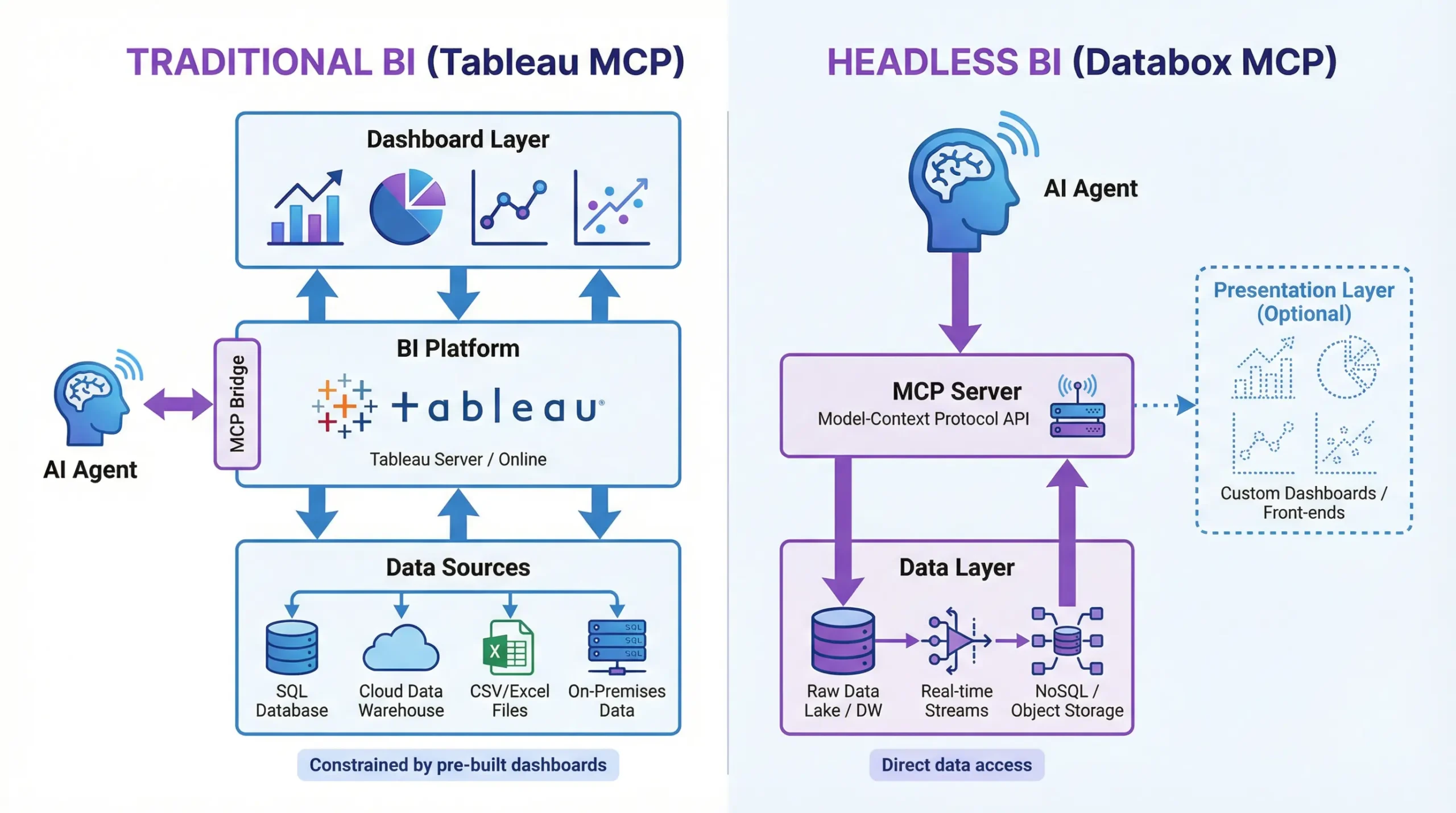
The Model Context Protocol (MCP) is reshaping business intelligence. It provides the technical standard for a new class of generative BI tools that let you talk to your data. The engine behind this revolution is the MCP server—the essential component that connects AI models (like Claude or Cursor) to a company’s data.
This article examines Tableau’s official MCP server vs. Databox MCP to help you decide between a traditional BI add-on and an AI-native headless platform.
What is Tableau MCP?
Tableau MCP is the official MCP server from Tableau. It acts as a bridge between Tableau’s semantic layer and AI agents, designed to make your existing Tableau environment conversational.
Core Capabilities:
- List and retrieve Tableau workbooks, data sources, and views
- Pull visualizations or data snapshots directly into chat
- Get metadata on published assets
- Search content or retrieve insights using Tableau Pulse
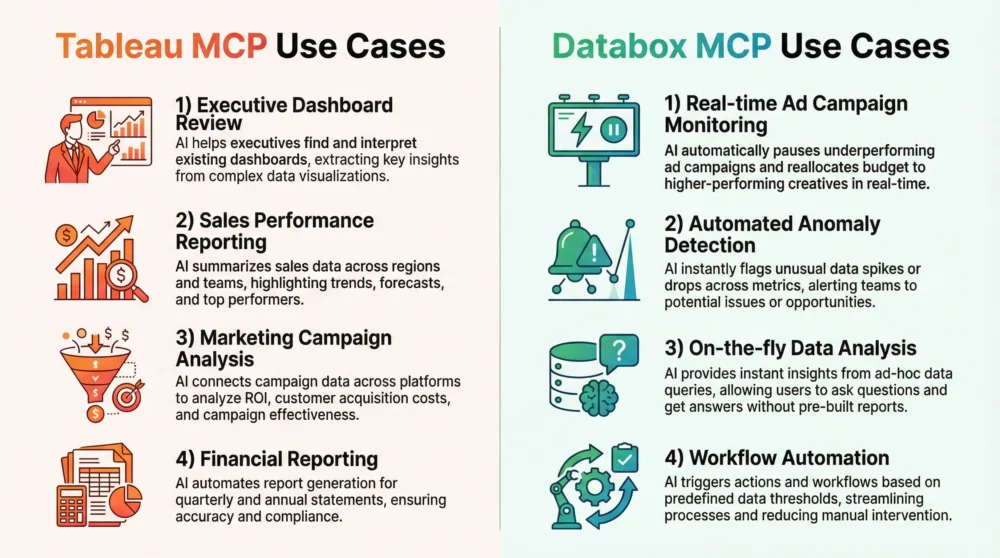
For example, a sales manager might ask, “Show me the latest regional sales performance view.” The MCP retrieves that published dashboard view and displays it in the chat interface.
But here’s the catch: Tableau MCP can only access what is already published in Tableau. It is strictly a “read-only” window into your existing dashboards. Furthermore, on-premise configurations often require manual setup (like enabling the VizQL Data Service). This controlled architecture ensures security, but restricts the AI from answering questions that you haven’t already built a dashboard for.
What is Databox MCP?
Databox MCP is built with a different philosophy. It’s AI-native, enabling headless BI. Rather than layering conversational access on top of existing dashboards, it treats data as a flexible, queryable asset from the start.
That means you can:
- Create new datasets and ingest raw data on the fly
- Query any dataset using natural language
- Build AI-driven workflows without relying on dashboards
For example, a marketer can upload a new CSV file of ad spend data, then ask: “Merge this with Shopify sales and calculate daily ROAS.” No dashboards or pre-published views required.
Setup takes under 60 seconds and supports real-time semantic querying.
Tableau MCP vs. Databox MCP: A Feature-by-Feature Comparison
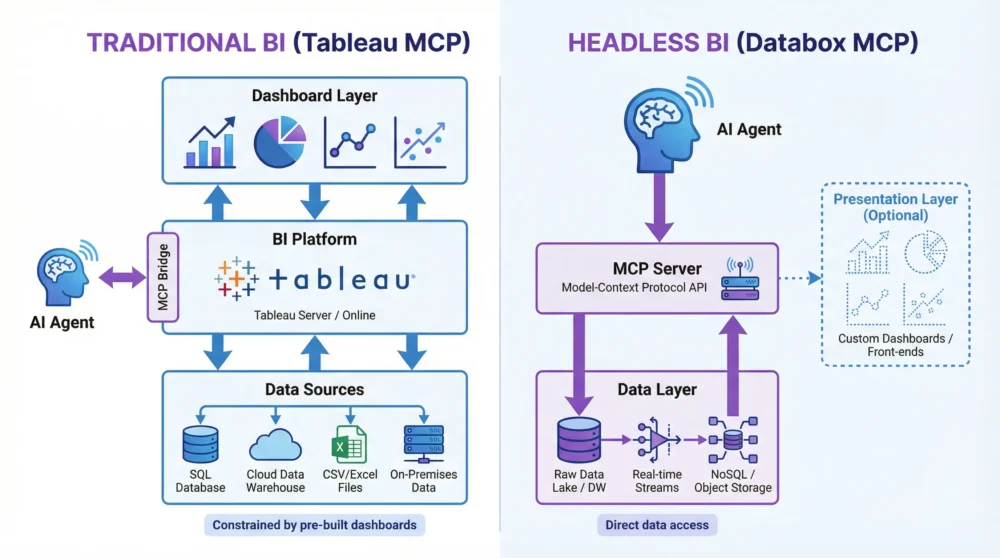
As the MCP ecosystem matures, major BI vendors like Microsoft and Google are releasing their own solutions, such as Power BI MCP and Looker MCP. While these tools are powerful, they generally follow a “Semantic Layer” model: they are designed to let AI agents query or edit existing data structures (like LookML models or Power BI datasets) that you have already built. This approach contrasts sharply with AI-native, headless BI platforms like Databox, which allow agents to ingest raw data and define metrics on the fly.
The table below breaks down the fundamental differences between these two philosophies.
| Feature | Tableau MCP | Databox MCP |
| Core Architecture | Layer on Existing BI. Sits on top of pre-built dashboards. | Headless BI. Decouples the data backend from the presentation layer. |
| Primary Function | Querying pre-published assets. | Ingesting any data & performing semantic querying. |
| Data Ingestion | Read-Only. Relies on data already published in Tableau. | Active Ingestion. Supports ingest_data for live, on-the-fly uploads. |
| Flexibility | Constrained. Limited to Tableau’s existing semantic layer. | High. Creates new datasets and metrics instantly; not limited by dashboards. |
| Setup Speed | Complex. Multi-step server configuration & permissioning. | Instant. Single endpoint setup in <60 seconds. |
| Use Case Focus | Reporting on historical/approved BI content. | AIOps, ad-hoc analysis, and workflow automation. |
Why Databox MCP Stands Out: Headless BI Features
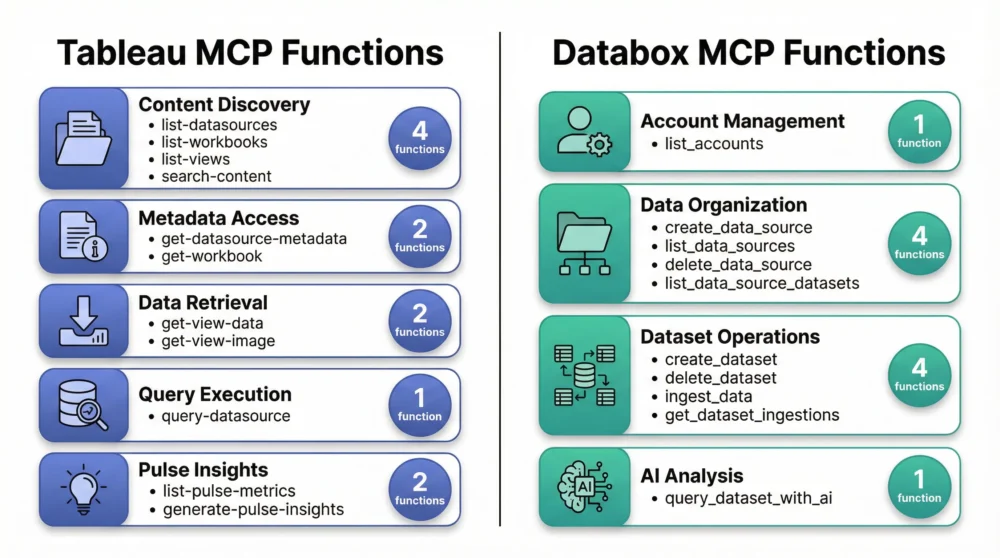
While Tableau MCP acts as a window into your existing reports, Databox MCP functions as an active data engine. By treating data as a flexible, queryable resource rather than a static visual, it enables capabilities that traditional tools cannot match.
1. Speed and Flexibility (The “ROAS” Example)
The architectural difference is most visible in how you handle new data. Consider a common scenario: calculating the Return on Ad Spend (ROAS) for a brand-new marketing channel.
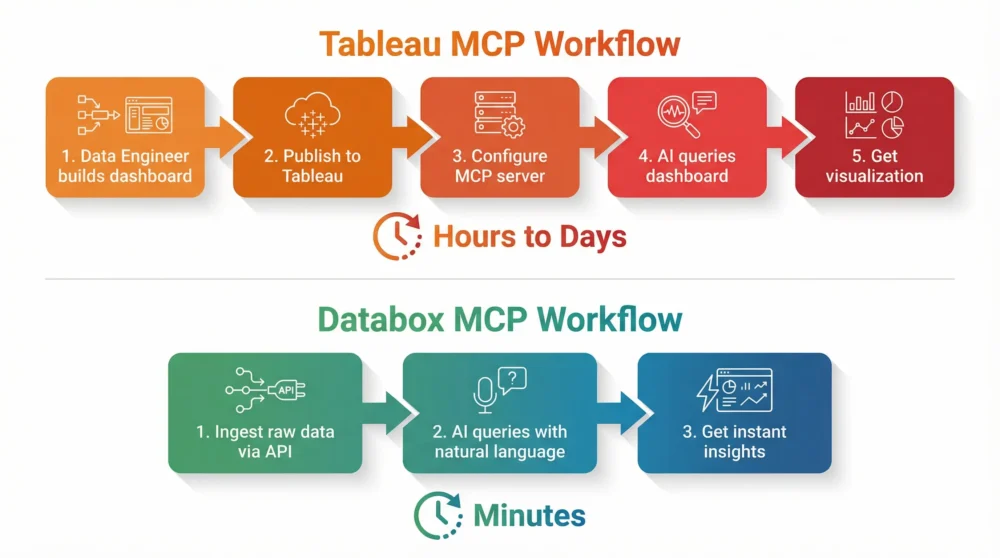
- The Tableau Way (Traditional): The data would first need to be cleaned, loaded into a database, modeled, and published as a new Tableau data source. Only then could the MCP server “see” it to answer questions.
- The Databox Way (Headless): A user simply uploads the raw CSV via the
ingest_datafunction and asks: “Merge this with my Shopify sales data and calculate my daily ROAS.” Thequery_dataset_with_aifunction handles the semantic querying instantly.
Result: You get answers in minutes without waiting for a data engineer to build a formal dashboard.
2. Built for AIOps and Closed-Loop Automation
True AIOps requires more than just reading data; it requires action. Because Databox allows agents to ingest and write data, it enables closed-loop automation workflows that read-only servers cannot support.
Example: An AI agent can monitor Google Ads spend continuously. If it detects an anomaly, it can automatically adjust the budget via the Google Ads API and then use ingest_data to log that action in Databox for a permanent record.
Final Verdict: Which One Is Right for You?
Choose Tableau MCP if:
- You are deeply integrated into the Tableau ecosystem.
- You need a secure, governance-first way to extend your existing, published dashboards into chat interfaces.
- Your primary goal is reporting on established metrics.
Choose Databox MCP if:
- You want an AI-native experience that allows for ad-hoc analysis and data creation.
- You need speed—setting up in under 60 seconds without complex server configurations.
- You are building modern AIOps workflows where AI agents need to actively monitor, analyze, and log data.
Skip the complex setup and get straight to the answers. Try Databox for free to experience true AI-powered business analytics. Connect your sources in seconds and use our analytics MCP to chat with your data inside Claude, Cursor, and more.
Explore Other MCP Comparisons
See how Databox MCP stacks up against other platforms:
Windsor.ai MCP vs. Databox MCP
Supermetrics MCP vs. Databox MCP
Appendix: Complete Function Lists
Tableau MCP Functions
| Function | API Used | Purpose |
|---|---|---|
list-datasources | REST API | Lists all published data sources on a Tableau site |
list-workbooks | REST API | Lists all workbooks on a Tableau site |
list-views | REST API | Lists all views on a Tableau site |
get-datasource-metadata | Metadata API | Retrieves field metadata (columns, descriptions) for a data source |
get-workbook | REST API | Retrieves detailed information about a specific workbook |
get-view-data | REST API | Retrieves data in CSV format for a specified view |
get-view-image | REST API | Retrieves a screenshot/image of a specified view |
query-datasource | VDS API | Executes a VizQL query against a data source |
search-content | Content Exploration API | Searches for content across the Tableau site |
list-all-pulse-metric-definitions | Pulse API | Lists all available Tableau Pulse metric definitions |
list-pulse-metric-subscriptions | Pulse API | Shows metrics the current user is subscribed to |
generate-pulse-metric-value-insight-bundle | Pulse API | Gets specific insight data for a metric |
generate-pulse-insight-brief | Pulse API | Generates an AI-powered summary of insights |
Databox MCP Functions
| Function | Purpose |
|---|---|
list_accounts | Lists all Databox accounts accessible to the authenticated user |
list_data_sources | Lists all data sources for a specific account |
create_data_source | Creates a new data source container for organizing datasets |
delete_data_source | Permanently deletes a data source and all its datasets |
list_data_source_datasets | Lists all datasets within a specific data source |
create_dataset | Creates a new dataset with a defined schema (columns, data types) |
delete_dataset | Permanently deletes a dataset and all its data |
ingest_data | Pushes data records into an existing dataset (max 100 records per request) |
get_dataset_ingestions | Retrieves ingestion history for a dataset (job statuses, timestamps, errors) |
query_dataset_with_ai | Queries a dataset using natural language; AI generates SQL and returns insights |
Frequently Asked Questions
Q: What is an MCP Server?
An MCP Server is a piece of software that acts as a middleman between an AI model (like Claude) and a data source. It exposes a set of tools that the AI can use to ask questions and retrieve information from the data source using the Model Context Protocol standard.
Q: How is Headless BI different from traditional BI?
Traditional BI, like Tableau, tightly couples the data layer with the presentation layer (dashboards). Headless BI decouples them. This means the data can be queried and used by any application, including AI agents, without being tied to a specific visual dashboard. This provides much greater flexibility.
Q: Can I connect a Postgres MCP server or other databases to Databox?
Yes. While Databox is its own MCP server, you can ingest data from virtually any source, including a Postgres database, into Databox. This allows you to use Databox as a central, AI-native hub for all your data, regardless of where it originates.
Q: What are the most popular MCP Clients?
Popular MCP clients that can connect to any compliant MCP server include Anthropic’s Claude (Desktop and Web), Cursor (an AI-native code editor), and automation platforms like n8n.
References
[1] GitHub – tableau/tableau-mcp – Official Tableau MCP server documentation.