




Table of contents
The Model Context Protocol (MCP) is forcing a philosophical shift in the world of business intelligence. As AI agents become the primary consumers of business data, BI vendors are racing to provide them with access.
Google’s answer for its Looker platform is, on the surface, the most comprehensive to date. With a staggering 32-tool arsenal, the Looker MCP server offers deep, developer-level control over its renowned semantic layer.
But does more always equal better? While Looker has built the ultimate API for a governed, static world, it misses a capability that is critical for the AI era: real-time data ingestion.
This guide compares Looker’s “Read-Heavy” architecture with Databox’s “Ingest-First” approach to help you decide which data strategy fits your AI roadmap.
What is Looker MCP?
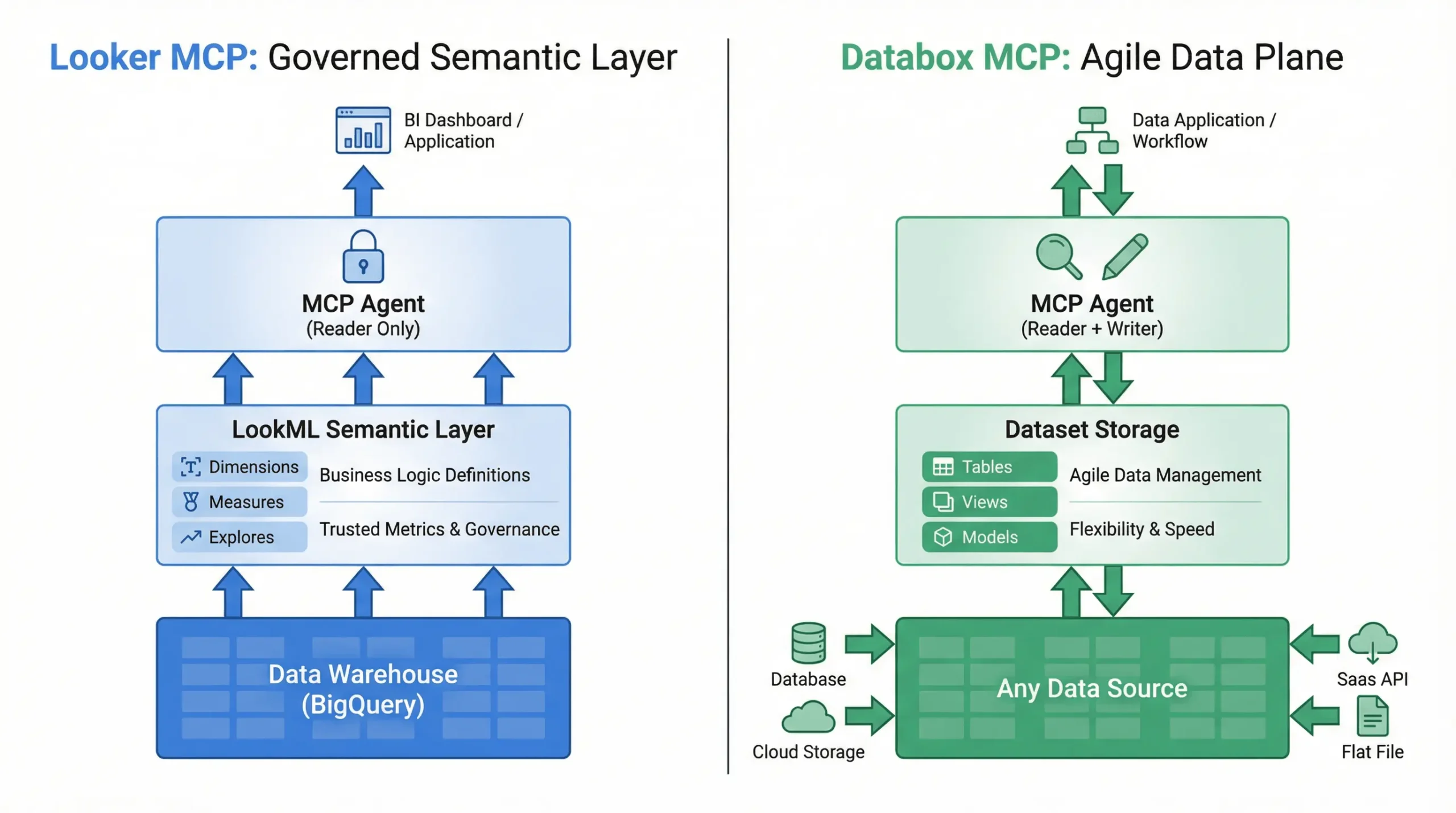
Looker’s implementation of MCP is a developer toolkit designed to extend its LookML semantic layer. It allows AI agents to query existing metrics, manage dashboards, and even modify the underlying LookML code. It is designed to let agents navigate the “Single Source of Truth” that Looker developers have already built.
Provided via the open-source MCP Toolbox for Databases, the Looker MCP server exposes a staggering 32 tools for AI agents, which can be grouped into four categories [2]:
| Tool Category | Tool Count | Purpose |
|---|---|---|
| Model and Query Tools | 9 | Get model metadata and execute queries against the semantic layer. |
| Content Creation Tools | 9 | Programmatically create and manage Looks (saved queries) and Dashboards. |
| Instance Health Tools | 3 | Monitor the health and usage of a Looker instance, a unique feature. |
| LookML Authoring Tools | 12 | Create, read, update, and delete LookML files, enabling model development. |
This is, without question, the most feature-rich MCP server from any major BI vendor. It allows an AI agent not only to query data but also to create dashboards, manage content, and even modify the underlying semantic model. For organizations deeply invested in the Looker ecosystem, it provides an incredibly powerful way to automate BI development and administration.
Note on Looker Studio: Google’s free reporting tool, Looker Studio, does not have an official MCP server. The capabilities discussed here refer to the enterprise Looker platform, which typically requires a paid license and technical configuration.
What is Databox MCP?
Databox MCP is a server designed to enable headless BI workflows. Unlike traditional BI tools that act as passive windows into a warehouse, Databox supports an active “write-and-read” cycle. It allows AI agents to ingest ad-hoc data and query it immediately, creating a dynamic data plane that doesn’t require pre-modeling.
At a Glance Comparison
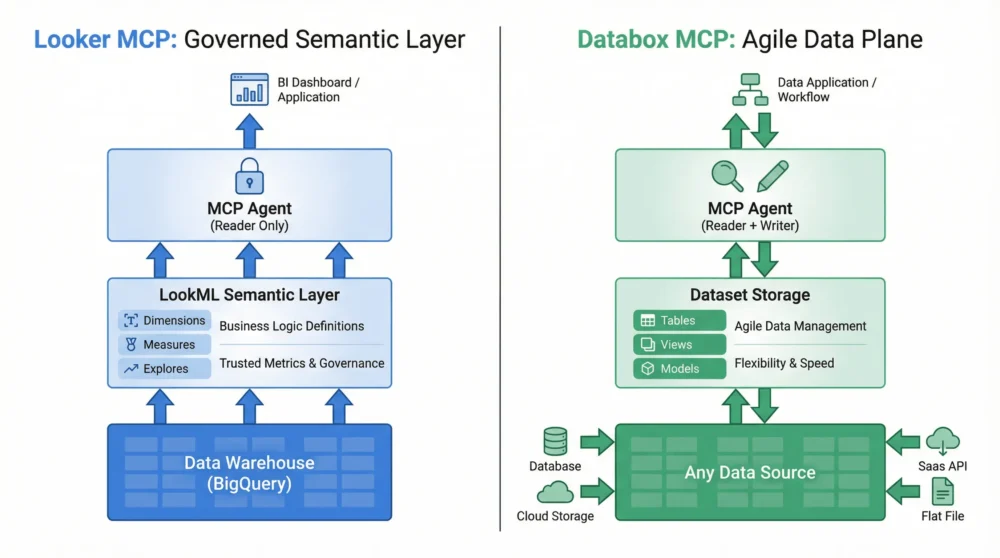
The following table outlines the structural differences between the two implementations.
| Feature | Looker MCP | Databox MCP |
| Primary Philosophy | Governed Semantic Layer | Agile Data Plane |
| Tool Count | ~32 (Management heavy) | ~10 (Lifecycle focused) |
| Agent Role | Reader & Model Manager | Reader & Writer (Ingestor) |
| Data Ingestion | No (Relies on external ETL) | Yes (Direct via Agent) |
| Time to Insight | Days (Model-dependent) | Minutes (On-the-fly) |
| Flexibility | Rigid (Limited by LookML) | High (Ingest any data) |
| Target User | BI Developers / Admins | Data Engineers / AIOps Teams |
Deep Dive: The “Reader” vs. The “Writer”
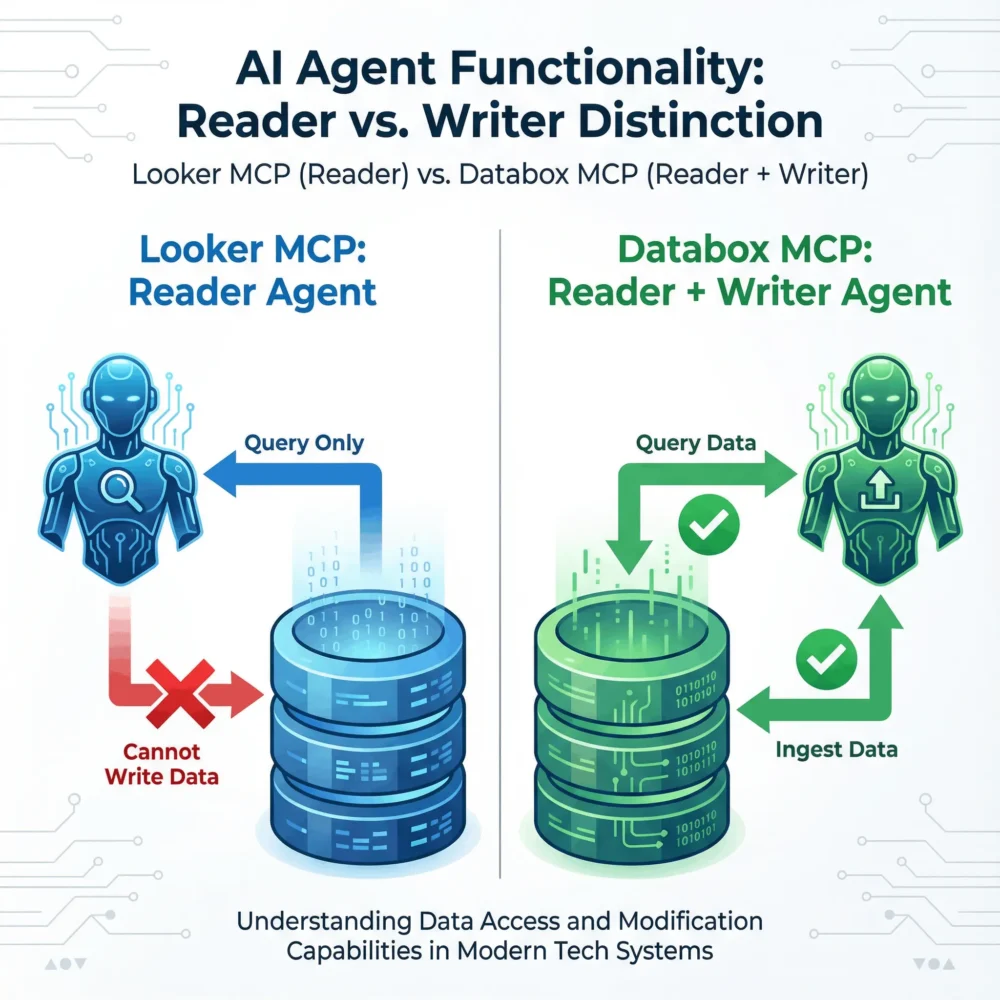
The most critical distinction is not how many tools the server offers, but what the agent is allowed to do with them.
Looker MCP: The Reader MCP
Looker MCP is arguably the most feature-rich server on the market. Its tools allow agents to:
- Query Data: Execute SQL against the semantic layer.
- Build Content: Programmatically create dashboards and Looks.
- Author LookML: Edit the code that defines the data model.
However, the agent remains a Reader. It can only report on data that has already been piped into the underlying database (e.g., BigQuery) and explicitly modeled in LookML. If the data isn’t in the warehouse yet, the AI cannot see it or put it there.
Databox MCP: The Read & Write MCP
Databox builds its architecture around Full-Cycle Integration. It recognizes that in an automated AI workflow, the data often doesn’t exist in a warehouse yet as it might be a live API response or a temporary log file.
The core advantage is the ingest_data function. This allows the AI agent to act as a Writer. An agent can pull data directly within a AI agent workflow from a live source, push it into Databox, and immediately analyze it using query_dataset_with_ai or newly ask_genie.
Real-World Scenario: The “Flash Sale” Intelligence
To understand the practical difference between these architectures, consider a common Marketing Ops blind spot: Competitive Intelligence.
Your conversion rate on Google Ads has dropped by 20% overnight. Your site is up, and your copy hasn’t changed. You suspect a major competitor has launched a flash sale, but that pricing data lives on their website, not in your data warehouse.
The Traditional Path (Looker)
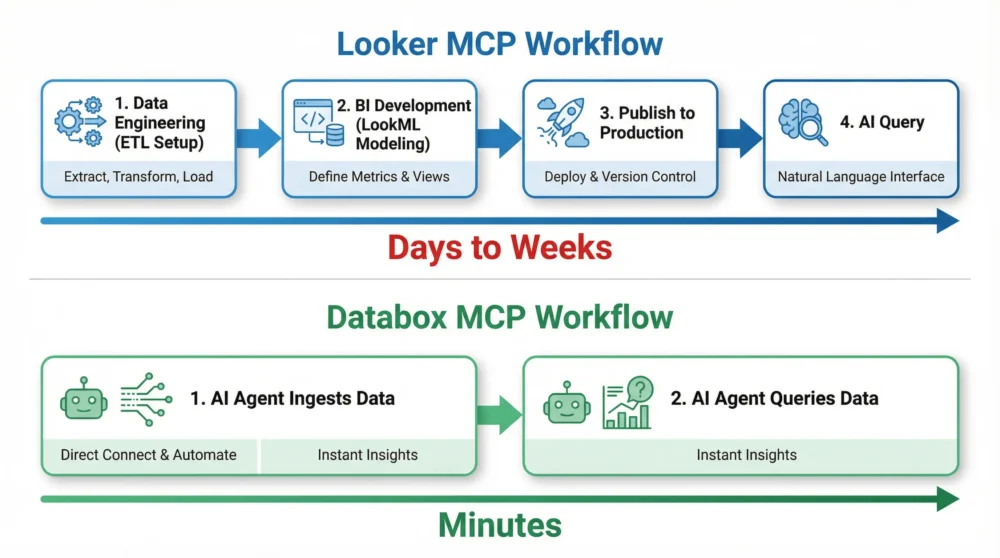
- Engineering: You file a ticket for a data engineer to build a web scraper for the competitor’s site and pipe that data into Snowflake.
- Modeling: A BI developer must then model this new “Competitor Pricing” table and join it with your “Google Ads Performance” table using complex LookML definitions.
- Deployment: The new dashboard is tested and published.
- Analysis: You finally confirm that when Competitor X drops prices by 15%, your conversion rate dips.
- The Result: High governance, but too slow. By the time you confirm the correlation, you have lost a week of sales.
The Agile Path (Databox)
- Ingestion: Your AI agent visits the competitor’s pricing page, extracts the current prices, and uses
ingest_datato push a “Competitor Price Index” directly into a Databox dataset. - Analysis: The same agent immediately uses
ask_genie (dataset query with ai)to ask: “Correlate the ‘Competitor Price Index’ with my ‘Google Ads Conversion Rate’ for the last 24 hours.”
- The Result: Databox supports AI Analytics by bringing external context into your internal reporting instantly. The agent confirms the correlation in minutes, allowing you to launch a counter-offer immediately.
e.
Conclusion: Governance vs. Operational Agility
Choosing between Looker and Databox isn’t about which tool has more features. It’s about deciding what role you want data to play in your business.
Choose Looker MCP for Centralized, Managed Governance Looker is designed for organizations that prefer a “Top-Down” approach to data. It is the right choice for Chief Data Officers who want a central BI team to manually define every metric via LookML before an agent can see it. If your primary goal is to provide a strictly controlled window into a static data warehouse—ensuring AI agents follow a rigid path to reach “official” company numbers—Looker’s read-heavy architecture is built for that level of oversight.
Choose Databox MCP for the “System of Action” Databox is built for the fast-moving world of AI Analytics. It is the go-to infrastructure for AI Automation Agencies and operations teams who treat data as a trigger for action, not just a historical record.
- For AI Automation Agencies: Databox acts as the “metric memory” for your agents. If you’re building workflows in n8n, you don’t want the overhead of setting up a new database for every project. Databox allows you to ingest and analyse data instantly, helping you prove ROI to your clients faster.
- For Business Operations: When you’re managing real-time inventory or customer support logs, you can’t wait for a nightly data sync. Databox enables headless BI strategies that let your AI agents write and query data in the same loop, closing the gap between a signal and a decision.
Looker provides a stable window into your organization’s historical performance. Databox provides the active, high-density data plane that your agents need to automate business future.
Skip the complex setup and get straight to the answers. Try Databox for free to experience true AI-powered business analytics. Connect your sources in seconds and use our analytics MCP to chat with your data inside Claude, Cursor, and more.
Explore Other MCP Comparisons
See how Databox MCP stacks up against other platforms:
Windsor.ai MCP vs. Databox MCP
Supermetrics MCP vs. Databox MCP
Appendix: Complete Function Lists
Looker MCP Functions
| Category | Function | Purpose |
| Querying | list_models | Lists all available LookML models |
| list_explores | Lists all Explores within a model | |
| get_explore | Retrieves fields and metadata for a specific Explore | |
| run_query | Executes a query against an Explore and returns data | |
| Content Creation | list_looks | Lists all saved Looks |
| get_look | Retrieves a specific Look | |
| create_look | Creates a new Look from a query | |
| update_look | Updates an existing Look | |
| delete_look | Deletes a Look | |
| list_dashboards | Lists all available dashboards | |
| get_dashboard | Retrieves a specific dashboard | |
| create_dashboard | Creates a new dashboard | |
| update_dashboard | Updates an existing dashboard | |
| delete_dashboard | Deletes a dashboard | |
| Instance Health | list_connections | Lists all database connections |
| test_connection | Tests the status of a database connection | |
| list_schedules | Lists all scheduled content deliveries | |
| get_schedule | Retrieves details for a specific schedule | |
| run_schedule | Manually triggers a scheduled job | |
| list_alerts | Lists all configured alerts | |
| LookML Authoring | list_projects | Lists all LookML projects |
| get_project | Retrieves details for a specific project | |
| list_project_files | Lists all files within a LookML project | |
| get_project_file | Retrieves the content of a specific LookML file | |
| create_project_file | Creates a new file in a LookML project | |
| update_project_file | Updates the content of a LookML file | |
| delete_project_file | Deletes a file from a LookML project | |
| validate_project | Validates the LookML code in a project | |
| deploy_project_to_production | Deploys a project from development to production mode | |
| get_git_branch | Gets the current Git branch for a project | |
| list_git_branches | Lists all Git branches for a project | |
| create_git_branch | Creates a new Git branch |
Databox MCP Functions
| Function | Purpose |
| list_accounts | Lists all Databox accounts accessible to the authenticated user |
| list_data_sources | Lists all data sources for a specific account |
| create_data_source | Creates a new data source container for organizing datasets |
| delete_data_source | Permanently deletes a data source and all its datasets |
| list_data_source_datasets | Lists all datasets within a specific data source |
| create_dataset | Creates a new dataset with a defined schema (columns, data types) |
| delete_dataset | Permanently deletes a dataset and all its data |
| ingest_data | Pushes data records into an existing dataset (max 100 records per request) |
| get_dataset_ingestions | Retrieves ingestion history for a dataset (job statuses, timestamps, errors) |
| query_dataset_with_ai | Queries a dataset using natural language; AI generates SQL and returns insights |
Frequently Asked Questions
Q: Is Databox an AI Agent? No. Databox is a Modern BI platform that enables headless BI. We provide the infrastructure (the MCP server) that your AI agents (like Claude or n8n workflows) use to access and manage data.
Q: Can I use Looker and Databox together? Yes. Many teams use Looker for their “System of Record” reporting and Databox for agile, real-time metric tracking and AI-driven automation.
References
1] [Introducing Looker MCP Server | Google Cloud Blog