
TL;DR
- Claude has no live access to your business data by default, so every answer it gives about your metrics is either a refusal or a confident fabrication based on pattern-matching.
- Four methods exist to connect business data to Claude (CSV uploads, automation platforms, custom MCP servers, and pre-built MCP). Only the MCP-based methods return validated query results, and only a pre-built analytics MCP like Databox provides that without engineering investment.
- Databox MCP connects to Claude in about a minute through Settings → Connectors with OAuth authentication, and the Databox MCP server executes actual queries against your data and returns calculated results, not LLM approximations.
- Once connected, Claude becomes a real analytics interface where you can ask ad-hoc business questions, run threshold checks, and execute cross-channel queries across 130+ data sources in plain language.
- Your data stays protected because Claude does not retain or learn from individual conversations, and Databox keeps access under your control.
Introduction
You ask Claude what your MRR was last month. The answer comes back fast, formatted cleanly, stated with total confidence, and completely wrong. Not because Claude is broken, but because it was guessing. Claude has no live connection to your business data by default. It cannot query your CRM, pull from your ad platforms, or check your billing system. So when a marketing manager asks about their numbers, Claude either refuses or generates a plausible-sounding figure based on patterns in its training data. Four methods exist to fix this: manual CSV uploads, automation platforms, custom MCP servers, and pre-built analytics MCPs like Databox. Only the MCP-based methods return validated, calculated results instead of letting Claude do the math on raw data it cannot verify, and only a pre-built MCP gives you that without engineering investment.
Claude is only as smart as the data behind it. For most business teams right now, Claude has no data behind it at all. The methods are not equal, and most of them still leave Claude estimating rather than querying. This article covers all four, explains why most still produce unreliable answers, and walks through the fastest path to getting Claude responses you can make decisions on.
Why Claude Gives Wrong Answers About Your Business (By Default)
By default, Claude does not connect to databases, data warehouses, or SaaS business tools. It can only analyze data you manually upload or paste into the chat. Everything else it “knows” about your company comes from its training data, a static snapshot of the public internet with a knowledge cutoff that excludes your live metrics entirely.
The distinction matters because there are two fundamentally different things Claude can do with data. It can reason about numbers you give it, summarizing, comparing, or spotting patterns in a spreadsheet you uploaded. It can also query a live data source, pull the actual number, and return a calculated result. Without a live connection, Claude can only do the first. When a marketing manager asks a specific question like “What was our CAC last quarter?”, Claude cannot say “I don’t have that data” if it thinks it can pattern-match a plausible answer. The output is a confident, well-formatted hallucination.
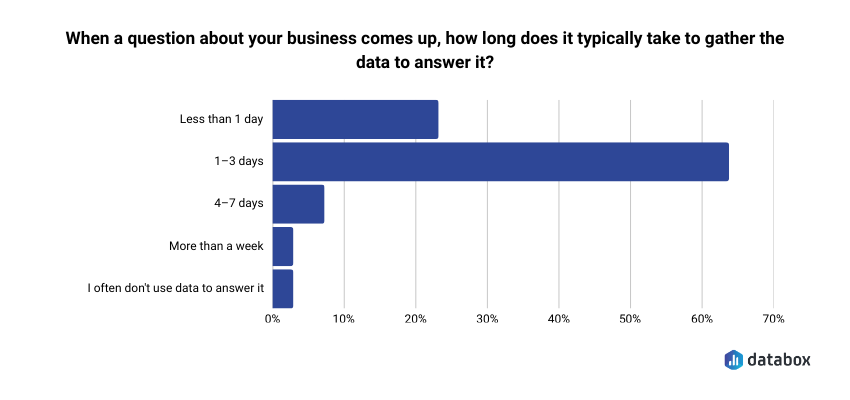
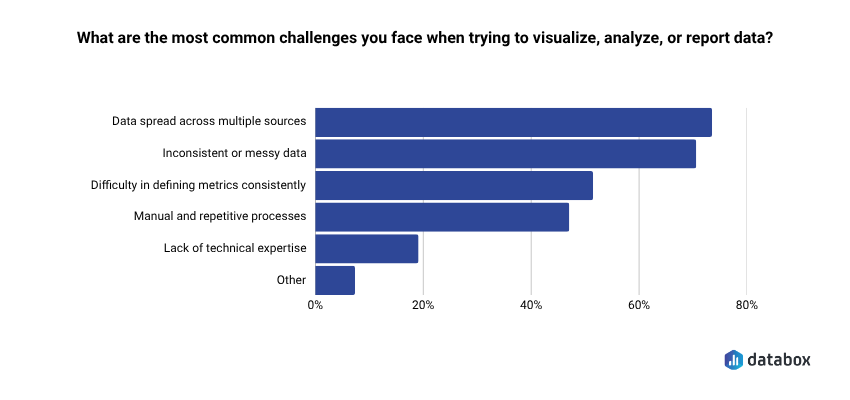
The cost of that gap is measurable. In Databox’s Time to Insight: What Are the Biggest Roadblocks to Actionable Data? Survey, 64.29% of respondents said it typically takes 1 to 3 days to gather the data needed to answer a single business question, and 73.13% named data spread across multiple sources as their top reporting challenge.
The accuracy problem is what business teams already live with before AI enters the picture.
Pasting a CSV into Claude works for a one-time question about a single dataset. As a daily workflow, manual uploads break down fast. Files go stale the moment you export them. Context windows have hard token limits. And Claude is still estimating across rows of raw numbers without understanding your metric definitions, your fiscal calendar, or your data schema. Manual data integration into Claude works as a temporary workaround. For ongoing business analytics, it falls apart.
The question is not whether to connect your business data to Claude, but which connection method produces answers you can trust.
The 4 Ways to Connect Business Data to Claude, and Why Most Still Produce Unreliable Answers
These four approaches differ in setup complexity, data freshness, and the dimension every competing guide ignores: whether Claude is doing the math itself or receiving validated results from an analytics engine that already did the math.
| Method | Setup Complexity | Data Freshness | Answer Accuracy | Best For |
| Manual CSV / File Upload | Low | Stale (point-in-time) | Low (Claude estimates on raw data) | One-time analysis of a single dataset |
| Automation Platforms (Zapier, Make) | Medium | Near-live triggers | Medium (structured but narrow) | Simple workflow triggers |
| Custom MCP Server / Claude API | High | Live | High (if built and maintained correctly) | Developer teams building custom products |
| Pre-Built MCP (Databox) | Very low | Live | High (validated query results) | Business teams who need trusted answers |
The table makes one thing visible that a feature list obscures: setup complexity and answer accuracy do not move in lockstep. The lowest-complexity option (CSV upload) produces the least accurate answers. The second-lowest-complexity option (Databox MCP) produces the most accurate answers, because it routes queries through a validated analytics layer instead of handing Claude raw numbers to interpret.
Manual Exports: Quick but Stale
Every team starts here. Export a CSV from Google Analytics or HubSpot, upload it to Claude, and ask a question. For a single bounded analysis (“summarize this spreadsheet”), it works fine. The file is stale the moment you export it. Claude has no schema context, so it interprets column headers literally and guesses at relationships between fields. If the file exceeds Claude’s context window, you lose rows silently with no warning. Manual data integration into Claude works as a temporary or fallback solution. It does not work as a long-term strategy for business analytics.
Automation Platforms: Lightweight but Limited
Zapier, Make, and similar tools can push structured data into Claude through triggered workflows. When a new deal closes in HubSpot, send the deal details to Claude. These integrations work well for narrow, predefined automations. They are not built for ad-hoc analytical queries. You cannot ask Claude to interrogate the underlying dataset, compare trends across time periods, or follow up with a clarifying question. The workflow fires once, delivers a payload, and the conversation ends there.
Custom MCP Servers: Powerful but Expensive
Building a custom MCP server is the most flexible option. Your engineering team writes a server that exposes your database schema to Claude, handles authentication, manages rate limits, and returns query results live. Technically, this produces excellent results if your team has the engineering resources to build it, the operational bandwidth to maintain it, and the security expertise to govern access. For most business teams without a dedicated data engineering function, this option is out of reach.
Pre-Built MCP (Databox): Live Data, Validated Answers
Databox MCP resolves the accuracy problem without requiring engineering resources. When you ask Claude a business question through Databox MCP, the Databox MCP server executes the actual query against your data and returns calculated results. Claude receives a validated answer, not raw numbers to interpret or estimate. A well-built custom MCP server can do the same thing, but only if your team builds, hosts, and maintains it. Databox provides this capability as a managed service.
Most vendor MCP servers are single-source. HubSpot’s MCP exposes HubSpot data only; Stripe’s exposes Stripe data only. Databox is the exception: a single MCP endpoint that exposes data from any of the 130+ sources you’ve connected to Databox, so cross-channel queries work through one connection instead of four. That directly addresses the 73.13% of teams in Databox’s Time to Insight: What Are the Biggest Roadblocks to Actionable Data? survey who name scattered data sources as their top reporting challenge.
CHART
What MCP actually is: MCP stands for Model Context Protocol, an open standard created by Anthropic in late 2024 and donated to the Linux Foundation’s Agentic AI Foundation in December 2025. It gives AI assistants like Claude a structured way to interact with external tools and data sources. Think of it as USB-C for AI: one protocol, any application. For a business user, MCP means Claude can now query your live metrics, understand your data schema, and return results it calculated rather than guessed. MCP separates “Claude with your data” from “Claude guessing about your data.”
A note on Databox’s two AI paths: Databox offers two complementary ways to apply AI to your business data. Genie, the in-platform AI Analyst, lives inside the Databox app and answers performance questions for teams who want to work directly in Databox. Databox MCP exposes your data to external AI tools like Claude, ChatGPT, and Cursor. If you would rather ask questions inside Databox, see Databox Genie page
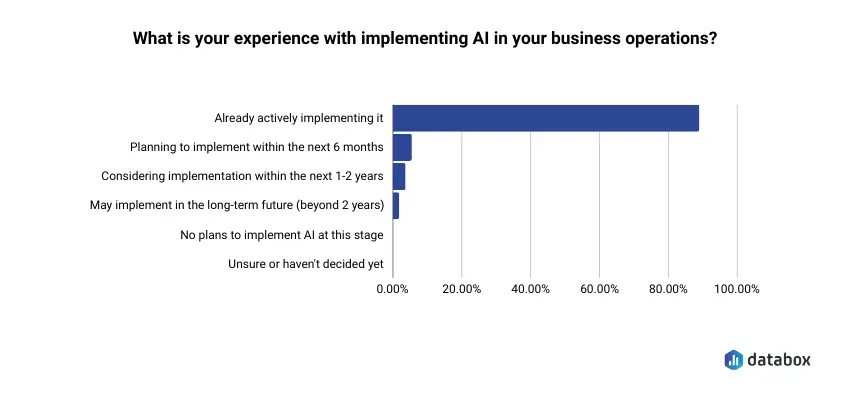
According to Databox’s Leveraging AI for Business Growth in SMBs survey, 89.21% of small and mid-sized businesses are already actively implementing AI in their operations, and 87.05% currently use generative AI.
The demand is here. What most teams are still missing is a reliable connection between their AI tools and their actual business data.
Connecting Databox to Claude Takes About a Minute and Requires No Engineering Resources
The connector setup is a UI flow, no code required. Before you begin, confirm three prerequisites:
- You have a Databox account with at least one data source connected (Google Ads, HubSpot, Stripe, or any of 130+ integrations).
- You have a paid Claude subscription. The Databox MCP connector requires a paid Claude plan (Pro, Max, Team, or Enterprise).
- If you are on a Team or Enterprise plan, your workspace admin needs to add the Databox MCP connector at the organization level before individual team members can connect. If you do not see the option to add a custom connector, contact your Claude workspace admin.
With those three in place, the setup itself takes about a minute.
Step 1: Confirm Your Databox Data Sources Are Connected
Databox acts as the aggregation layer between your business tools and Claude. The data sources you want Claude to query (Google Ads, HubSpot, Stripe, Google Analytics, and so on) need to be connected in Databox first. If you already use Databox, this is likely complete. If you are new, connecting a source takes a few clicks through the Databox integrations page.
Step 2: Add the Databox MCP Connector in Claude
Open Claude Desktop or the Claude web app. Go to Settings → Connectors → Add custom connector. Fill in:
- Name: Databox
- URL: https://mcp.databox.com/mcp
- Authentication: OAuth 2.0
Click Add. A Databox login screen opens in your browser. Log in and authorize the connection. You will land back in Claude with Databox listed in your active connectors.
Already a Databox user? The full setup guide lives at developers.databox.com/docs/mcp/setup, including configuration details for Claude Code, ChatGPT, Cursor, n8n, and other MCP-compatible clients.
Step 3: Ask Your First Business Question
Open a new Claude conversation and ask a real question about your data. Try something specific:
“Using my Databox data, what was my MRR trend over the last 30 days, and which channels contributed most to any changes?”
Claude routes the question through the Databox MCP server. The server queries your actual metrics, calculates the result, and returns a validated, human-readable answer to Claude. You are no longer asking Claude to guess. You are asking it to report.
Once Connected, Claude Answers From Your Actual Data, Not a Pattern-Matched Estimate
With Databox MCP live, Claude stops being a chatbot that guesses about your numbers and becomes an analytics interface that answers from your actual data. The Databox MCP server understands your schema, generates the necessary queries, and returns results in terms that a non-technical user can act on. No SQL required. No waiting on an analyst.
And Databox MCP supports both reading and writing data. Claude can query your metrics through the MCP, and it can also ingest new data into Databox (competitor research, survey results, custom calculations) through the same connection. For persistent alerts, scheduled reports, or multi-step workflows, pair Databox MCP with Databox’s native Alerts feature or an orchestration tool like n8n.
Ask Ad-Hoc Business Questions in Plain Language
The most immediate use case is the one you came here for: asking Claude a business question and getting back a real answer. Revenue trends, channel performance breakdowns, and metric comparisons across time periods are all available in plain language.
Try this prompt:
“Why did my MRR drop last week? Break it down by segment.”
The Databox MCP server queries your actual MRR data across segments, identifies which segments declined, calculates the magnitude of each change, and returns the breakdown to Claude. Claude presents it in natural language. The marketing manager who asked that question gets an answer grounded in real numbers, not a pattern-matched estimate from training data.
Run Threshold Checks From Claude, Or Set Native Alerts in Databox
For ad-hoc threshold checks, ask Claude directly. Try this prompt:
“Show me any campaigns where CPA has exceeded $50 in the last 3 days.”
The Databox MCP server runs the query against your live metrics and returns the campaigns that crossed the threshold. Claude gives you the answer in seconds, with the underlying numbers.
For continuous 24/7 monitoring, configure Databox’s native Alerts feature inside the Databox app under Notifications → Alerts. Alerts run independently of Claude, send notifications to email or Slack, and don’t require an active Claude session. For more advanced orchestration, build an n8n workflow that combines scheduled Databox MCP queries with notification actions across your stack.
The two paths work together: use Claude and MCP for ad-hoc investigation, and use Databox Alerts or n8n for persistent monitoring.
Run Cross-Channel Queries Without Source-by-Source Setup
Databox’s 130+ pre-normalized integrations create the clearest advantage for cross-channel queries. Because Databox already aggregates and normalizes data from Google Ads, Meta, HubSpot, Stripe, and dozens of other sources, cross-channel queries work immediately. No source-by-source configuration required.
Try this prompt:
“Compare my Google Ads, Meta, and HubSpot pipeline performance last month. Which channel had the best cost-per-acquisition?”
A validated comparison across three platforms returns in a single Claude response. Without the aggregation layer, the same question would require three separate data exports, a spreadsheet to normalize the metrics, and an hour of manual work before the analysis could even begin.
Your Business Data Stays Protected, and Claude Does Not Retain or Learn From Your Conversations
Data security is the most common unstated objection when a business team considers connecting live metrics to an AI assistant. The concern is reasonable. The answer is more reassuring than most teams expect.
Claude’s data handling: Claude does not retain or learn from individual conversations. Each chat session is independent. Data is encrypted in transit and at rest, and Anthropic maintains SOC 2 Type II compliance along with ISO 27001:2022 and ISO/IEC 42001:2023 certifications. Your business metrics are not being fed into Claude’s training data or made available to other users.
Databox’s security posture: Your data stays protected, and access remains under your control. The MCP connection authenticates through OAuth 2.0, and you can revoke access at any time from your Databox account settings. Databox does not expose raw database credentials to Claude. Query execution happens inside Databox’s infrastructure, and only the calculated result passes through the MCP protocol to Claude. Databox is SOC 2 Type 1 certified.
Practical guidance for your team: Do not send raw PII (customer names, email addresses, phone numbers) through Claude queries. Do not paste API credentials or passwords into the chat. If your organization operates under HIPAA, GDPR, or similar regulatory frameworks, confirm with your legal or compliance team that your intended use falls within your existing data processing agreements before connecting.
The goal is not to avoid connecting data to Claude. The goal is to connect it through a layer that enforces access controls and returns only the results you need, which is exactly what Databox MCP provides.
The Right Connection Method Depends on Whether You Need Answers You Can Share in a Budget Review
If you need answers your whole team can trust, based on live data from multiple sources: connect through Databox MCP. Setup takes about a minute, requires no engineering resources, and returns validated query results instead of LLM approximations.
If you prefer to ask questions inside Databox instead of working through Claude: use Genie, Databox’s in-platform AI Analyst. Genie lives inside the Databox app and answers performance questions in plain language, without requiring a Claude account or MCP setup.
If you have a one-time question about a single spreadsheet: upload the file directly to Claude. It works for bounded, point-in-time analysis. Do not treat it as an ongoing workflow.
If you need a specific, narrow trigger (“when X happens, send Y to Claude”): use an automation platform like Zapier or Make. Good for structured workflows, not for ad-hoc analytics.
If you are a developer building a custom AI product: build a custom MCP server against the Claude API. Maximum flexibility, maximum engineering investment.
The method worth choosing is not the one that gets Claude connected fastest for a single question. It is the one that produces answers you can use to reallocate spend before a quarter closes, share in a pipeline review, or defend in a budget meeting. At the beginning of this article, Claude gave you an MRR number. Confident, well-formatted, completely wrong. Databox MCP is how you make sure the next answer is the real one.
Frequently Asked Questions
Do I need to know SQL or coding to use Databox MCP with Claude?
No coding or SQL knowledge is required. The Databox MCP server understands your data schema and generates the necessary queries for you. You ask questions in plain language and get calculated answers back.
Will Claude store or learn from my business data?
Claude does not retain or learn from individual conversations. Each session is independent, and data is encrypted in transit and at rest. Anthropic maintains SOC 2 Type II compliance, ISO 27001:2022, and ISO/IEC 42001:2023 certifications.
Which Claude plan do I need to use the Databox MCP connector?
A paid Claude subscription is required to use the Databox MCP connector. This applies across Pro, Max, Team, and Enterprise plans. On Team and Enterprise, the workspace admin must enable the connector at the organization level before individual team members can connect.
Can I connect multiple data sources like Google Ads, HubSpot, and Stripe at the same time?
Yes. Because Databox acts as the aggregation layer, all 130+ connected integrations are accessible through a single MCP connection. You can ask cross-channel questions across all your sources without setting up separate connections for each tool.
What is Genie, and how is it different from Databox MCP?
Genie is Databox’s in-platform AI Analyst, and Databox MCP is the connector that exposes your Databox data to external AI tools like Claude. Genie lives inside the Databox app and answers questions without requiring a Claude subscription. Databox MCP lets you ask the same kinds of questions from inside Claude, ChatGPT, Cursor, or any other MCP-compatible AI tool.