

A manual walkthrough, and the Claude skill that does it for you.
TL;DR
- You don’t need a dedicated content analytics platform. GA4 already has the signal for what to refresh, expand, or retire. The work is in classifying every page by its lifecycle stage and scoring it against your ICP.
- Three steps build the manual audit. Pull landing-page data from GA4 across two 30-day windows. Classify every page into a lifecycle stage: Rising, Stable, Declining, Zombie, or New. Score each page against your ICP and turn the scored list into a four-to-six-item editorial work queue.
- ICP scoring is where the manual audit earns its keep. A blog post with growing traffic that’s off-ICP is a problem, not a win. The audit that pays off is the one that separates the two.
- Search Console adds the Perfect Storm layer. Pages with high impressions and almost no clicks are your highest-upside refresh candidates. GSC data is what makes them findable.
- The Content Performance Partner Claude skill automates the join. Same GA4 and Search Console data, same lifecycle classification and ICP scoring, one monthly HTML report in about five minutes. Built by AI Marketing Automation Labs.
You don’t need a dedicated content analytics platform. GA4 already has the signal for what to refresh, expand, or retire. The work is in classifying every page by its lifecycle stage and scoring it against your ICP. Here’s how to build the audit manually, and here’s the skill that does it for you when the manual scoring stops paying off.
The procedure is three steps in tools you’re already using. Pull landing-page data from GA4 across two 30-day windows and compute the change per page. Classify every page into a lifecycle stage: Rising, Stable, Declining, Zombie, or New. Score each page against your ICP and turn the scored list into a four-to-six-item editorial work queue for the month.
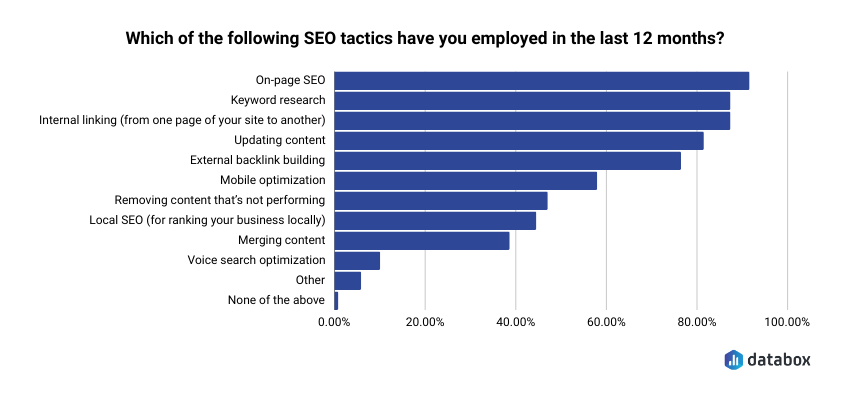
The gap between publishing content and knowing what to do with the content you’ve already published is where most editorial calendars quietly go wrong. In Databox’s State of Content Marketing for SEO research, over 80% of marketers named “updating existing content” as one of their most-used SEO tactics in the last twelve months. Refreshing content is now core work. Knowing which content to refresh is a different question, and it’s the one this audit answers.
What a monthly content audit actually delivers
A monthly content audit is not a traffic report. Total sessions, channel splits, top-of-page tables — those are dashboards. Useful for status meetings, useless for editorial decisions.
The audit that pays off is per-page and prescriptive. Every published piece on your site gets a lifecycle stage assigned to it (is it climbing, stable, declining, dead, or just launched), an ICP alignment score (is the traffic it pulls actually your audience), and one of three verdicts: refresh, expand, or retire. That’s what a Content Marketing Manager or Head of Content actually needs to walk into a monthly editorial planning meeting with. Not “sessions were up 4%.” A ranked list of pages and a dated action for each.
Step 1: Pull GA4 landing-page data for two 30-day windows
Every content lifecycle audit starts with a comparison across time. A page’s stage is defined by how it’s changing, not by its absolute traffic.
In GA4, open Reports → Engagement → Landing page. Set the primary date range to the last 30 days. Set a comparison date range to the prior 30 days (the 30 days before that). GA4 will show sessions, active users, engagement rate, average engagement time, and conversions for every landing page, side by side, with the percentage change per metric.
Add a filter to exclude non-content pages you don’t need to audit: the homepage, the pricing page, the login page, thank-you pages. What you want in the export is your actual content library: blog posts, resource pages, guides, glossary entries, whatever your content stack ships.
Export the report as a CSV or Google Sheet. In your working spreadsheet, keep six columns: Landing Page, Sessions (current), Sessions (prior), Sessions % change, Engagement rate, Days since publish.
Two 30-day windows is the practical minimum. Weekly windows are too noisy to read; quarterly windows smooth over the fast movers you want to catch. Thirty and thirty is the cadence that surfaces month-over-month change without the seasonality problems of longer windows.
Step 2: Classify each page by lifecycle stage
The lifecycle classification is where the audit stops being a spreadsheet and starts being a decision.
Add a column called Lifecycle Stage. Fill it in for every row using these rules as your starting rubric:
- Rising Hard: sessions up more than 50% month over month, engagement rate above your site average.
- Rising: sessions up 15 to 50%, engagement rate stable or improving.
- Stable: sessions within plus or minus 15%, engagement rate steady.
- Declining: sessions down 15 to 50%, or engagement rate falling sharply.
- Zombie: sessions down more than 50%, or fewer than 10 sessions in the current window on a page more than 6 months old.
- New Launch: published in the current 30-day window.
Adjust the thresholds to your site’s traffic volume. A B2B SaaS blog getting 100,000 monthly sessions applies different bandwidths than one getting 5,000. The point isn’t the exact percentages. The point is that every page gets a stage, and the stage is what defines the action you take on it.
A few patterns worth spotting when you first apply the rubric. The false-Rising page: a piece that spikes because it got shared on Reddit, LinkedIn, or Hacker News in the current window. It looks like Rising Hard, but the traffic won’t recur next month. Check the referring source before you invest editorial effort. If 80% of the spike came from a single referrer, treat the page as Stable and check again in 30 days.
The flickering page: a piece that oscillates between Stable and Declining month over month. That is usually a signal of narrow keyword coverage: the page ranks for one or two queries where its position bounces between page 1 and page 2. Not a Zombie, not a Rising candidate. It belongs on the Refresh list, not the Retire list.
The Zombie timing question: a page hits Zombie once it drops below 10 sessions and stops recovering. Give it two more monthly cycles at Zombie before you retire it; some pages come back on the next algorithm update or after a competitor loses coverage. If it’s still a Zombie in month three, retire or consolidate.
This is the step that turns a traffic export into an editorial dataset. Every subsequent decision, what to refresh, what to double down on, what to retire, starts from the lifecycle stage.
Step 3: Score each page against your ICP and build the editorial work queue
Traffic alone is a broken signal. A blog post pulling 4,000 monthly sessions from an audience that will never buy your product is worth less than a post pulling 400 sessions from your ICP. The manual audit that stops at lifecycle classification tells you what’s growing. The manual audit that adds ICP scoring tells you what’s growing that matters.
Add three more columns: Referring Queries (top 3), ICP Score (0 to 3), and Verdict.
For Referring Queries, cross-reference the page with Google Search Console. In GSC → Search results, filter by the page URL. Note the top three queries driving impressions and clicks.
For ICP Score, judge each page against your defined ICP using the referring queries and engagement data as evidence:
- 3 — Strongly ICP-aligned: referring queries match your persona and use case, engagement rate above site average.
- 2 — Mixed: some ICP signal, some off-ICP traffic.
- 1 — Mostly off-ICP: referring queries are adjacent but not your audience.
- 0 — Wrong audience: queries are unrelated, engagement low, traffic isn’t yours to convert.
Referring queries are the primary signal, but a few secondary signals are worth pulling into the judgment on any page that scores a 2 (mixed). Session depth: does the page’s audience read one page and leave, or do they navigate to related content? Return-visitor ratio: is the traffic first-touch discovery, or is your audience coming back? Geographic distribution: if you sell to North American mid-market SaaS and 60% of a page’s traffic is coming from India, that’s a signal about ICP fit even if the referring query looks right. Device split has the same effect for products where desktop vs. mobile predicts persona.
One nuance worth being deliberate about: the adjacent-audience problem. A page might be pulling steady traffic from readers who aren’t your buyer but are the person who recommends your product to your buyer: a developer reading a marketing tool’s content, a marketing manager reading a dev tool’s content, a founder reading finance content that a CFO would act on. Score those as 2, not 1. Adjacent audiences don’t convert directly, but the content still earns its place in your library because it seeds recommendations.
For Verdict, apply the lifecycle stage against the ICP score:
- Rising Hard + ICP 3 → Expand. Build the follow-up piece. Add a related section. This is a page pulling your buyers.
- Rising or Stable + ICP 2 or 3 → Refresh. Update the piece, refine the CTA, add internal links to your bottom-of-funnel content.
- Declining + ICP 3 → Refresh urgently. You’re losing traffic on a page that was reaching your audience. Diagnose ranking loss and update.
- Zombie + any ICP → Retire or consolidate. Redirect to a stronger page, or delete.
- Any stage + ICP 0 or 1 → Deprioritize. Even if traffic is growing, off-ICP traffic isn’t the traffic to invest editorial effort in.
“Expand” and “Refresh” are different verdicts and want different work. Expand means new adjacent content – a follow-up piece answering the next question a reader would have, a comparison piece, or a related section added to the existing page that captures a broader query cluster. Refresh means the page itself gets rebuilt: outdated data replaced, the CTA repointed at your current offer, internal links updated to your bottom-of-funnel content, the intro rewritten to match how your audience actually phrases the query today. A page can graduate from Refresh to Expand once the refresh proves the audience is there.
Now sort by Verdict and pick the top four to six pages that need action this month. That’s your editorial work queue. Not a hundred-row spreadsheet. Six specific pages with dated actions. That’s what walks into your monthly planning meeting.
The Search Console addition: Perfect Storm detection
There’s one more move worth making if you have GSC connected. Pages with high impressions and low clicks are what a content audit should treat as the highest-priority refresh candidates. They’re the ones Google is already showing to search users. The refresh work here has the shortest payback.
Open GSC → Search results. Set the date range to the last 90 days. Change the report view from Queries to Pages. Sort by Impressions descending. Then look at the CTR column and filter to pages with a CTR under 2%.
These are your Perfect Storm pages: high demand, low click-through. Diagnosing the cause matters as much as spotting the pattern, because the fix is different for each cause. Three usual suspects: the title tag is unclear or too generic to compete with the surrounding results in the SERP; the meta description doesn’t match what the searcher was actually looking for (or Google is rewriting a poor one on the fly); or a SERP feature, an AI Overview, a featured snippet, a People Also Ask block, is eating the click-through by answering the query before the reader reaches the blue links. The first two you fix by rewriting metadata. The third you fix by rewriting the page’s opening section to be the source Google cites in the AI Overview, or by targeting a variant query where the SERP feature doesn’t dominate.
Position matters when reading CTR. A 2% CTR on a page ranking in position 1 is broken: position 1 should be pulling 25–40% for informational queries and higher for branded. A 2% CTR on a page in position 15 is over-performing. Sort your Perfect Storm list by average position, and prioritize pages ranking in positions 1 through 5 with low CTR before you touch the rest. Those are the refreshes with the shortest possible payback.
One caution: not every high-impression, low-CTR page is a real Perfect Storm. Some pages rack up impressions on queries you don’t actually want to rank for: accidental cannibalization on a branded term for an adjacent product, or queries that surface your page for a use case that isn’t yours. Before you invest a refresh in a Perfect Storm candidate, look at the top three queries driving the impressions. If those queries aren’t queries your ICP would search, don’t refresh. Add it to Deprioritize.
Two things the manual audit does poorly
Worth being honest about these, because they are where the manual workflow starts costing more time than the audit is worth.
ICP scoring at scale. With a 30- or 40-page blog, the ICP scoring is a genuine cognitive workflow that pays off. With 300 pages, the judgment work quietly collapses. Every scoring decision requires a look at referring queries, an engagement check, and a call on ICP fit, and that call gets faster with reps but never gets automatic. A Content Marketing Manager scoring 300 pages in one session is running out of nuance by page 80. The pages that get scored last are the ones getting the sloppiest judgment. And the pages that get scored last are usually the older ones, which is exactly where the Zombie and Declining classifications live.
The GSC-to-GA4 join for Perfect Storm detection. Doable in a spreadsheet, but tedious. You export GSC page-level impression and CTR data, export GA4 landing-page data, match on URL, filter for the Perfect Storm criteria, and merge the result back into your working audit spreadsheet. It takes twenty to thirty minutes if your URLs are clean. Longer if they aren’t (trailing slashes, parameter variations, protocol mismatches). Most content teams skip this step in the manual audit, which means most content teams miss their highest-upside refresh candidates every month.
The two failures compound. Skip ICP scoring on the older pages, skip Perfect Storm detection entirely, and the monthly audit becomes what it started as: a traffic report with a fresh coat of paint.
How often to run the manual audit
Monthly is the right cadence. Content lifecycle stages shift on that timescale. Anything more frequent is over-tracking; anything less frequent is missing the fast movers.
A reasonable rhythm:
- Monthly: run the full audit. Two-window pull, lifecycle classification, ICP scoring, Perfect Storm detection if you have GSC, editorial work queue of four to six dated actions. About one to three hours depending on how many pages you’re auditing.
- Quarterly: review the actions you took over the past three months. Which refreshes actually recovered traffic? Which expansions built compounding pipeline? Which retirements caused zero measurable harm? Use the answers to tune your rubric.
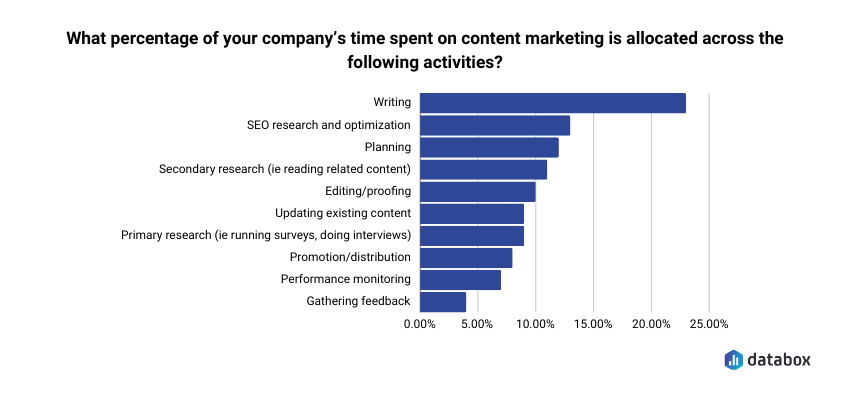
For context on what this cadence means in a content team’s time budget: in the same State of Content Marketing for SEO research, respondents reported spending on average 7.33% of their content time on performance monitoring, less than they spend on writing or SEO optimization. If your monthly audit is taking longer than that budget allows, the workflow needs to change. Either the audit gets tighter, or it gets automated.
When the manual audit stops being worth the time
For a site with under 50 content pages, the manual audit is genuinely doable. For a site between 50 and 200 pages, it’s doable if you have discipline about the rubric. For a site over 200 pages, or an agency running audits across multiple client sites, the ICP scoring cognitive load stops paying off. That’s the point where the math tips.
That’s the point of the Content Performance Partner Claude skill, built by AI Marketing Automation Labs and available at Databox Skills Marketplace. It reads live GA4 landing-page data through Databox MCP across the same two 30-day windows, applies the same lifecycle classification (Rising Hard, Rising, Stable, Declining, Zombie, New Launch), scores each page against your ICP based on the onboarding context you provide, computes what share of your traffic is actually going to ICP-aligned content, and explicitly flags the case that ruins most audits: when the off-ICP pages are the ones growing. If you have Search Console connected as well, it adds Perfect Storm detection to the same report. The output is a self-contained HTML report ending in a prioritized editorial work queue: four to six dated actions telling you exactly what to refresh, expand, or retire this month.
Rick Kranz, the skill’s author, described the underlying trade-off in his LinkedIn launch post:
“Most AI analysis starts with assumptions. You paste data into a prompt, the model fills in the gaps with whatever sounds plausible, and you get a confident answer built on guesses. That works for brainstorming, but it falls apart when you need to make actual decisions.”
The skill’s design solves that specifically by reading live data from Databox through MCP instead of asking Claude to infer what’s in your dashboard. Every lifecycle classification and ICP score in the monthly report is computed against your actual data — not against a plausible interpretation of a pasted export.
To install: download the skill from the Skills Marketplace, open Claude Desktop and import the file from Settings → Skills, then connect Databox via the MCP connector. The setup guide included with the download names the trigger phrase. Total setup is about five minutes.
Once the skill is installed, you invoke it by asking Claude a question in natural language. “What content should I refresh this month?” “Which posts are rising and which are declining?” “Give me my editorial work queue for this month.” Any of those triggers a full audit run against your live data.
Do the manual audit once before you install anything. Your lifecycle thresholds have to be calibrated against your own site’s traffic patterns, not a rubric borrowed from someone else’s blog. Your ICP scoring gets sharper each cycle. Your Perfect Storm patterns look different on a marketing blog than on a documentation site. The skill carries all of that forward once you know what “right” looks like for your library. It can’t tell you that on the first run.
Frequently Asked Questions
Do I need a dedicated content analytics platform to run a monthly content audit?
No. A monthly content audit is a GA4 report, a lifecycle classification, and an ICP scoring pass. GA4 already has the landing-page data. Search Console has the impression and click data needed for Perfect Storm detection. What you need is a rubric for classifying every page by lifecycle stage and a defined ICP to score against. Dedicated content analytics platforms are useful when you need cross-site benchmarking or agency-level reporting across many clients. For the monthly editorial decision most content teams actually need, they are not the entry point.
What is a "lifecycle stage" in a content audit, and what are the standard stages?
A lifecycle stage describes where a piece of content is in its performance arc. The standard set is Rising Hard, Rising, Stable, Declining, Zombie, and New Launch. Rising pages are climbing month over month. Stable pages are holding. Declining pages are losing traffic. Zombie pages are effectively dead: low traffic, no growth signal, older than six months. New Launch pages published inside the current 30-day window. Every page in a content audit gets exactly one stage, and the stage defines the action: refresh, expand, retire, or leave alone.
What are "Perfect Storm" pages and how do I find them?
Perfect Storm pages are pages with high search impressions and low click-through rate; pages Google is already showing to search users, but that users are not clicking. They are the highest-upside refresh candidates in a content library because the traffic demand is already there; only the title, meta description, or SERP snippet is under-performing. Find them in Google Search Console under Search Results → Pages, sorted by impressions descending, filtered to CTR under 2%.
How should I score pages against my ICP if I only have GA4 and Search Console data?
Use referring queries from Search Console as the primary signal; do the queries driving impressions match how your ICP actually searches? Use engagement rate from GA4 as a secondary signal: is engagement above your site average, which is a proxy for audience fit? A page with ICP-aligned queries and above-average engagement scores high. A page with unrelated queries and low engagement scores low. Judgment calls in between are what a Content Marketing Manager brings to the audit.
How often should I run a content audit?
Monthly. Content lifecycle stages shift on that timescale, pages move from Rising to Stable or Stable to Declining inside a 30-day window, and catching those transitions is what makes the audit actionable. Weekly is too noisy. Quarterly misses the fast movers. A monthly cadence lines up with most content teams’ planning cycles and produces a work queue you can act on inside the same month.