
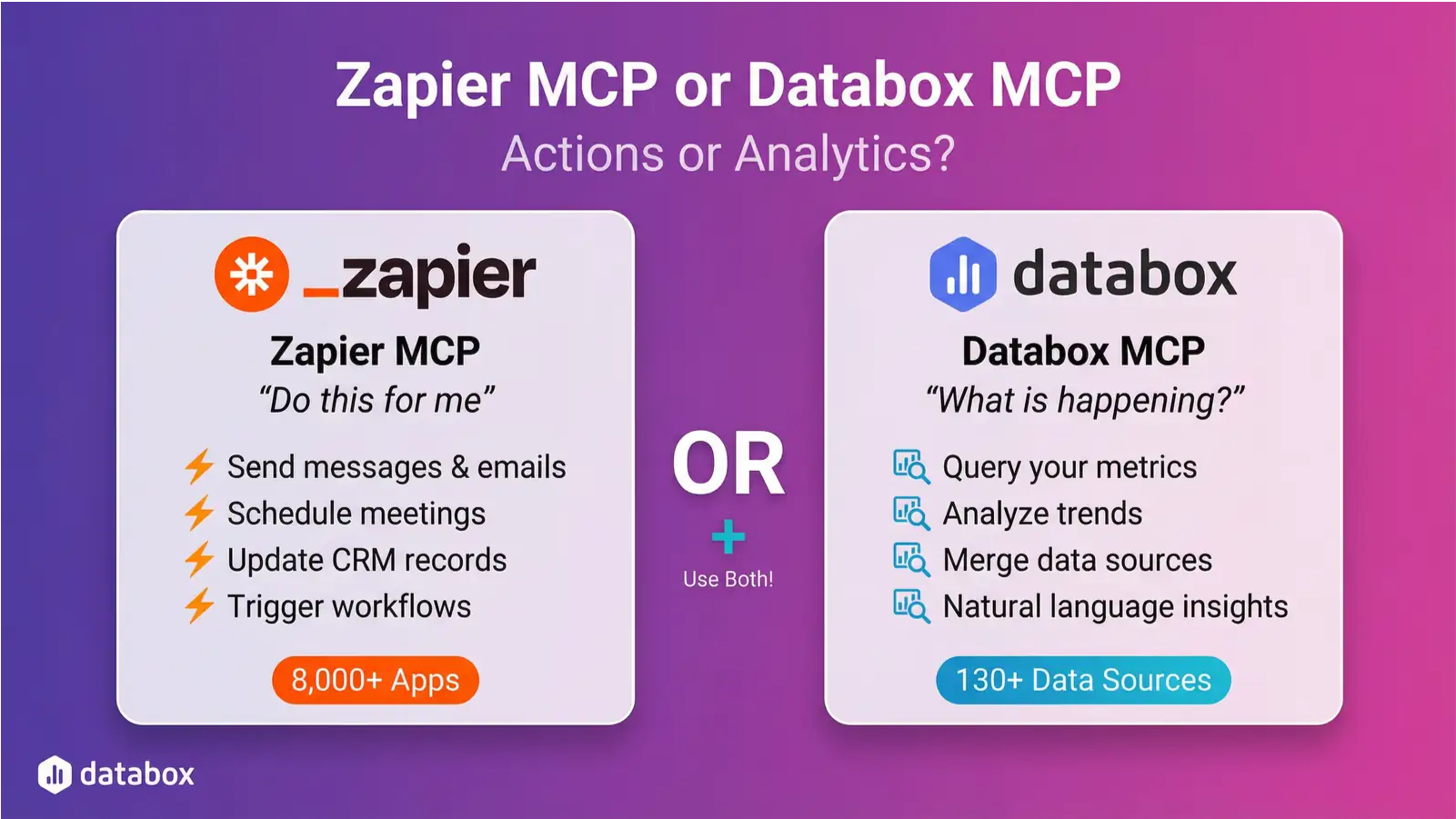
Zapier connects to 8,000+ apps. Databox connects to 130+. So why would anyone choose Databox MCP?
The answer: they’re built for different things.
TL;DR:
Zapier MCP is an action tool. It lets AI send messages, schedule meetings, update records, and trigger workflows across 8,000+ apps.
Databox MCP is an analytics tool. It lets AI query your metrics, analyze trends, merge data sources, and answer business questions.
Zapier handles “do this for me.”
Databox handles “what’s happening in my business?”
If you need both, use both. They’re complementary.
What Zapier MCP Actually Does
Zapier MCP is an action tool, and it’s genuinely good at what it does.
With access to 8,000+ apps and 30,000+ actions, Zapier MCP lets AI agents take real actions across your stack:
- Send messages — Post to Slack channels, send emails via Gmail or Outlook, notify teams
- Manage calendars — Schedule meetings, find available times, create events
- Update records — Add leads to your CRM, create tasks in Asana or Trello, update spreadsheets
- Trigger workflows — Kick off multi-step Zaps, connect actions across dozens of apps
The use cases are practical. Your AI can summarize Slack channels each morning. It can find time on everyone’s calendar and book a meeting. It can pull context from email, chat, and your CRM to prepare a meeting brief. It can send a follow-up email after a call.
Zapier handles the authentication, rate limits, and API complexity. You describe what you want in natural language, and Zapier’s prompt resolution engine figures out the right API calls.
What this means in practice: Zapier MCP turns AI into a productivity assistant that can act on your behalf across your apps. If your goal is “do things for me”, like send this, schedule that, update this record, Zapier MCP is well-suited for the job.
What Zapier MCP Doesn’t Do
Here’s where the confusion starts.
Zapier MCP is great for actions. But it’s not built for analytics. It can’t:
- Query your metrics
- Analyze trends over time
- Answer “why did this happen?”
- Compare this month to last month
- Merge data from multiple sources
- Access governed metric definitions
Zapier’s Databox integration specifically? It can push data in. That’s it. Two actions: “Push Custom Data” and “Increase Counter.” Both write-only. Your AI can tell Databox that something happened, but it can’t ask Databox what’s been happening.
If you ask Zapier MCP “what was our CAC last month?”, it can’t answer. That’s not a limitation; it’s just not what the tool is designed for.
What Databox MCP Is Built For
Databox MCP is an analytics backend for AI. It’s designed to answer business questions.
Where Zapier asks “what do you want me to do?”, Databox asks “what do you want to know?”
Here’s what that looks like in practice.
All Your Metrics, One Connection
Databox connects to 130+ data sources natively: Google Ads, GA4, HubSpot, Salesforce, Meta Ads, LinkedIn, Stripe, and dozens more. Each integration pulls structured, historical, dimensional data ready for analysis.
Your AI connects once and gets access to all your metrics across all connected sources. One authentication. One data model. One place to query everything.
What this means in practice: Instead of prompting “pull Google Ads data, then pull HubSpot data, then pull Stripe data, then figure out how they relate”—you ask “what’s my CAC by channel?” Databox already has all those sources connected and normalized.
Governed Metrics, Not Raw Data
When an AI queries raw data, it can misinterpret what it finds. A field called cost_micros is cost in millionths of a dollar, but an AI might not know to divide by 1,000,000. A column named rev could mean revenue, or it could mean revisions.
Databox solves this with a semantic layer. Every metric has a defined meaning, calculation, and unit. When your AI asks for “revenue,” it gets the governed, company-approved definition, not a raw database column that could mean anything.
What this means in practice: Your AI can’t accidentally report that your ad spend was $4.2 million when it was actually $4,200. The semantic layer normalizes everything before the AI sees it.
Ask Questions, Get Answers Instantly
Databox MCP includes ask_genie, our AI analyst that turns questions into insights.
You don’t write SQL. You don’t build reports. You ask:
- “Which channel had the best ROAS last quarter?”
- “How did our conversion rate trend week over week?”
- “Why did signups drop last Tuesday?”
Genie queries your data, runs the calculations, identifies patterns, and explains what’s happening. It delivers analysis, not raw data dumps.
What this means in practice: An AI using Databox MCP can answer “what happened to our performance last week?” directly. It reasons about your data and surfaces insights.
Merged Datasets: Cross-Source Insights
Your most useful insights usually require combining data from multiple sources. True CAC needs ad spend from Google Ads plus customer data from your CRM. True ROAS needs revenue from Stripe plus cost from Meta Ads.
Databox’s merged datasets let you join sources on the fly. Connect ad spend data with sales data. Merge website analytics with CRM conversions. Combine survey results with revenue metrics.
This happens inside Databox, no data warehouse required. Your AI can query the merged result as a single dataset.
What this means in practice: Ask “correlate our Facebook ad spend with Shopify revenue by week” and get an answer.
60-Second Setup, No Extra Cost
You can connect the Databox MCP in under a minute:
- Paste the URL:
https://mcp.databox.com/mcp - Log in to Databox
- Click Allow
No servers to configure. No database to provision. No code to write.
And it’s included in your Databox plan. No additional cost. Zapier charges 2 tasks per MCP call; high-frequency workflows add up. Databox MCP has no per-query pricing.
What this means in practice: You can build an agent that checks your metrics every hour without worrying about task limits or unexpected bills.
Different Tools for Different Jobs
The distinction is clear once you see it:
Zapier MCP answers: “Can you do this for me?”
- Send a Slack message to the sales channel
- Create a task in Asana for follow-up
- Schedule a meeting with the marketing team
- Add this lead to HubSpot
Databox MCP answers: “What’s happening in my business?”
- What was our CAC by channel last month?
- Why did conversions drop last week?
- How does this quarter compare to last quarter?
- Which campaigns are underperforming?
Zapier excels at actions. Databox excels at analysis.
If you need both—and many teams do—they work alongside each other. Use Zapier MCP to take actions across your apps. Use Databox MCP to understand your performance data. They’re complementary, not competing.
The Comparison
| Capability | Zapier MCP | Databox MCP |
|---|---|---|
| Actions & Automation | ||
| Send messages, emails, notifications | ✓ | ✗ |
| Create/update records in apps | ✓ | ✗ |
| Schedule calendar events | ✓ | ✗ |
| Trigger multi-step workflows | ✓ | ✗ |
| Number of apps supported | 8,000+ | 130+ (analytics sources) |
| Analytics & Insights | ||
| Query metrics | ✗ | ✓ |
| Natural language analysis | ✗ | ✓ (Genie) |
| Governed metric definitions | ✗ | ✓ |
| Merge datasets from multiple sources | ✗ | ✓ |
| Pull historical data | ✗ | ✓ |
| Pricing | ||
| Cost model | 2 tasks per call | Included in plan |
The Bottom Line
Zapier MCP and Databox MCP solve different problems.
Zapier MCP is a productivity tool—it lets AI take actions across 8,000+ apps. Send messages, schedule meetings, update records, trigger workflows. It’s excellent at what it does.
Databox MCP is an analytics backend—it lets AI understand your business performance. Query metrics, analyze trends, merge data sources, and get answers to business questions.
If you’re using Zapier MCP expecting it to answer “how are we performing?”, that’s not what it’s built for.
If you need AI to understand your data and answer business questions, connect Databox MCP.
Frequently Asked Questions
Can I use Zapier MCP and Databox MCP together?
Yes, and many teams do. They solve different problems. Use Zapier MCP to take actions—send messages, update records, and trigger workflows. Use Databox MCP to understand your data—query metrics, analyze trends, and answer business questions. They complement each other.
Does Zapier MCP let me query Databox data?
No. Zapier’s Databox integration is write-only. It can push data into Databox (“Push Custom Data” and “Increase Counter”), but it can’t read or query data from Databox. If you need AI to answer questions about your metrics, you need Databox MCP.
Can Databox MCP send Slack messages or create tasks?
No. Databox MCP is focused on analytics—querying metrics, analyzing trends, and merging datasets. If you need AI to take actions in other apps (send messages, schedule meetings, update records), use Zapier MCP for that.
Which is better for automated reporting?
Databox MCP. Automated reporting requires reading data, analyzing it, and formatting results. Zapier MCP can’t query data, so it can’t generate reports. Databox MCP can pull metrics, run comparisons, and produce summaries—which you could then send via Zapier MCP if needed.
What if I already use Zapier for all my automations?
Keep using it for actions. Zapier is excellent at moving data between apps and triggering workflows. But if you want AI to answer questions about your business performance, add Databox MCP alongside it. One handles the doing, the other handles the knowing.
Is Databox MCP harder to set up than Zapier MCP?
No. Both use OAuth authentication. Databox MCP setup takes under a minute: paste the URL, log in, and click Allow. No servers, no databases, no code.
Why does Zapier charge per task, but Databox MCP is included?
Different business models. Zapier is a workflow automation platform—tasks are their core unit. Databox MCP is part of the Databox analytics platform—it’s included because querying your own data is core functionality, not an add-on.
Getting Started
Connect Databox MCP using the server URL https://mcp.databox.com/mcp in Claude, ChatGPT, or your preferred AI tool.
Full setup instructions: developers.databox.com/docs/mcp/setup