
The right question returns a deal name, an owner, and a dollar value. The wrong one returns a framework about pipeline health. The difference is not the model, it’s how you ask.
It’s 7:47am Monday. Your pipeline review starts at 8. You have thirteen minutes to find out which deals need attention, which reps are behind pace, and whether you’re actually going to hit the number this quarter.
You type into your AI tool: “How’s my pipeline looking?”
What comes back is a 400-word essay about the factors that contribute to pipeline health, useful to nobody. You close the tab, open HubSpot, and start clicking through deals manually, which is exactly what you were trying to avoid.
The problem is not the AI, but the question. And once you fix the question, there’s a bigger problem waiting: the AI is guessing at what your pipeline actually looks like: using a stale CSV, without your metric definitions, without your history. It doesn’t know what “committed” means in your sales motion or why your Stage 3 is different from every other company’s Stage 3.
This article gives you eleven questions that actually work, sourced from the Databox Prompt Library. They’re built for HubSpot CRM and Pipedrive. Copy them, paste them, and use them in your next review.
TL;DR
- Generic AI questions produce generic answers. The fix is specificity: a named object, a time window, a decision trigger.
- The eleven questions below come from the Databox Prompt Library. They are the exact questions VPs of Sales are using in weekly reviews right now.
- 64% of data leaders say it takes 1–3 days just to gather data to answer a business question. That number is the real reason most AI pipeline analysis fails.
- A CSV is stale the moment it’s downloaded. A CSV without your metric definitions is worse, because the AI has to guess at what your data means. Databox MCP fixes both.
- Start with the pipeline health questions this week. Add the forecasting questions before your next board update.
Why Your AI Answers About Pipeline Feel Generic
Every AI question about your pipeline hinges on one structural decision: how specific you are willing to be.
Compare these:
Vague: “What’s at risk in my pipeline?”
Specific: “Which pipeline has the highest win rate, and which has the most deals stalling in early stages?”
The vague version forces the AI to guess what “risk” means to you. Activity gaps? Stakeholder coverage? Close date slippage? Mix of stage distribution? It picks one, usually the most generic interpretation, or covers all of them badly.
The specific version names two things to compare (win rate, stall rate), one object to compare them across (pipeline), and one decision it enables (where to focus coaching this week). It returns a ranked answer in seconds. You walk into the review with names and numbers.
Every question in this article is built the same way. Each one names a specific object, a specific time window, and a specific decision. That’s not a writing trick. It’s what the underlying CRM data can actually support.
Before You Ask: What Your CRM Data Needs to Look Like
The ceiling on AI’s usefulness is the floor of your CRM hygiene. If stage names are inconsistent or activities aren’t logged, AI works around the gaps, which means answers look complete when they aren’t.
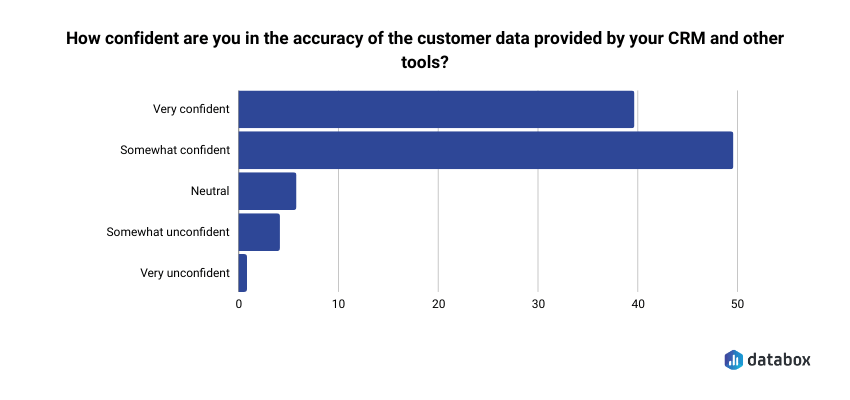
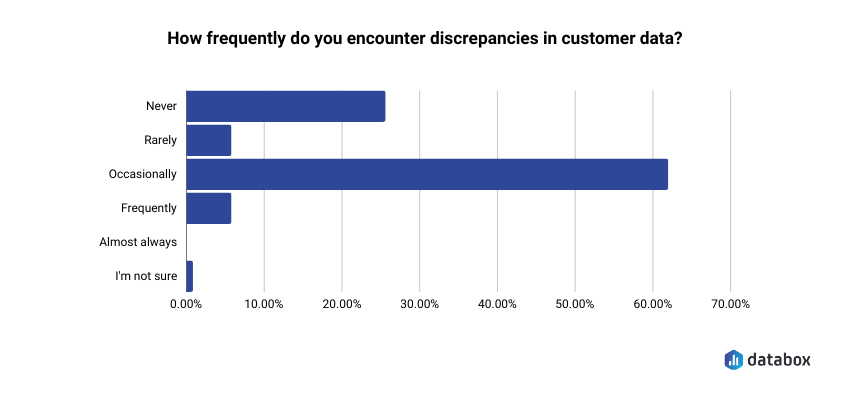
This is not a hypothetical. In Databox’s research on CRM and customer data management, 48% of respondents said they were only somewhat confident in the accuracy of their CRM data, and 60% reported discrepancies at least occasionally. Nearly half pointed to the lack of data validation processes as the single biggest reason they couldn’t fully trust what was in the system.
Before you run any of the questions below, check these four conditions:
Stage definitions are consistent across reps. If your SDR team uses “Discovery” and your AEs use “Qualification” for the same buyer moment, AI cannot compare them. One-off stages, legacy names, and rep-specific workarounds create silent errors that AI will confidently report on.
Activities are logged in the CRM, not just in inboxes. Calls, emails, and meetings need to be captured in HubSpot or Pipedrive, not sitting in Gmail or Outlook. If your reps don’t BCC the CRM, AI sees silence where there’s active engagement.
Close dates are maintained with discipline. Deals that perpetually slide forward break every forecasting question. Half your “this quarter” pipeline being overdue makes coverage look healthy when it isn’t.
Pipeline and source fields are populated. Pipeline assignment, deal source, and primary contact are the fields that make cross-pipeline and rep-level questions answerable. Empty fields mean AI either skips those deals or fills in assumptions you can’t verify.
“We identified a discrepancy between our lead sources in the CRM and actual marketing spend that was causing us to skew our ROI reports. We audited the entire dataset and implemented mandatory ‘Lead Source’ fields with validation rules. Once the data was cleaned, we found that one of our outreach methods was actually 40% more effective than previously thought and were able to reallocate budget to increase overall lead volume.”
The point isn’t that the audit fixed the data. The point is what the bad data had been hiding — a 40% misread on channel performance that the team had been operating on as if it were true. AI asking questions against that same dirty dataset would have confidently returned the same wrong answer, faster.
If most of these conditions hold, the questions below will work. If they don’t, fix the data first — no AI question is going to paper over the gap.
Pipeline Health: What’s Real, What’s Stalling, What Needs Your Attention This Week
These are the questions to run before your weekly pipeline review. They surface where deals need attention and where pipeline is being actively managed versus just sitting there.
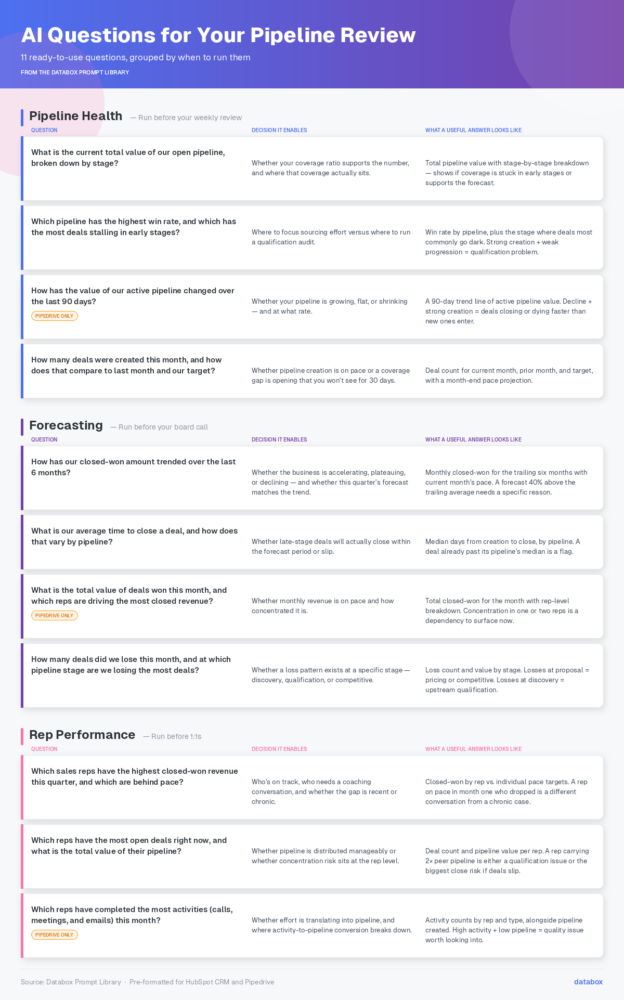
What is the current total value of our open pipeline, broken down by stage?
Decision it enables: Whether your coverage ratio supports the number, and where that coverage actually sits.
What a useful answer looks like: A total pipeline value with a stage-by-stage breakdown. From one answer, you can see whether 80% of your coverage is sitting in early stages that historically convert at 15%, or whether late-stage pipeline actually supports your forecast.
Which pipeline has the highest win rate, and which has the most deals stalling in early stages?
Decision it enables: Where to focus sourcing effort versus where to run a qualification audit.
What a useful answer looks like: Win rate by pipeline, with the specific stage where deals most commonly go dark. A pipeline with strong creation but weak progression is a qualification problem. One with weak creation but strong progression is a top-of-funnel problem.
How has the value of our active pipeline changed over the last 90 days?
(Available in Pipedrive)
Decision it enables: Whether your pipeline is growing, flat, or shrinking and at what rate.
What a useful answer looks like: A trend line of active pipeline value across the last 90 days. A declining trend that coincides with a strong creation month means deals are closing or dying faster than new ones are entering. That’s a different conversation than a slow creation quarter.
How many deals were created this month, and how does that compare to last month and our target?
Decision it enables: Whether pipeline creation is on pace or whether a coverage gap is opening up that you won’t see for another 30 days.
What a useful answer looks like: Deal count for the current month, prior month, and target, with a pace projection for month-end. If you’re 20% behind target at the two-week mark, that’s a sourcing conversation to have now, not at month-end when the gap is unfixable.
Forecasting: Questions That Hold Up on a Board Call
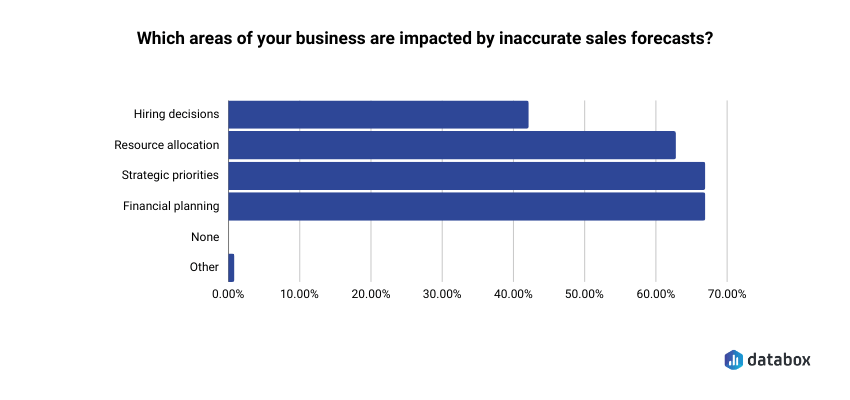
Forecasting is where the questions get consequential. In the same Databox CRM research, 67% of respondents said inaccurate forecasts directly impacted both strategic priorities and financial planning. These aren’t reporting inconveniences; they’re decisions that run upstream into budget, headcount, and the board conversation you’re about to have.
How has our closed-won amount trended over the last 6 months?
Decision it enables: Whether the business is accelerating, plateauing, or declining — and whether this quarter’s forecast is consistent with that trend or represents a step change that needs an explanation.
What a useful answer looks like: Closed won revenue month by month for the trailing six months, with the current month’s pace. If your forecast calls for a month that’s 40% above the trailing average, you need a specific reason why, and you need it before the board call, not during.
What is our average time to close a deal, and how does that vary by pipeline?
Decision it enables: Whether deals currently in late stage will actually close within the forecast period or slip into next quarter.
What a useful answer looks like: Median days from creation to close, broken down by pipeline. A deal committed for this month that has already been in-flight longer than the median for its pipeline is a flag. Flag enough of them, and the forecast has a credibility problem.
What is the total value of deals won this month, and which reps are driving the most closed revenue?
(Available in Pipedrive)
Decision it enables: Whether monthly revenue is on pace and how concentrated it is.
What a useful answer looks like: Total closed won for the month with a rep-level breakdown. If two reps account for 80% of this month’s revenue and one of them is a PIP candidate, that’s a dependency worth surfacing now.
How many deals did we lose this month, and at which pipeline stage are we losing the most deals?
Decision it enables: Whether a loss pattern exists at a specific stage and whether it’s a discovery, qualification, or competitive problem.
What a useful answer looks like: Loss count and value for the month with a stage-by-stage breakdown. Losses clustering at proposal stage suggest pricing or competitive issues. Losses at discovery suggest a qualification problem upstream.
Rep Performance: Where Individuals Are Winning and Losing
These questions surface coaching opportunities, not incidents. They work best when you ask them as patterns: what’s happening across the quarter, not what happened on a single deal.
Which sales reps have the highest closed-won revenue this quarter, and which are behind pace?
Decision it enables: Who is on track, who needs a coaching conversation, and whether any gap is recent or chronic.
What a useful answer looks like: Closed-won revenue by rep with a comparison to individual pace targets. A rep who was on pace in month one and dropped in month two is a different conversation than a rep who has been behind since the start.
Which reps have the most open deals right now, and what is the total value of their pipeline?
Decision it enables: Whether pipeline is distributed in a manageable way or whether concentration risk exists at the individual rep level.
What a useful answer looks like: Deal count and total pipeline value per rep. A rep carrying twice the pipeline of their peers either has a qualification problem (deals that shouldn’t still be open) or is about to become your biggest close risk if even one or two slip.
Which reps have completed the most activities (calls, meetings, and emails) this month?
(Available in Pipedrive)
Decision it enables: Whether effort is translating into pipeline and where activity-to-pipeline conversion breaks down.
What a useful answer looks like: Activity counts by rep and type, ideally alongside pipeline created in the same period. High activity with low pipeline creation is a quality issue. Low activity with strong pipeline means that rep’s leads are warmer: worth understanding before applying a blanket activity mandate to the whole team.
Why Your CSV Export Is the Lesser of Two Problems
Here is the problem every VP of Sales runs into after they nail the question. The AI is working against data that is already stale, and that is not even the biggest issue.
The standard workflow looks like this. Monday morning, you export a pipeline report from HubSpot or Pipedrive. Upload it to your AI tool. Ask a well-formed question. Walk into the review at 11am with an answer.
Between 8am and 11am, your SDR team logged 23 new activities. Two deals moved stages. One deal closed. The export reflects none of that. Your answer is confident, specific, and wrong in ways you cannot see.
That is problem one. Here is problem two, which most sales leaders don’t realize until they’re already mid-meeting: even if the data were current, the AI has no idea what your pipeline actually means.
Your ChatGPT does not know that Stage 3 in your HubSpot sits after the POC in your sales motion, but before the paper process. It does not know your team defines “committed” differently than “best case.” It does not know your close rate by stage, your median cycle time, or which lead sources historically convert at half the rate of the rest.
So it guesses. It pattern-matches from the CSV you uploaded, recalculates everything from scratch, and returns an answer that sounds right, but won’t match what your dashboard shows if you check.
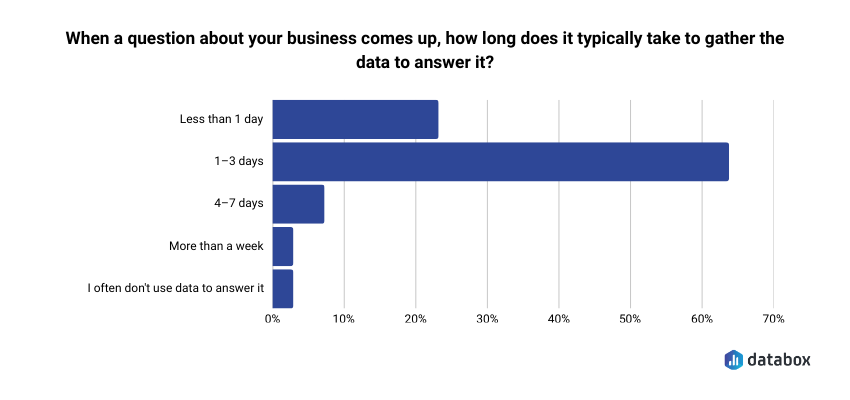
In Databox’s Time to Insight research, 64% of data leaders said it typically takes one to three days just to gather the data needed to answer a business question. That number captures both problems at once: assembly time and translation time, stacked on top of each other.
Databox MCP addresses both at the source.
MCP (Model Context Protocol) connects your AI tool to Databox, which already has your CRM data cleaned, centralized, and structured with the metric definitions your team actually uses. When you ask your AI, “What is the current total value of our open pipeline, broken down by stage?”, the answer comes back using your stages, your definitions, and your live numbers. For a VP of Sales running a weekly review, four things change:
- Your definitions are preserved. The AI uses the stages, pipelines, and metrics your team has already defined inside Databox, not what it infers from column headers in a spreadsheet
- Historical context comes standard. Questions like “how has our closed won amount trended over the last 6 months?” work because the history is already there, already structured the same way your dashboard structures it
- It works with your AI tool of choice. MCP is an open standard, not a proprietary plugin. Claude, ChatGPT, n8n, Cursor, if your team already has an AI workflow, MCP plugs into it
- The questions can run automatically. Through tools like n8n, the same pipeline health questions can run every Monday at 7am and land a briefing in your inbox before the review starts. You stop asking the question manually and start reviewing the answer
Setup takes about 60 seconds. One endpoint, one authentication step, any MCP-compatible client. MCP is included for all Databox users at no additional cost (including on the free plan).
“The MCP integration fits right into how we already work and gives us structured access to performance data without extra overhead.”
The eleven questions in this article are the ones worth asking. Asking them against data the AI actually understands — live, with your definitions, in your context — is what makes the answers worth acting on.
Start With Three Questions This Week
Don’t try to rewire your entire pipeline review. Pick three questions from the list above and run them before Monday’s meeting.
If you’re not sure where to start, start here:
- What is the current total value of our open pipeline, broken down by stage? — the one that replaces clicking through HubSpot manually
- Which pipeline has the highest win rate, and which has the most deals stalling in early stages? — the one that surfaces coaching opportunities
- How has our closed won amount trended over the last 6 months? — the one that keeps your forecast honest
All eleven questions in this article are pre-formatted in the Databox Prompt Library for HubSpot CRM and Pipedrive. They’re ready to be used.
Browse the Databox Prompt Library →
And if you want these questions to return answers that match your dashboard — using your definitions, against live data, in any AI tool your team already uses — Databox MCP is what makes that work. It’s included in every Databox plan.
The Question Is the Variable
Your AI tool is not what’s holding you back from better pipeline answers. The question is. And underneath the question, whether the AI is working against live data, with your definitions, your history, your context, or guessing from a CSV.
A specific question asked against properly-defined live data gives you names, dates, and dollar amounts you can act on in the next ten minutes. A vague question asked against a stale export gives you a framework for thinking about your pipeline, which is not the same thing as information you can use.
The eleven questions above are specific. The Databox Prompt Library has them pre-formatted. MCP makes them answerable against your actual Databox data, with the same definitions, history, and metrics your team already relies on. That’s the whole system.
The next pipeline review starts Monday. Pick three questions. Ask them. See what changes.
Frequently Asked Questions
Can I use these questions with ChatGPT or Claude, or do I need Databox?
You can paste these questions into any AI tool. The difference is what the AI is working against. General-purpose AI assistants cannot connect to HubSpot or Pipedrive on their own — you have to export a CSV and upload it. That gives the AI stale data and no context: it has no idea what your stages mean, how your team defines “committed,” or what your historical close rates look like. Databox MCP connects your AI tool to Databox, which already has your CRM data cleaned, structured, and using the definitions your team actually uses. The questions are the same. The quality of the answer is not.
What's the difference between these questions and a standard CRM report?
A CRM report shows you what happened. A well-formed AI question surfaces what it means and where you should focus. Your HubSpot report tells you there are 47 deals in late stage. An AI question like “which pipeline has the highest win rate, and which has the most deals stalling in early stages?” tells you which of those 47 are in the pipeline where late-stage deals historically stall — and flags them by name. Reports establish the baseline. Questions dig into what the baseline is telling you.
My CRM data isn't clean. Should I still try these questions?
Start with the four hygiene conditions in this article: consistent stages, logged activities, disciplined close dates, populated key fields. The questions that depend on activity data — rep performance especially — will be unreliable if activities aren’t logged. Begin with pipeline value and deal creation questions, which depend on fewer fields. Improve hygiene in parallel. Most teams find that about 20% of their pipeline has data gaps significant enough to make AI answers unreliable.
How often should I run these questions?
Pipeline health questions align to your weekly review cadence. Forecasting questions belong in your daily routine during close periods and before any board call. Rep performance questions work best before 1:1s. The cadence should match when you make decisions — not add another reporting workflow on top of what you already do.
Why are these questions simpler than what I've seen in other AI pipeline guides?
Simpler questions return cleaner answers. The questions in the Databox Prompt Library are built around the fields and objects your CRM actually tracks. Questions that reference fields your CRM doesn’t have, or that are never populated, produce hedged or incomplete answers. Start with questions the data can actually support. Once you know what a good answer looks like, you can layer in more specific variants.
What's Databox MCP and why does it matter for sales?
MCP — Model Context Protocol — is an open connection standard that lets AI tools work with your Databox data directly. For a VP of Sales, that means two things. First, questions return live numbers using your definitions — the same stages, metrics, and history your dashboard uses, without any CSV upload or translation step. Second, it works across the AI tools your team already uses (Claude, ChatGPT, n8n, Cursor), and through n8n you can schedule the same pipeline questions to run automatically every Monday morning. MCP is included in every Databox plan at no additional cost. Setup takes about 60 seconds.
Does this work with ChatGPT, or only Claude?
Both, plus others. MCP is an open standard, so any MCP-compatible client works — that currently includes Claude (web and desktop), ChatGPT (in developer mode), n8n, Cursor, and Gemini CLI, with more being added. You don’t have to change which AI tool your team uses. You connect Databox to whatever they’re already using.