

Pulling the numbers takes minutes. Deciding what they mean is the part you redo every month.
A Google Ads performance report should show spend, conversions and CPA against your target, split into brand and non-brand, with impression share lost to budget and to rank, month-to-date spend against budget, a six-month trend and flagged anomalies. Every rate in it should be calculated from summed cost and conversions, never averaged across campaigns. The numbers come from Google Ads. The judgment calls behind them come from you, and that’s where most reports go wrong.
TL;DR
- A Google Ads performance report rests on five decisions made before any number is read: which conversion counts, how brand and non-brand are split, which CPA target applies, how rates are calculated, and why impression share was lost.
- An account-level CPA can sit close to target while non-brand campaigns run well above it, because cheap brand conversions pull the average down. The brand split is the first thing a useful report shows.
- Building the report by hand is reliable if you’re careful, but you remake the same decisions every month.
- Pasting exports into ChatGPT or Claude, or connecting Google’s MCP server, is fast. The model still does the arithmetic and improvises the method on every run.
- The free Google Ads Performance Report skill asks the five questions once, saves the answers, and builds the same report from live data every time.
A Google Ads performance report can be accurate in every cell and still point the budget the wrong way. The cause is rarely a wrong number; it’s a decision nobody made before the numbers were pulled.
The most common one is the brand split. Brand search captures people who already know the company and search for it by name, so it converts cheaply. Non-brand search is where the budget pays for new demand, and it costs more per conversion. Report the two together and the account CPA lands somewhere between them, close enough to target that nobody opens the campaign table. The cheap brand conversions carry the average. The expensive part of the budget disappears inside it.
That’s one decision. But a useful report needs five.
A Google Ads performance report is five decisions before it’s a single number
Which conversion counts. The Conversions column in Google Ads counts only actions set as primary. All conversions includes the secondary ones too, such as page views or micro-goals. A report that mixes the two, or switches between them from one month to the next, measures a different thing each time.
How brand and non-brand are split. Brand search converts cheaply because the demand already exists. Non-brand search is where the budget buys new demand. Report them together and the brand campaign subsidizes everything else.
Which target the numbers are judged against. A CPA means nothing until you know the target it’s measured against. Brand and non-brand usually need different targets.
How rates are calculated. CPA, conversion rate and ROAS for a group of campaigns come from summed cost and summed conversions, then divided. Averaging campaign-level CPAs gives the smallest campaign the same weight as the largest and produces a number that matches none of them.
Why impression share was lost. Search lost impression share (budget) and Search lost impression share (rank) look like the same problem on a chart. They need opposite fixes. Budget loss is solved with money. Rank loss is solved with bids, ad quality or landing pages, and more budget doesn’t help at all.
Get those five right and the rest of the report is arithmetic. Get one wrong and the arithmetic is precise about the wrong thing.
Three ways to build a Google Ads performance report
Every route gets you the numbers. Only one keeps the five decisions the same from one month to the next.
| By hand in Google Ads | AI on exports or an MCP server | Google Ads Performance Report skill | |
|---|---|---|---|
| Who makes the five decisions | You, every month | The model, differently on each run | You, once, at setup |
| Who does the math | You, in a spreadsheet | The language model | Databox |
| Same method every run | Only if you’re disciplined | No | Yes |
| Brand vs non-brand split | Manual sort or label filter | Only if you ask for it | Built in |
| Effort per report | Exports, merges and formulas every month | Fast to get, slow to check | One run after a one-time setup |
| What you need | Google Ads access | Claude or ChatGPT, plus an export or an MCP setup (Google Cloud project, OAuth) | Claude and a Databox account with MCP (included in the 14-day trial) |
The long way: building a Google Ads performance report by hand
Google Ads holds every number you need. The work is in putting them together the same way each month.
- Set the period and comparison. Select last month in the date range and turn on Compare. Google Ads compares two ranges at a time, so a view of last month, the month before and the same month last year takes two exports and a spreadsheet merge.
- Pick the columns. Cost, Clicks, Impressions, CTR, Avg. CPC, Conversions, Cost / conv., Conv. rate, Search impr. share, Search lost IS (budget), Search lost IS (rank). Check that Conversions shows the primary action you report on.
- Split brand from non-brand. If your campaign names or labels mark brand campaigns consistently, filter on them. If they don’t, this step becomes a manual sort, and it breaks the first time someone launches a campaign with a new name.
- Build the campaign table by type. Search, Performance Max, Shopping, Display. Sum cost and conversions for each type, then calculate CPA and conversion rate from the sums.
- Check delivery. Put lost impression share (budget) next to lost impression share (rank) for each Search campaign. Performance Max doesn’t report impression share the same way, so note the gap instead of estimating it.
- Check spend against budget. Compare month-to-date spend with the monthly plan. Google can spend up to twice the average daily budget on a given day and caps monthly charges at 30.4 times it, so one heavy day isn’t overspend.
- Add the trend. Six months of spend and conversions, so one bad month reads as either a blip or a direction.
- Pull the top ad groups and keywords. The few that carry the account, and the few that cost the most per conversion.
- Flag what changed. Anything that moved beyond its normal range, with the date it started.
- Write it up. What happened, why, and what changes next month.
Done carefully, this report is reliable. It’s also slow in a specific way: steps 2 to 5 are the five decisions, and you make them again every month. The rest is copying.
The structure of the report rarely changes. In Databox’s State of Business Reporting survey, 55.96% of respondents said their reports include the same KPIs and charts every time. The template is already fixed. Only the judgment calls get remade by hand.
For agencies, multiply that by every client.
The skill below makes those five decisions once, saves them, and builds this report from live data in one run. Get it free.
The fast way that isn’t reliable: asking AI to read your exports
The obvious shortcut is to export the campaign report, paste it into ChatGPT or Claude and ask for a summary. Or to skip the export and connect Google Ads to Claude directly through an MCP server. Google publishes one. It’s read-only, it queries your account in GAQL, and it needs a Google Cloud project and OAuth credentials to set up.
Both routes get the data to the model. Neither one decides how the report is built.
The model calculates the CPA. It reads the rows and does the arithmetic itself, and a language model doing arithmetic is sometimes right and sometimes close. It also improvises the method. Ask for a monthly report today and it might split brand from non-brand. Ask again next month and it might not. It doesn’t know your CPA target, your brand naming convention, or which days your conversion tracking can’t be trusted, unless you tell it every time.
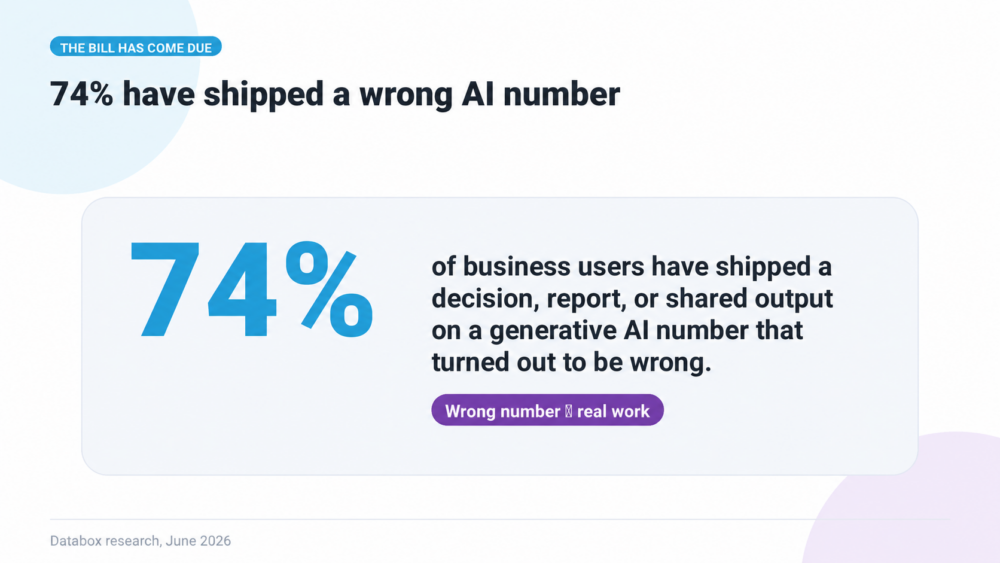
That isn’t a theoretical risk. In Databox’s Using AI You Don’t Trust: How Business Users Actually Run Analytics in 2026 survey, 74% of business users said they had shipped a decision, report or shared output based on an AI-generated number that later turned out to be wrong. 59% had gotten different answers when they reran the same question.
Fast, then, but not reliable. A report you have to check line by line hasn’t saved you the time.
The Google Ads Performance Report skill: the same five decisions, made once
The Google Ads Performance Report is a free Claude skill. It reads your Google Ads data through Databox and writes the report as an HTML page.
The difference from the paste-and-ask route is what happens before the first number.
On the first run, the skill asks the questions you’d otherwise answer by hand every month: your conversion goal, your CPA target, how your brand campaigns are named, how reliable your conversion tracking is, your bid strategy, your monthly budget, and whether there’s a secondary source such as your CRM for business impact. It saves the answers in the skill file. Every run after that skips setup and goes straight to the data.
The calculations run in Databox, not in the model. The skill reads standardized metrics from Databox’s data layer. Claude interprets and writes. It doesn’t add up your cost column.
The report covers the five decisions by default. An account snapshot. Month-to-date spend against your monthly budget. CPA against target for the account, brand and non-brand. Six-month performance trends. Brand against non-brand side by side. A campaign table grouped by type. Impression share for each Search campaign. Top ad groups. Top keywords. Business impact, when a CRM or revenue source is connected. Anomaly flags marked urgent, watch or info.
When a flag says urgent, the Google Ads troubleshooting guide walks through why Google Ads stopped working, step by step.
To run it, install the skill in Claude Desktop (Settings, Skills, Install from file), connect Databox through the connector, and type the trigger phrase from the setup guide. Setup takes a few minutes, once.
If you want the numbers on a schedule instead of on demand, the free Weekly Paid Ads Performance Reports workflow sends core metrics from every connected ad platform to Slack and email each Monday. It’s a lighter check than this report, not a replacement for it.
Which tools can build a Google Ads performance report with AI?
There are four realistic routes, and they differ in who makes the decisions.
Google Ads itself. The report editor builds custom tables and charts and can email them on a schedule. It shows what happened. The brand split, the target and the write-up are still yours.
Reporting and dashboard tools. Looker Studio, AgencyAnalytics, Swydo, Whatagraph and Databox dashboards put Google Ads next to other sources and keep the layout consistent. They’re strongest when the same people read the same charts every month.
Claude or ChatGPT with an MCP server. Google’s own server or a connector from a third party gives the model live access to your account. It answers any question you can phrase. The method and the arithmetic are up to the model on each run.
The Databox Google Ads Performance Report skill. It runs in Claude through Databox MCP, with your decisions saved in the skill and calculations done in Databox. It’s built for the recurring monthly report, where consistency matters more than flexibility.
Conclusion
A Google Ads performance report is only as good as the five calls behind it. Which conversion counts. Where brand ends. What the target is. How the rates are calculated. Why impression share was lost.
Done by hand, you make them every month and hope you make them the same way. Done by a model reading your exports, nobody makes them at all. Done by a skill, you make them once, and every report after that carries them.
The numbers were never the hard part. The decisions were.
Get the skill free and make them once.
FAQ
What should a Google Ads performance report include?
Spend, clicks, conversions, CPA and conversion rate against your target, split into brand and non-brand. Add impression share lost to budget and to rank for Search campaigns, month-to-date spend against your monthly budget, a six-month trend, a campaign table by type, top ad groups and keywords, and flagged anomalies.
What should I do when the report flags an anomaly?
Confirm the change is real before you act: compare equal-length periods with the same weekday mix, and rule out conversion tracking. Then check delivery, traffic economics and which campaign, device or region the change came from.
Why should brand and non-brand campaigns be reported separately?
Brand search captures demand that already exists, so it converts at a much lower cost. Reported together with non-brand, it pulls the account CPA down and hides expensive non-brand campaigns. Separate targets for each make the report useful for budget decisions.
Should I average CPA across campaigns?
No. Sum cost and conversions for the group first, then divide. Averaging campaign-level CPAs gives a small campaign the same weight as a large one and produces a number that matches neither.
How often should I create a Google Ads performance report?
Monthly for the full report, with daily and weekly checks in between for problems that can’t wait.
Can Claude analyze my Google Ads account?
Yes, through an exported report or a live MCP connection. By default, the model does the calculations itself and builds the method on each run, so results can vary between runs. The Google Ads Performance Report skill saves your setup once and reads metrics calculated by Databox.
Is the Google Ads Performance Report skill free?
The skill is free to download. Running it needs Claude and a Databox account with MCP access. The free Databox plan doesn’t include MCP, but the 14-day trial does.