

Find out why before you change a setting. A fix applied too early destroys the evidence you need.
When Google Ads is not working, first decide which problem you have: ads that aren’t showing, or ads that run but don’t deliver results. For ads not showing, check account, campaign, ad and keyword status, then budget, targeting and Ad Rank. For ads not performing, confirm the change is real, rule out tracking, then check delivery, traffic economics and where the change started. Only then touch bids, budgets or targeting.
TL;DR
- “Google Ads not working” means two different problems. No impressions, or close to none, is a status, eligibility, settings or Ad Rank problem. Ads that run with worse results are a performance problem.
- Many performance alarms don’t survive a fair comparison: equal-length periods, the same weekday mix, and a window that ends a few days ago so conversions finish reporting.
- Rule out measurement before anything else. A conversion action switched from primary to secondary looks exactly like a drop in Conversions.
- Read CPC, CTR, conversion rate and CPA together. A rising CPA is either an auction problem (CPC up) or a post-click problem (conversion rate down).
- An account-wide change is often one campaign, device or region. Isolate it before acting on the whole account.
- The free Google Ads Performance Report skill flags anomalies in your account, so you know when to start this process.
When an account changes, the fastest way to make it worse is to react before you know why. Every setting you change before the diagnosis becomes a new variable. The evidence you needed to find the cause goes with it.
This Google Ads performance troubleshooting guide separates what the data shows from what it might mean and what you still need to confirm inside Google Ads. Every check names where to find it.
Why is my Google Ads not working? The 7 steps
- Identify the problem type. Not showing, or not performing?
- Confirm the change is real. Compare equal-length, same-weekday periods and check for normal variance and seasonality.
- Rule out measurement. Verify tracking and conversion actions before trusting the number. Don’t blame tracking without evidence either.
- Check delivery. Impressions, spend, budget and impression share: is the account competing the way it was?
- Check traffic economics. Read CPC, CTR, clicks, conversion rate and CPA together, never one alone.
- Find where it started. Isolate by campaign, device, geography, network or conversion action before acting on the whole account.
- Decide, document, monitor. Match the evidence to a response, record what you’re deliberately not changing yet, and set one signal to watch.
Step 1: Are your ads not showing, or not performing?
If you’re working out why your Google Ads might not be working, start here. The two problems need different checks.
| What you see | Problem type | Go to |
|---|---|---|
| No impressions or close to none, spend at or near zero | Ads not showing: a status, eligibility, settings or Ad Rank problem | The not-showing checks below |
| Spend lower than planned, but not near zero | A pacing problem | Google Ads budget pacing |
| Impressions and clicks, but conversions dropped, costs rose, or results don’t justify spend | Ads not performing | Step 2 onward |
Google Ads not showing: what to check
Work through these in order. The first ones are the fastest to rule out and the most common reasons ads stop serving entirely.
| Check | What to look for |
|---|---|
| 1. Account | Billing or payment problems, and notifications about verification or policy at the top of the account |
| 2. Campaign status | Paused, removed, ended (past its end date), or “Eligible (limited)” |
| 3. Ad group and ad status | Paused ad groups; ads that are disapproved, under review, or “Eligible (limited)” by policy |
| 4. Keyword status | Low search volume; rarely shown due to low Quality Score; below first page bid estimate; paused due to low activity (Google auto-pauses keywords with no impressions in the past 13 months) |
| 5. Budget, schedule and locations | A budget used up early in the day, an ad schedule that excludes the hours you’re checking, a location list or presence setting narrower than intended |
| 6. Negative keywords | Negatives at campaign or account level, or in a shared list, that block the searches you want |
| 7. Ad Rank | Ads eligible but losing auctions: high Search lost IS (rank), keywords below first page bid estimate |
Don’t search for your own ad to check. Google recommends its Ad Preview and Diagnosis tool instead. It shows whether your ad would appear for a search, in a given location and on a given device, and if not, why not.
Check in Google Ads:
- Ad Preview and Diagnosis: Tools → Troubleshooting → Ad Preview and Diagnosis.
- Disapprovals and policy limits: Tools → Troubleshooting → Policy manager.
- Keyword status: the Status column on the Search keywords page. Hover over a status for the reason.
- Recent changes: Campaigns → Change history, around the date ads stopped.
Step 2: Confirm the performance change is real
A number moving is not the same as a problem. Before you look for a cause, establish that there’s something to investigate: against a proper baseline, not a single prior period, and with enough time for conversions to finish reporting.
| Check | Why it matters |
|---|---|
| Baseline from several periods | One prior week or month isn’t a baseline. Look at several to know the normal range. |
| Equal-length, same-weekday comparison | “Last 30 days” against “this month” rarely matches day counts or weekday mix, which fakes a trend on its own. |
| Seasonality and calendar effects | A dip that repeats at the same time every year is a calendar pattern, not a new problem. |
| Planned changes in the window | List every budget, bid, targeting, creative or tracking change. A self-inflicted cause is the cheapest one to find. |
| Conversion lag | Google Ads reports conversions on the click date, so recent days keep filling in. Compare a window that ends several days ago. |
| Isolated vs. account-wide | Whether the change touches one segment or the whole account changes what you look for in Step 6. |
The Google Ads Performance Report skill puts six-month trends next to the current period, so the baseline for this step is already on the page. Get it free.
Step 3: Rule out measurement. Is conversion tracking working?
A real performance change and a measurement gap can look identical in the numbers. Look for evidence of a break before concluding that performance changed. Just as important, don’t default to blaming tracking without evidence.
- Conversion action status and setup. Is the action active, and not renamed, duplicated or restructured?
- Primary vs. secondary. Only primary actions count in the Conversions column. Switch an action to secondary and it disappears from Conversions but still shows in All conv., which looks exactly like a conversion drop. Compare the two columns.
- Shape of the change. A single-day cliff usually points to measurement. A change that ramps over days or weeks usually points to the account or the market.
- Known tracking or site changes. A consent banner update, a tag manager change or a checkout redesign can cut off measurement without warning.
- A second, independent signal. Compare with GA4 sessions, CRM leads or call tracking. If it moved by the same amount, the change is real. If only Google Ads moved, suspect measurement.
“It’s a tracking issue” is a hypothesis, and it needs the same evidence as any other. If a break is confirmed, fix it. If you use conversion-based Smart Bidding, apply a data exclusion for the outage dates so bidding doesn’t learn from the missing conversions.
Check in Google Ads:
- Conversion status and settings: Goals → Conversions → Summary. Hover over any status that isn’t Active. Click an action to see whether it’s primary or secondary, its count method and its conversion window.
- Conversions vs. All conv.: add both columns to the Campaigns table and compare them across the change date.
- Changes to conversion setup: Campaigns → Change history.
Step 4: Check delivery: spend, impressions, budget and impression share
If the account isn’t shown as often, nothing downstream can recover. Each combination below is a lead to confirm, not a verdict.
| What moved | May indicate | Evidence to check |
|---|---|---|
| Impressions down, Search lost IS (budget) up | Budget runs out before the day ends | Budget report and time-of-day pattern; see Google Ads budget pacing |
| Impressions down, Search lost IS (rank) up | An Ad Rank change: bid, Quality Score or relevance | Quality Score history, recent bid or creative changes, Auction insights |
| Impressions down, some ads or assets disapproved | A policy status change | Ad and asset status, Policy manager |
| Impressions up sharply, impression share down | Targeting or match type broadened the pool of eligible auctions | Which campaign drives the volume (Step 6) |
| Cost and impressions both down | A tightened bid target | Recent tCPA or tROAS changes, and whether the bid strategy shows “Learning” or “Limited” |
For more on reading impression share, see the impression share guide.
Check in Google Ads:
- Impression share split: columns icon → Modify columns → Competitive metrics → Search impr. share, Search lost IS (budget), Search lost IS (rank).
- Competitors: Campaigns → Insights and reports → Auction insights.
- Bid strategy status: the Status column on the Campaigns page. Hover for the reason.
Step 5: Google Ads not converting? Check traffic economics
No single metric means much alone. CPC, CTR, clicks, spend, conversion rate and CPA tell a coherent story only when read together. Cost per conversion is cost per click divided by conversion rate. So a rising CPA is either an auction problem (CPC up) or a post-click problem (conversion rate down). Find out which before you choose a fix.
| Combination | What it narrows toward |
|---|---|
| CPC up, conversion rate stable | Winning a click got more expensive, but converting traffic is unaffected. Points to the auction (competition, Quality Score), not the offer. |
| Clicks down, conversions stable | Fewer, better-qualified clicks. Check whether a bid strategy change traded volume for intent. |
| Spend up, conversions flat | Paying more for the same outcome. Check the CPA trend and whether impression share or CTR moved with it. |
| CTR down, impressions up | A broader or less relevant audience entered the mix and diluted engagement as volume grew. |
| Conversion rate down, CPC and CTR flat | The auction and the ad look unchanged. The problem likely sits after the click: landing page, offer or segment mix. |
These are diagnostic patterns, not findings. Use them to form hypotheses, then confirm them with your own account’s evidence.
Check in Google Ads:
- CPC rising: Campaigns → Insights and reports → Auction insights.
- CTR falling: Quality Score columns on the keywords page (expected CTR, ad relevance, landing page experience).
- Conversion rate falling: Campaigns → Insights and reports → Landing pages. Then test the conversion path yourself: form, checkout, call.
- Broader traffic: Campaigns → Insights and reports → Search terms.
Step 6: Find where the change originated
A pattern that looks account-wide is often one campaign, one device or one segment. Isolating it changes what you should do, and whether you should do anything at all. Compare each segment with its own baseline, not with the account average.
| Signal | What it might mean | Evidence to check next |
|---|---|---|
| One campaign dominates the change, others unaffected | A campaign-specific cause (a setting, budget or targeting change), not competitive or seasonal | That campaign’s impression share and CTR against its own baseline, and its Change history |
| Change concentrated on one device | A device-specific experience or bid adjustment issue | Device segment trend and recent site changes |
| Change concentrated on one geography | A regional targeting, budget or market event | Location report |
| Change on Search Partners or Display, not Search | A network-mix shift, not a Search auction issue | Network breakdown |
| One conversion action moved, others didn’t | A measurement or definition change in that action, not a demand change | That action’s settings, including whether it’s still primary |
| Change appears everywhere, evenly | A true account- or market-level shift: seasonality, a brand event, broad competitive pressure | Widen the investigation instead of narrowing it |
Check in Google Ads:
- Device, network, time and conversion action: the Segment icon above any statistics table.
- Geography: Campaigns → Audiences, keywords and content → Locations.
- Query mix: Campaigns → Insights and reports → Search terms.
The Google Ads Performance Report skill splits results by campaign type and by brand and non-brand, and shows impression share for each Search campaign. That’s the first cut of this step, done before you open the account. Get it free.
Step 7: Decide, document and monitor
Once you know which category the evidence points to, match it to a response. Decide just as deliberately what to leave alone until you’re sure.
| Category | Finding | Next step | Don’t change prematurely |
|---|---|---|---|
| Status or eligibility | Ads, keywords or the account can’t serve: disapproval, billing, low search volume, a paused or ended campaign | Fix the specific status, then confirm with Ad Preview and Diagnosis | Bids or budgets. They can’t help ads that aren’t eligible. |
| Measurement | A conversion action, tag or consent flow broke or changed | Fix tracking, apply a data exclusion if you use Smart Bidding, then re-baseline | Bids, budgets or creative. The numbers behind those decisions aren’t confirmed yet. |
| Delivery or demand | A budget cap, an Ad Rank loss, or a real seasonal shift | Address the specific constraint (budget, bid or relevance), or wait out the season | Bids or budget broadly, before you know which constraint it is |
| Auction or cost | CPC rose from competitive pressure or a Quality Score change; conversion rate unaffected | Review Quality Score components and Auction insights, then adjust bids deliberately | Budget cuts or pauses, before confirming conversion rate is unaffected |
| Traffic quality | A campaign, network or match type change diluted who’s clicking, without breaking measurement or losing rank | Judge the new traffic on its own CPA and lead quality | Reverting because broader traffic looks worse, before checking cost per outcome |
| Conversion performance | Clicks and delivery are normal; the drop starts after the click | Test and fix the landing page or offer, and compare by device and segment | Ads, bids or targeting. The ad already did its job. |
| No meaningful problem | The change is within normal variance, or reverted once isolated | Document the finding and close the investigation | Anything. A fix for an unconfirmed cause is a new variable, not a solution. |
If the evidence points to more than one cause, rank them by how much of the change each one explains. Address the largest first, then re-run the comparison before touching the second. Write down what you’re deliberately not changing yet, and set one signal to watch in your Google Ads optimization checklist.
Know when to troubleshoot: let the report flag it
Troubleshooting starts with a signal. The hard part is noticing it in time and telling a real change from a normal week.
The Google Ads Performance Report is a free Claude skill that reads your Google Ads data through Databox and builds a structured report. It covers an account snapshot, month-to-date spend against budget, CPA against target for brand and non-brand, six-month trends, a campaign table, impression share for each Search campaign, and top ad groups and keywords. It ends with anomaly flags marked urgent, watch or info.
An urgent flag is your Step 1. The report tells you something moved. This guide tells you why.
The calculations run in Databox, not in the language model, so the numbers you start troubleshooting from aren’t estimates. For what the report covers and how it’s built, see how to build a Google Ads performance report.
The Google Ads troubleshooting checklist
The same checks, grouped for a working session.
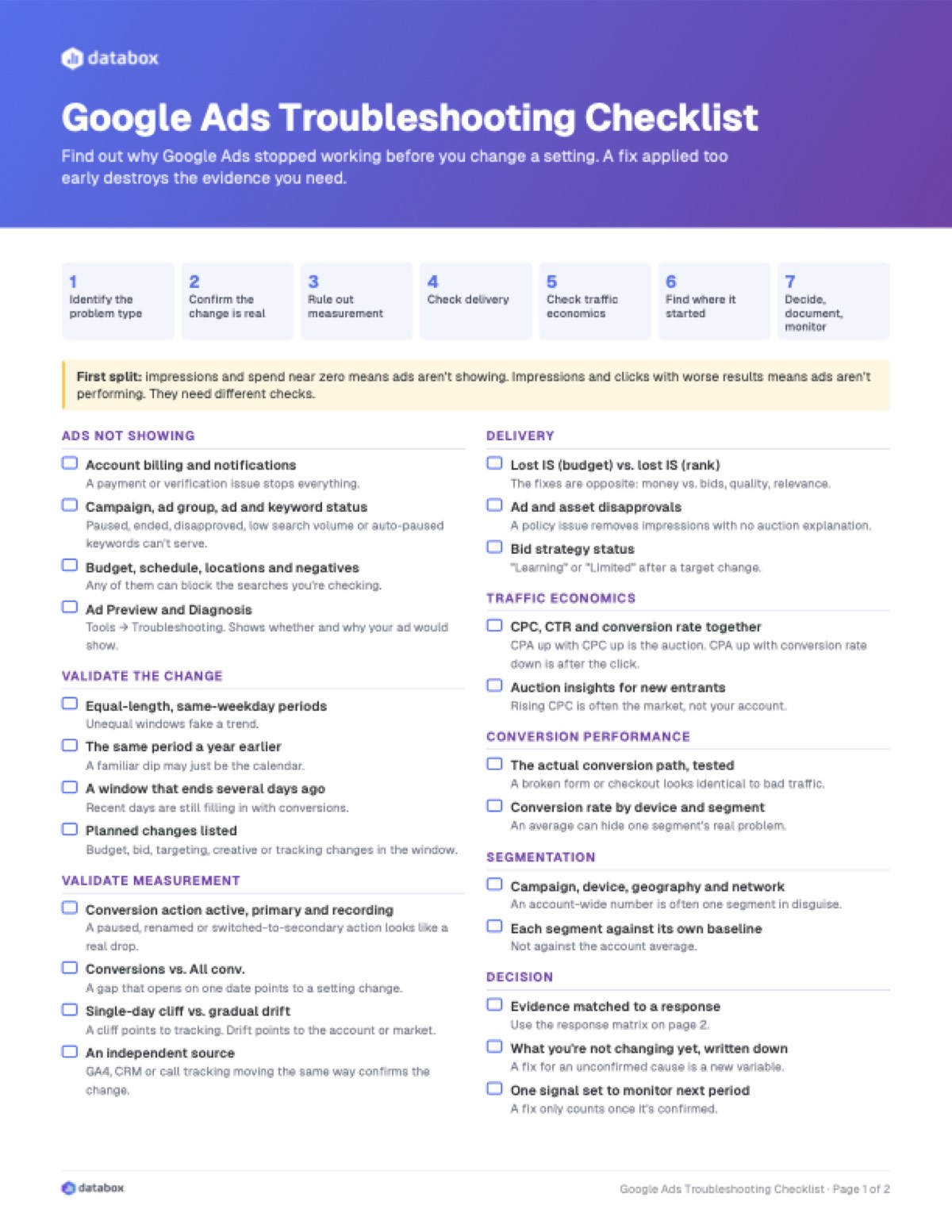
Download the printable checklist (PDF) with the response matrix and a session notes page.
Identify the problem type
Impressions and spend near zero, or running with poor results? They need different checks.
Ads not showing
- Account billing and notifications. A payment or verification issue stops everything.
- Campaign, ad group, ad and keyword status. Paused, ended, disapproved, low search volume or auto-paused keywords can’t serve.
- Budget, schedule, locations and negatives. Any of them can block the searches you’re checking.
- Ad Preview and Diagnosis. Confirms whether and why your ad would show, without searching for it yourself.
Validate the change
- Equal-length, same-weekday periods. Unequal windows fake a trend.
- The same period a year earlier. A familiar dip may just be the calendar.
- A window that ends several days ago. Recent days are still filling in with conversions.
Validate measurement
- Conversion action active, primary and recording. A paused, renamed or switched-to-secondary action looks like a real drop.
- Conversions vs. All conv. A gap that opens on one date points to a setting change.
- Single-day cliff vs. gradual drift. They point to different causes.
- An independent source. GA4, CRM or call tracking moving the same way confirms the change is real.
Delivery
- Lost IS (budget) vs. lost IS (rank). The fixes are opposite.
- Ad and asset disapprovals. A policy issue removes impressions with no auction explanation.
Traffic economics
- CPC, CTR and conversion rate together. Any one alone invites the wrong fix.
- Auction insights for new entrants. Rising CPC is often the market, not your account.
Conversion performance
- The actual conversion path, tested. A broken form or checkout looks identical to bad traffic.
- Conversion rate by device and segment. An average can hide one segment’s real problem.
Segmentation
- Campaign, device, geography and network. An account-wide number is often one segment in disguise.
- Each segment against its own baseline. Not against the account average.
Decision
- Evidence matched to a response. Use the matrix in Step 7.
- What you’re deliberately not changing yet, written down.
- One signal set to monitor next period. A fix only counts once it’s confirmed.
Conclusion
Google Ads rarely breaks in a way that tells you where to look. It shows a number that moved, and that number fits several stories at once.
The seven steps narrow those stories to one before anything in the account changes. Status before bids. Measurement before performance. The segment before the account.
A fix only counts once the cause is confirmed. Until then, it’s just another variable. Get the Google Ads Performance Report skill free and let the next change flag itself.
FAQ
Why is my Google Ads not working?
First work out which problem you have. If ads aren’t showing, the cause is usually a status or eligibility issue (billing, disapprovals, paused or low-volume keywords), restrictive settings, or low Ad Rank. If ads run but results dropped, confirm the change is real, rule out tracking, then check delivery, traffic economics and which segment the change came from.
Why are my Google Ads not showing?
The most common causes are billing or account issues, paused or ended campaigns, disapproved ads, keywords with low search volume or low Quality Score, a budget used up early, an ad schedule or location setting that excludes you, blocking negative keywords, or low Ad Rank. Google’s Ad Preview and Diagnosis tool shows whether and why your ad would show.
Why are my Google Ads not converting?
Split the problem. If CPC rose while conversion rate held, the cause is in the auction. If conversion rate fell while CPC and CTR held, the cause is after the click: landing page, offer, form or checkout. Also check that the conversion action is still active and set as primary, because a tracking or setting change looks identical to a real drop.
What should I check first when Google Ads performance drops?
Check whether the comparison is fair: equal-length periods with the same weekday mix, enough time for conversion lag to clear, and a baseline built from several periods. Many false alarms don’t survive this check. Then rule out measurement before investigating anything else.
How do I tell a tracking issue from a real decline?
Check whether an independent signal moved with it, such as GA4 sessions, CRM leads or call tracking. If only the Google Ads number moved, suspect measurement first. A single-day cliff also points to tracking more than a gradual decline does.
Why did my conversions drop but All conv. didn’t?
Usually because a conversion action was switched from primary to secondary. Only primary actions count in the Conversions column, which bidding also uses. All conv. includes secondary actions too. Check the action’s settings and Change history around the date the gap opened.
How do I know whether a performance change is meaningful?
Compare the current period with several prior periods, not just one. If it falls inside the range you already see week to week, it’s noise. A change that persists for several periods, moves real money and isn’t explained by segmentation is worth investigating.
What’s the difference between troubleshooting and a Google Ads audit?
Troubleshooting starts from a specific problem, ads not showing or a performance change, and works back to its cause. An audit is a scheduled, full review of the whole account that ranks every finding by confidence and impact. Run a full audit monthly, and troubleshoot when a signal demands it.
Is “no action needed” ever the right conclusion?
Yes, and it should be documented like any other finding. A change that reverted on its own, or falls inside normal variance, is a completed investigation. Applying a fix to an unconfirmed cause just adds a new variable.
Can AI troubleshoot Google Ads for me?
Partly. The Google Ads Performance Report skill reads live Google Ads data through Databox, with calculations done in Databox rather than by the language model, and flags anomalies as urgent, watch or info. Deciding which of the seven categories a change falls into still takes the checks in this guide.