

Shopify’s MCP servers give Claude real command of your store, from storefront conversations to bulk product updates. Analytics is the one job they were never built for, and pairing them with Databox MCP closes that gap.
TL;DR
- Shopify’s MCP tools cover three jobs well: Storefront MCP powers AI shopping experiences (product discovery, cart, checkout, order tracking), Dev MCP grounds Claude in current API documentation, and the AI Toolkit lets merchants run store operations from Claude Code in plain language.
- Setup takes minutes: the AI Toolkit installs with two commands in Claude Code (exact steps in the FAQ), keeps your API token on your own machine, and updates itself when Shopify changes its API.
- Business analytics sits outside Shopify MCP’s scope by design: when an eCommerce Director asks Claude to calculate ROAS or CAC from retrieved store data, the LLM performs the arithmetic, and cross-source data like ad spend is not there at all.
- Databox MCP completes the stack: it connects Claude to a computation layer fed by 130+ data sources, where a query engine computes every metric and the LLM never touches your calculations.
- The two connections work best together: Shopify MCP for running the store and the storefront, Databox MCP for answering how the business is performing, both inside the same Claude conversation.
Connect Shopify’s MCP tooling to Claude, and an eCommerce Director can pull unfulfilled orders, update 200 product descriptions, or check a technical question against current Shopify docs, all in plain language. Shopify has even extended the same idea to shoppers: Storefront MCP lets an AI assistant on your store help customers search the catalog, build a cart, and complete checkout. Setup for the merchant side takes minutes; the two-command install is in the FAQ at the end.
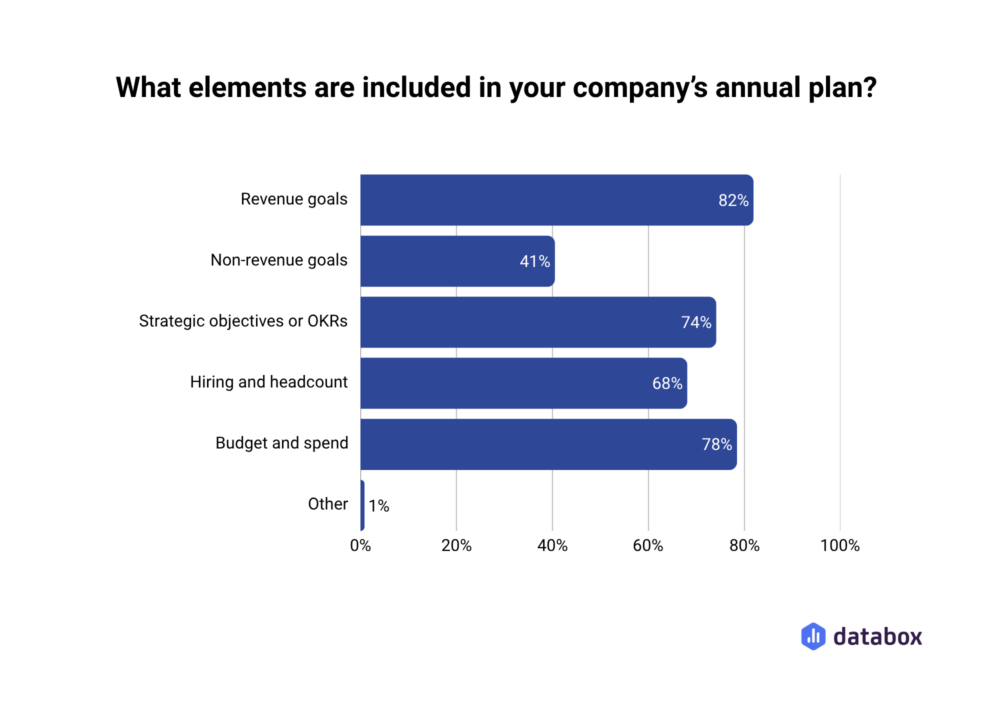
What the connection does not include is an analytics layer. In Databox’s State of Annual Planning & Modeling survey, 82% of companies include revenue goals in their annual plan, and goals like that demand accurate computation of CAC, LTV, and return on ad spend. Ask Claude those questions over a raw store-data connection and the language model does the math itself. Shopify MCP retrieves the data faithfully; computing business metrics was never its job.
This article walks through what each Shopify MCP tool genuinely delivers, where the scope ends, and how connecting Databox’s MCP alongside it gives Claude answers a CRO can take into a board meeting.
Shopify MCP Gives Claude Real Command of Your Store, Across Three Distinct Surfaces
MCP, the Model Context Protocol, is the standard that lets an AI tool like Claude connect to external data and act on it. Shopify adopted it earlier and more completely than most commerce platforms, and it now offers three separate MCP tools, each built for a different job. Knowing which is which saves a lot of setup confusion.
Storefront MCP is for your customers. It powers an AI shopping assistant on your store: a shopper types “I need a waterproof jacket under $100,” gets matching products and recommendations, asks about shipping and returns, adds the jacket to the cart, and completes checkout without leaving the conversation. A companion Customer Accounts server handles order tracking and returns for logged-in customers. For a Head of Growth, the practical benefit is that the shopping assistant runs on Shopify’s own supported infrastructure rather than a fragile custom-built chatbot.
Dev MCP is for technical questions. It is read-only by design and connects Claude to Shopify’s current developer documentation, so answers about schemas, discounts, or checkout capabilities come from today’s docs instead of whatever Claude remembers from training.
The AI Toolkit is for you, the merchant. Released in early 2026, it connects Claude to your live store, so Claude can read and write products, orders, inventory, and customers. For the operator of a DTC brand with 4,000 SKUs, it replaces admin-screen navigation with conversation: which products are out of stock, which orders shipped late, what the current discount structure looks like.
What Claude + Shopify MCP Does Well: Store Queries, Bulk Operations, and Documentation Grounding
Once connected, three categories of work get noticeably faster.
Natural language store queries land first. An eCommerce Director asks “Which orders from the last 7 days are still unfulfilled?” and Claude returns a structured list in seconds, with order numbers and totals. No filtered views, no CSV exports. For a non-technical merchant, the shift is real: conversations with store data instead of report-pulling.
Documentation grounding is the second win. Because the toolkit includes the Dev MCP, Claude checks your store’s setup against Shopify’s current documentation instead of guessing from training data. A Head of Growth asking whether checkout supports a new discount type gets an answer grounded in the live docs.
Bulk product operations are the third, with one honest caveat. “Update the prices of all products in the Summer Collection by 15%” runs as a batch of updates, and Claude works out each new price before sending it. Even in the operational sweet spot, the LLM does some arithmetic. It stays safe because the numbers are small, visible, and checkable: an ops manager can spot-check five variants in the admin within a minute of the run finishing.
Auditability is the common thread. Every one of these wins involves Claude retrieving, filtering, or passing data through, and on the occasions it computes, the output can be verified at a glance. Which is exactly the property that disappears when the questions turn from running the store to measuring the business.
Business Analytics Is the One Job Shopify MCP Was Never Built For
Shopify’s MCP tools deliver exactly what they promise: structured access to commerce data. The limitation appears after the data arrives in the conversation, in what Claude does with it. Three specific gaps matter to anyone who owns a revenue number, and none of them is Shopify’s fault.
Cross-source data is absent by design. ROAS needs revenue attributed to a campaign and the cost of that campaign. Shopify stores the revenue; Facebook ad spend lives in Meta, and Google spend lives in Google Ads. Ask Claude how your Facebook ads performed last quarter through a store-data connection, and the honest answer is that it cannot know. Claude may say so. It may also attempt an answer from whatever revenue it can retrieve and whatever cost figure it infers, because nothing in the MCP standard prevents a plausible number built from incomplete inputs.
Single-source metrics still route arithmetic through the LLM. An eCommerce Director asks for average order value, Q2 versus Q1. Claude retrieves accurate order data, then computes the average itself. Language models predict tokens; they do not run arithmetic on a math engine. Sometimes Claude sidesteps that by writing a quick throwaway script, and the objection “but it can write code” deserves a direct answer: sometimes it does; you do not know when, and a throwaway script is math nobody defined, nobody validated, and Claude may not repeat the same way next week. The response looks identical either way: confident, specific, unqualified. In Databox’s State of Business Reporting research, nearly 65% of business leaders revise goals quarterly based on last quarter’s performance and other factors. A revised goal built on an approximated number inherits the error and compounds it forward.
Claude sometimes skips the tool call. The subtlest gap. Claude Code will occasionally answer from prior context when it judges the answer already available: ask about Q1 revenue early in a thread, ask about Q2 later, and the Q2 number may come from the conversation’s pattern rather than a fresh query. Nothing in the interface flags the difference.
A better prompt just reduces the frequency of all three. It cannot remove the cause, because the cause is structural: over a raw-data connection, the LLM is the computation layer. You cannot build serious business decisions on approximate math. The conclusion is not to disconnect Shopify MCP. It is to stop asking a store-operations connection to double as an analytics system, and to give Claude a second connection built for exactly that.
Databox MCP Adds the Analytics Layer: A Query Engine Computes, Claude Interprets, and the LLM Never Touches Your Calculations
Trustworthy AI analytics has three requirements, and all three sit outside the prompt. Every data source the metric depends on must be connected, so ROAS draws on both Shopify revenue and Meta or Google spend. A real query engine must compute the answer, the same way every time, on infrastructure built for analytics. And the LLM must interpret rather than calculate: translate the question into the right query, then present the computed result in context.
That combination is the difference between a raw data connection and an intelligence layer for business data. Databox is an agentic platform built on the principle that names this article’s whole argument: the LLM never touches your calculations.
The pieces fit together in a specific way. Databox’s 130+ native integrations pull data from Shopify, Meta Ads, Google Ads, Google Analytics, Klaviyo, and HubSpot, so when a CRO asks about ROAS, the system holds both revenue and spend rather than one source and a guess. Every computation, from period-over-period comparisons to blended CAC, runs on the query engine, so the number is computed rather than generated. Genie, Databox’s conversational AI analyst, sits on top of that layer inside Databox itself: an eCommerce Director asks “What was our CAC this quarter versus last?”, Genie translates the question into a query, the engine computes across connected sources, and Genie presents the result in plain language. Data in, answers out.
Databox’s MCP brings that same architecture into Claude. Connect it alongside Shopify MCP, and when a conversation turns to analytics, Claude calls the Databox query engine instead of computing from raw data. Claude asks, Databox computes, Claude presents. The separation holds by design rather than by prompt instruction.
The numbers are board-safe because a VP of Marketing quoting Databox-computed CAC is quoting a query engine, not a language model’s estimate. The metrics stay consistent, because the same definitions Databox uses in dashboards and reports answer the Claude conversation, so the number in the thread matches the number in Monday’s Databoard. And the answers carry their sources, because cross-platform metrics come from named, connected integrations rather than inference.
For the eCommerce Director running a DTC brand across Shopify, Meta, Google Ads, and Klaviyo, the working setup is both connections side by side. Shopify MCP runs the store: orders, bulk updates, documentation, and, through Storefront MCP, the customer-facing shopping assistant. Databox MCP measures the business: ROAS, CAC, LTV, revenue trends. Each does the job it was built for, inside the same Claude conversation.
Frequently Asked Questions
What are the three Shopify MCP servers and what does each one do?
Storefront MCP is customer-facing: it connects AI assistants to a store’s catalog, cart, and policies so shoppers can search, ask questions, and check out in natural language, with a companion Customer Accounts server for order tracking and returns. Dev MCP is read-only and grounds AI tools in Shopify’s current developer documentation. The AI Toolkit is the merchant tool, connecting Claude Code to your live store for products, orders, and inventory operations.
How do I connect the Shopify MCP to Claude?
Inside Claude Code, run /plugin marketplace add Shopify/shopify-ai-toolkit followed by /plugin install shopify-plugin@shopify-ai-toolkit, then authorize your store’s access when prompted. You need Node.js 18 or higher and a Shopify plan with custom app access. The plugin runs locally, so your API token stays on your own machine, and it updates automatically when Shopify changes its API. To confirm it works, ask Claude to show your 10 most recent orders; a structured list with real order numbers means the connection is live.
Can Claude accurately calculate ROAS from Shopify data retrieved through MCP?
No, for two reasons. ROAS requires ad spend from platforms like Meta or Google Ads, which a Shopify store connection does not carry, so Claude lacks a required input. And even for metrics contained entirely in Shopify data, such as average order value, Claude computes the answer inside a language model rather than on a real math engine, or improvises an unvalidated script. Neither is a flaw in Shopify’s tools; analytics computation was never their scope.
Will Claude always query the Shopify MCP server when asked about store data?
No. Claude Code will sometimes skip the MCP tool call when it judges the answer already available from earlier conversation context. If an eCommerce Director asked about Q1 revenue earlier in a thread and then asks about Q2, Claude may generate a number from the conversation’s pattern rather than re-querying the store, and nothing on screen distinguishes a retrieved number from an invented one. Routing analytics questions through a computation layer like Databox MCP removes the risk for metrics.
Why connect both Shopify MCP and Databox MCP to Claude instead of one or the other?
Because they do different jobs. Shopify MCP runs store operations and storefront experiences: orders, bulk product updates, documentation, and AI shopping assistants. Databox MCP connects Claude to a query engine fed by 130+ data sources, so metrics like ROAS, CAC, and revenue trends are computed the same way every time across Shopify, Meta Ads, Google Ads, and Klaviyo, and Claude only presents the verified result. Together they cover running the store and measuring the business in one conversation.