

Ten reporting platforms compared on current pricing, integrations, white-label options, and AI capabilities, with a clear recommendation for every agency type.
TL;DR
- Databox is the best agency reporting software in 2026 for agencies managing 15 to 50 clients. Genie, its AI analyst, works across every client account from one workspace and flags what changed before the client meeting. Pricing starts at $79/month billed annually.
- AgencyAnalytics fits small, SEO-focused agencies that want built-in SEO tools and white-labeled client reports in one platform. Its 2026 Core plan costs $20 per client per month with no base fee.
- DashThis ($44/mo) and Swydo ($69/mo) fit budget-conscious agencies that prioritize simple report delivery over analysis; Supermetrics and Funnel.io serve technically mature agencies running a separate data pipeline layer.
- Google Data Studio (renamed back from Looker Studio in April 2026) stays free at its core, but non-Google connectors carry separate subscription costs that erase the price advantage for most agencies.
- In Databox’s survey “What’s the biggest mistake you can make in client reporting meetings?”, 49.25% of teams run client reporting monthly and 49.25% spend 1 to 3 hours preparing per client, which is why template propagation and connector stability decide more than any single feature.
The best agency reporting software in 2026 is Databox for most agencies, with AgencyAnalytics, Whatagraph, DashThis, Supermetrics, Google Data Studio, Swydo, SE Ranking, Funnel.io, and TapClicks each earning a recommendation for a specific agency profile. The right pick depends on three variables: how the pricing model scales with your client count, how much of your stack the platform connects to natively, and whether your deliverable is a live dashboard or a scheduled report.
The stakes are operational, and they compound. In Databox’s survey “What’s the biggest mistake you can make in client reporting meetings?“, 49.25% of teams run client reporting meetings monthly, and 49.25% spend 1 to 3 hours preparing for each one, per client. An agency with 20 clients on that cadence commits 20 to 60 hours a month to reporting prep before anyone analyzes a number. The reporting platform either shrinks that block of hours or quietly becomes one of the agency’s largest unbilled line items.
What the Best Agency Reporting Software Has to Do in 2026
Five criteria separate a platform that grows with an agency from one that becomes the reason you switch again in 18 months. Every tool below gets held to the same five.
A pricing model that survives your growth. Does cost compound per client, per seat, or per data source? A tool that looks cheap at 8 clients and consumes 3% of gross revenue at 30 clients has moved the problem, without solving it. Model the bill at double your current roster before signing anything.
Connector stability. When a data source disconnects, does the platform alert your team or fail silently? An account manager presenting a client review with stale Google Ads data loses credibility no dashboard polish can rebuild. For agencies where the monthly report is the primary deliverable, the connector layer is the product.
Template management at scale. One update should propagate across every client dashboard and report. Platforms that force manual replication turn a 10-minute change into a half-day project once the roster passes 15 clients.
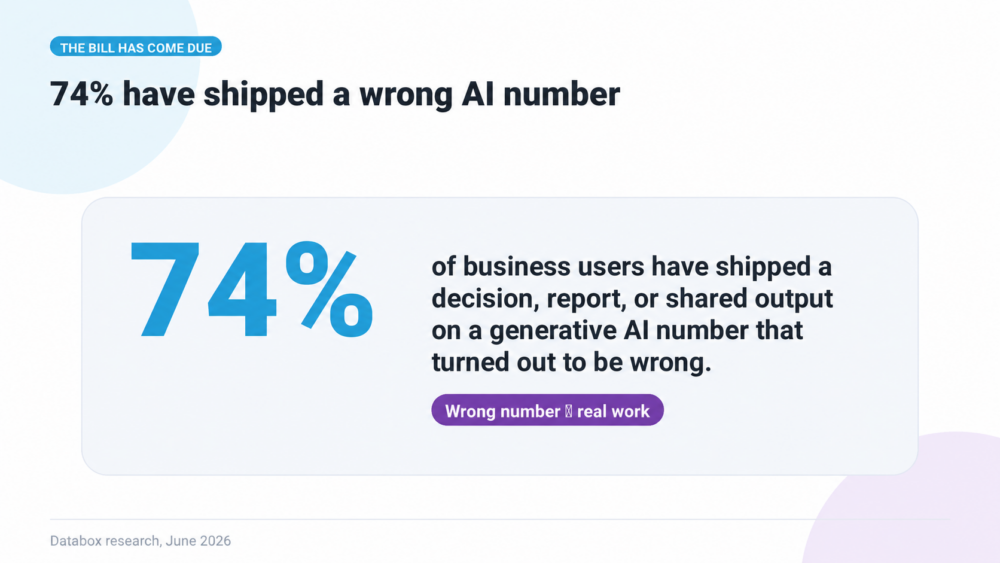
AI grounded in verified data. Most platforms now ship an AI feature. The question worth asking is what the AI reads. In Databox’s report “Using AI You Don’t Trust: How Business Users Actually Run Analytics in 2026“, 74% of business users have shipped a decision or report based on a generative AI number that later turned out to be wrong, and only 9% have a unified data layer their AI can query freely. An AI summary generated from unverified pasted data creates client-facing risk, while an AI analyst reading your defined metrics removes work.
White-label flexibility. Clients should access a branded dashboard without seeing the vendor’s logo. Check which tier includes it, because several platforms gate full white-labeling behind their most expensive plan.
Agency Reporting Software Compared (2026): Pricing, Integrations, and AI
| Tool | Best For | Entry Price (Annual) | Free Plan? | Native Integrations | White-Label | AI Features |
|---|---|---|---|---|---|---|
| Databox (winner) | Agencies (15-50 clients) that need AI analysis across every client account | Agency $79/mo (4 clients) + $20 per additional client (billed annually) | No (14-day trial) | 130+ | Yes; as paid add-on | Genie AI Analyst with cross-client reporting, MCP server, Routines, Performance Summaries, Anomaly detection |
| AgencyAnalytics | Small SEO/PPC agencies under ~15 clients | $20/client/mo (no base fee) | No (14-day trial) | 85+ | Yes | Ask AI, AI Summary, Benchmarks, Trend Forecasting, Anomaly Detection |
| Whatagraph | Mid-size agencies prioritizing visual report design + multi-source blending | €199/mo (Go) | Yes (5 source credits) | 50+ | On Max plan and above (€699/mo) | Whatagraph IQ |
| DashThis | Small agencies and freelancers wanting simple, fast reports | $44/mo (Individual) | No (14-day trial) | Unlimited integrations (data sources capped per plan) | Logo only on Individual; full white-label on Professional+ | AI Insights free on all plans; AI Insights Pro $19/mo add-on |
| Supermetrics | Data-heavy agencies feeding Data Studio / Sheets / warehouse | $37/mo (Starter) | No (14-day trial) | 100+ connectors | On higher tiers (~$299/mo) | No |
| Google Data Studio (formerly Looker Studio) | Budget-conscious, technically confident agencies | Free core (third-party connectors extra) | Yes (core platform) | Google-native; others via third party | Yes (manual build) | No (BI/AI via separate tools) |
| Swydo | PPC-focused agencies (10-30 clients) | $69/mo base, unlimited clients (sliding-scale per source) | No (14-day trial) | ~34 | Yes (base plan) | AI report summaries (4k credits/mo) |
| SE Ranking | SEO-first agencies consolidating SEO tool + reporting | $103.20/mo (Core, annual) | No (14-day trial) | SEO-focused | Yes (Agency Pack add-on, ~$69/mo) | AI Search Visibility |
| Funnel.io | Enterprise multi-channel data pipelines | $300/mo (Starter, annual) | No (removed Dec 2025) | 121 on Starter; 590 on Enterprise | N/A (pipeline only) | No |
| TapClicks | Large agencies (50+ clients) with dedicated ops staff | Quote-based (4-tier AI Reporting suite) | No public free plan; 10-client bundle on every tier | 250+ (TapData Lite on SmartStory; full library from SmartReports) | Yes | TapAI, AI agents, “Ask Your Dashboard” LLM chat |
The 10 Best Agency Reporting Software Tools in 2026
Each entry includes current 2026 pricing verified against vendor pricing pages, key capabilities, and at least one honest limitation.
1. Databox
Overview
Databox is an agentic analytics platform that combines performance data, consistent metrics, and business context with AI-powered analysis and workflows, so you can analyze, report, and take better-informed action faster. Agencies manage client reporting across an entire roster from one platform.
Key capabilities
- Cross-client reporting. Genie, the AI Analyst, answers questions across every client account at once, such as which clients lost paid traffic this month. Selecting All accounts in the composer gives Genie access to every client. The Databox MCP server gives Claude, ChatGPT, and other AI tools the same access to every client account.
- Routines. Genie runs recurring tasks on a schedule, so each client’s monthly performance summary is ready before the account manager opens the dashboard.
- Custom skills. Your agency writes its own instructions for how Genie analyzes and reports, so every client analysis follows the same method and format.
- Artifacts. Genie saves an analysis as a deliverable, such as a quarterly client report, that the team can reuse.
- Unlimited users. Every team member and every client can log in, and adding people never changes the bill.
- Custom templates. A dashboard or report built once becomes the starting point for every new client account.
- Anomaly detection and goals. Databox flags spikes and drops in client metrics automatically and tracks each client’s targets against live data.
- Governed metrics. Metric definitions live in a shared semantic layer, so Genie and every user calculate a KPI the same way. Verified badges mark the approved versions.
- Data and integrations. Databox connects to 130+ tools, plus spreadsheets, databases, and the Databox API. The Agency plan includes 4 clients and 20 data sources, each client pack adds 1 client and 5 more data sources, and data syncs hourly.
- White-labeling. A paid add-on replaces Databox branding with your agency’s logo, colors, and domain.
- Solutions Partner Program. Agencies earn commissions by reselling Databox to their clients.
Pros and cons
✅ Non-analysts build dashboards same-day, with no SQL and no training session.
✅ Unlimited users on the Agency plan, so adding account managers or client logins never changes the bill.
✅ Genie, MCP access, performance summaries, and anomaly detection are all included in the Agency plan.
✅ Native connectors remove the need for middleware or third-party billing.
✅ Custom templates give every new client account the same starting dashboard.
✅ At 20 clients, Databox costs $399/month on annual billing, about the same as AgencyAnalytics, and includes unlimited users, a shared pool of 100 data sources, and cross-client AI analysis.
❌ Each client past the 4 in the base plan adds a $20/month client pack, so the bill grows with the client roster.
❌ White-labeling is a paid add-on.
❌ Built for KPI monitoring and analysis rather than ad-hoc SQL exploration of a raw warehouse.
❌ AI use draws from a monthly pool of 300 credits plus 50 per client pack, so agencies that use Genie heavily may need a credit top-up.
Pricing
The Agency plan costs $79/month billed annually and includes 4 clients, 20 data sources, 300 AI credits per month, unlimited users, and hourly sync. Each additional client pack costs $20/month and adds 1 client, 5 data sources, and 50 AI credits. At 20 clients the plan costs $399/month, and at 50 clients it costs $999/month. White-labeling, OKRs, and 15-minute sync are paid add-ons. A free plan covers 1 user and 3 data sources, and the Agency plan has a 14-day trial with no credit card required.
Best for
Agencies managing 15 to 50 clients that need one AI analyst watching every client account, with unlimited logins for the team and its clients.
Learn why teams use Databox and Hubspot here.
Try Databox free or see how Databox compares to AgencyAnalytics feature-by-feature.
2. AgencyAnalytics
Overview
AgencyAnalytics is the best-known tool built specifically for agency reporting, and it belongs on any credible list of the category. It bundles client dashboards, scheduled reports, and built-in SEO tools (rank tracking, site audits, backlink monitoring) into one platform. In 2026 it replaced its legacy three-tier structure with a single Core plan at $20 per client per month, billed annually, with no base fee and no included client buffer.
Key capabilities
- 85+ native integrations across SEO, PPC, social, email, and call tracking.
- Built-in SEO toolkit: rank tracking, site audits, backlink monitoring, keyword research.
- White-label dashboards and automated report scheduling on the Core plan.
- Ask AI, AI Summary, benchmarks, trend forecasting, and anomaly detection.
Pros and cons
✅ Transparent per-client pricing that is easy to forecast at small scale.
✅ SEO tools included, so small SEO shops avoid a second subscription.
✅ White-labeling available without a top-tier upgrade.
❌ Each client costs $20/month from the first one, so 20 clients cost $400/month and 50 cost $1,000/month before add-ons.
❌ Integration instability is the most consistently cited limitation in 2026 G2 reviews; sources disconnect and the platform does not always surface the failure clearly.
❌ Applying template updates across a large active client roster takes meaningfully more manual work than in platforms built for template propagation.
Pricing
Core plan: $20 per client per month, billed annually, no base fee. Enterprise pricing is custom and begins at 25 clients. Existing customers may remain on legacy plans. A 14-day free trial requires no credit card.
Best for
Small agencies under roughly 15 clients whose deliverables center on SEO and PPC reporting, and who value bundled SEO tools over cross-client AI analysis.
3. Whatagraph
Overview
Whatagraph is a reporting platform built primarily for visual report design. It competes on cross-channel data blending and templated report output. In May 2026, Whatagraph restructured its pricing, replacing the Start / Boost / Max tiers with Go / Max / Prime, with prices now listed in euros.
Pros and cons
✅ Polished visual report design out of the box, with no designer needed.
✅ Multi-source data blending on paid plans.
✅ Source-credit pricing avoids per-client compounding cost.
✅ Whatagraph IQ AI included across all plans.
❌ White-label branding gated behind the Max plan (€699/mo).
❌ Pricing listed in EUR, so US agencies pay an effective USD cost that moves with exchange rates.
❌ Go’s 20 source credits typically cover only 5 to 7 clients, pushing growing agencies to Max within months.
❌ Connector complaints appear in 2026 reviews, similar to the criticism AgencyAnalytics receives.
Pricing
Billed annually, in EUR: Free (5 source credits), Go at €199/month (20 credits), Max from €699/month (50+ credits, white-label branding, dedicated CSM), Prime custom (100+ credits, SSO/SAML). A 14-day Max trial requires no credit card.
Best for
Mid-size agencies (15-50 clients) that prioritize polished visual report output and will step up to the Max tier for white-label branding and multi-source blending.
4. DashThis
Overview
DashThis trades configurability for speed. Setup is fast, templates are plentiful, and pricing runs on dashboard count rather than client count. For agencies whose primary deliverable is a clean, client-ready report rather than a live monitoring dashboard, DashThis covers the basics without the overhead of a heavier platform. DashThis updated its pricing on March 30, 2026, adding data source caps per plan.
Pros and cons
✅ Dashboard-based pricing avoids per-client compounding cost.
✅ Most agencies go live within hours of signup.
✅ Unlimited users across every tier, and AI Insights included free on every plan.
❌ Full white-label and custom domain require the Professional plan ($139/mo) or above.
❌ Chat-mode AI (AI Insights Pro) costs an additional $19/month.
❌ Limited custom metric depth, with no native goal tracking or alerting.
Pricing
Billed annually: Individual at $44/month (3 dashboards, 15 sources), Professional at $139/month (10 dashboards, 40 sources, full white-label), Business at $279/month (25 dashboards, 100 sources), Standard from $429/month on a sliding scale. Monthly billing adds roughly 15-20%. A 14-day free trial requires no credit card.
Best for
Small agencies and freelancers who want simple, fast, client-ready reports and don’t need goal tracking, alerting, or blended multi-source metrics.
5. Supermetrics
Overview
Supermetrics is a data pipeline rather than a reporting tool. Agencies that already maintain a separate visualization layer (Google Data Studio, Power BI, BigQuery) use it to pull marketing data into that layer. Agencies wanting an all-in-one reporting platform should look elsewhere on this list first.
Pros and cons
✅ Wide connector coverage across marketing data sources.
✅ Natural fit for agencies already running Data Studio or a warehouse stack.
✅ Dependable, scheduled data refresh once configured.
❌ Requires a separate visualization tool for client-facing reports; the total stack cost frequently exceeds an all-in-one platform.
❌ Per-destination, per-source, per-user billing is widely cited as one of the most opaque pricing models in the category.
❌ White-label reporting requires a higher tier (around $299/month).
Pricing
Billed annually: Starter from $37/month (3 data sources, 1 user, weekly refresh), Growth from roughly $177-$222/month (daily refresh), Pro from roughly $399-$499/month (hourly refresh), Enterprise custom. Extra users, ad accounts, and connectors bill separately. A 14-day free trial is available.
Best for
Agencies and analysts who centralize marketing data in Google Data Studio, Google Sheets, or a data warehouse and treat visualization as a separate layer.
6. Google Data Studio (formerly Looker Studio)
Overview
Google Data Studio is a free visualization platform built for teams on the Google stack. Google renamed the product back from Looker Studio in April 2026, restoring the original name after three and a half years, so recent documentation may reference either. Google-native connectors (GA4, Google Ads, Search Console, BigQuery) work out of the box, while everything else routes through third-party connectors from Supermetrics, Porter Metrics, or Funnel.io, each with its own subscription cost.
Pros and cons
✅ Free base platform with no licensing cost for core use.
✅ Maximum design flexibility with no template constraints.
✅ Google ecosystem connections work without middleware.
❌ No native client management layer, no alerting, no goal tracking, and no AI features in the free tier.
❌ Non-Google data requires paid third-party connectors that erase the cost advantage.
❌ Setup burden converts the price advantage into a time deficit for agencies without a technical team member, and it can’t replace an all-in-one platform without substantial extra tooling.
Pricing
Free base platform. Third-party connector sets covering non-Google data typically cost $37-$200+/month. Data Studio Pro carries per-project/user pricing; verify on cloud.google.com.
Best for
Budget-conscious, technically confident agencies that want maximum design flexibility and will invest real setup time and connector subscriptions to reach a functional reporting stack.
7. Swydo
Overview
Swydo is a focused tool. For agencies whose primary deliverable is paid media reporting across Google Ads, Meta Ads, and LinkedIn Ads, it competes on price and ease of use. Reports get built and scheduled with minimal configuration, and cost stays predictable as long as data sources stay contained.
Pros and cons
✅ Flat $69/month base with unlimited users and unlimited clients.
✅ White-label delivery included on the base plan.
✅ Strong ready-made templates for paid media reporting, with 4,000 AI summary credits monthly.
❌ Roughly 34 native integrations, concentrated in paid media.
❌ Per-source pricing adds up: 25 clients with 4 platforms each cost $69 base plus 90 sources × $4.50, or $474/month.
❌ Agencies managing SEO, organic social, ecommerce, or complex multi-channel work will find the connector library too narrow.
Pricing
$69/month base including 10 data sources, then sliding-scale per-source pricing ($4.50 each for sources 11-100, $3.00 for 101-500, $2.00 beyond). Annual billing saves 10%. A 14-day free trial requires no credit card.
Best for
PPC-focused agencies managing 10 to 30 clients where the connector list (Google Ads, Meta, LinkedIn) covers most client needs.
8. SE Ranking
Overview
SE Ranking is an SEO platform that added reporting, the inverse of most tools on this list. For agencies where SEO is the core service, it consolidates two subscriptions into one. The reporting layer is functional rather than category-leading, but for an SEO-first agency the consolidation matters more than reporting polish.
Pros and cons
✅ One subscription replaces a dedicated SEO tool plus a separate reporting platform.
✅ Native rank tracking, backlink monitoring, and site audit in the base plan.
✅ AI search visibility tracking for AEO/GEO use cases, added in 2026.
❌ Weak on paid media, social, and multi-channel reporting.
❌ Agencies serving clients across SEO, PPC, and social will need a second tool for non-SEO deliverables.
❌ White-label reporting requires the Agency Pack add-on (~$69/month) on top of the base plan.
Pricing
Core at $103.20/month annual ($129 monthly), Growth at $223.20/month annual, Enterprise custom, Agency Pack add-on around $69/month. A 14-day free trial requires no credit card.
Best for
SEO-first agencies where the bulk of client deliverables are organic search performance reports.
9. Funnel.io
Overview
Funnel.io operates upstream of reporting. It collects raw marketing data, normalizes it into a consistent schema, and pushes it into a warehouse or visualization tool. It produces no client-facing reports on its own; agencies pair it with Google Data Studio, Tableau, or Power BI. Funnel.io removed its free plan for new users in December 2025, and Starter now sits at $300/month annual on a Flexpoints credit system.
Pros and cons
✅ Built-in normalization standardizes metrics before they hit the reporting layer.
✅ Wide connector library at the Business and Enterprise tiers.
✅ Pushes governed data into BigQuery, Snowflake, and major BI tools.
❌ Requires a separate reporting tool; total stack cost sits beyond what most agencies under $500K in annual revenue can justify.
❌ The Flexpoints credit system is frequently described as unpredictable in 2026 reviews.
❌ Connector access is plan-gated: Starter carries 121 connectors, and the marketed 590 requires Enterprise. No self-serve trial exists.
Pricing
Billed annually: Starter from $300/month (121 connectors, 5 users), Business from $600/month (579 connectors, full warehouse exports), Enterprise custom (SSO, EU data center, enterprise SLA).
Best for
Enterprise and large multi-channel agencies that need a dedicated data collection and normalization layer upstream of their reporting tools, with the budget and analyst capacity to operate it.
10. TapClicks
Overview
TapClicks is the enterprise option on this list. The platform restructured in 2026 into a four-tier AI Reporting suite: SmartStory, SmartReports, SmartAnalytics, and SmartSuite. Reporting, data connectors, order management, workflow automation, and AI agents live in one platform. TapClicks publishes no prices; every tier requires a sales conversation.
Pros and cons
✅ Single platform covering reporting, data, order management, and workflow.
✅ 250+ connectors via TapData (full library from the SmartReports tier).
✅ AI agents and “Ask Your Dashboard” LLM chat on SmartAnalytics; persona-based agents on SmartSuite.
❌ No public pricing on any tier, which makes apples-to-apples evaluation harder than competitors who publish rates.
❌ Features agencies expect by default (unlimited dashboards, event alerts, goals and pacing) sit gated at SmartAnalytics or above.
❌ Implementation is significant, and 2026 review patterns on G2 and Capterra continue to cite data accuracy and support as recurring frustrations.
Pricing
Four quote-based tiers, each including a startup bundle of 10 clients. Third-party listings put typical implementation costs at $1,000-$10,000.
Best for
Large agencies and enterprise marketing operations teams that need reporting, order management, and AI analytics in a single platform and will absorb a sales cycle and implementation project.
Which Agency Reporting Software Fits Your Agency
Three variables determine the right tool: your core service, your current client count, and whether technical staff exists to manage a complex stack.
Budget is the primary constraint, with 10 or fewer clients: DashThis ($44/month) or Swydo ($69/month). Both undercut AgencyAnalytics’ Core plan at small scale, since 5 clients there already cost $100/month.
AI analysis across every client account is the priority: Databox. Genie and the MCP server answer questions across all client accounts, routines produce recurring client summaries on a schedule, and anomaly detection flags changes in hourly-synced data. A 14-day trial lets you test it against live client data first.
SEO is the core deliverable: SE Ranking consolidates rank tracking, site audits, and client reporting at $103.20/month annual. AgencyAnalytics also fits here at very small client counts.
Enterprise scale with dedicated ops staff: Funnel.io or TapClicks. Both demand implementation investment smaller agencies cannot justify, and both offer the infrastructure large rosters need.
Data Studio users who need broader pipelines: Supermetrics, though the total stack cost frequently exceeds an all-in-one platform.
For agencies managing 15 to 50 clients, Databox costs about the same per client as AgencyAnalytics and adds an AI analyst that works across every client account. It closes the most gaps without a custom data stack.
See how Databox compares to AgencyAnalytics feature-by-feature.
Pick for the Client Count You’ll Have Next Year
Every agency eventually outgrows the reporting tool it began with. The tools on this list compete for different agencies: a 5-person boutique SEO shop and a 40-person full-service agency have different problems, different technical capacity, and different definitions of “the reporting platform works.” Price the tool at double your current roster, test the connector layer against your messiest client stack, and check where white-labeling actually sits in the pricing tiers before committing.
For the agency that needs real-time KPI visibility, goal tracking against live data, and AI analysis without building a custom stack first, Databox is the answer most of those agencies land on.
Frequently Asked Questions
What is the best agency reporting software in 2026?
Databox is the best agency reporting software for most agencies in 2026, specifically those managing 15 to 50 clients. Its AI analyst works across every client account, and pricing starts at $79/month billed annually for 4 clients, plus $20/month for each additional client. DashThis and Swydo fit smaller budgets, SE Ranking fits SEO-first agencies, and Funnel.io or TapClicks fit enterprise operations.
How much does agency reporting software cost in 2026?
On annual billing, entry pricing ranges from $37/month (Supermetrics Starter) to $300+/month (Funnel.io), and most agency-focused platforms cost between $44 and $199/month. Databox, Whatagraph, and Google Data Studio also offer free plans. The scaling model matters more than the entry price. AgencyAnalytics charges $20 per client, Databox charges $79/month for 4 clients plus $20 per additional client, and Whatagraph charges per source credit. Model your bill at double your current client count before choosing.
Is Google Data Studio still free for agencies?
Yes. The core platform stays free after Google renamed it back from Looker Studio in April 2026, and Google-native sources like GA4 and Google Ads connect at no cost. Non-Google data requires third<-party connectors that typically run $37-$200+/month, so most multi-channel agencies end up paying comparable amounts to an all-in-one platform while also absorbing the setup and maintenance time.
What is the best AgencyAnalytics alternative for agencies with more than 20 clients?
Databox. At 20 clients on annual billing, the two cost about the same, with AgencyAnalytics at $400/month and Databox at $399/month. At that size Databox includes unlimited users, a shared pool of 100 data sources and 1,100 AI credits a month, and an AI analyst that works across every client account from one workspace. Custom templates give every new client account the same starting dashboard.
Do agencies need AI features in reporting software?
Only if the AI reads verified data. In Databox’s report “Using AI You Don’t Trust: How Business Users Actually Run Analytics in 2026”, 74% of business users have shipped work based on a generative AI number that later proved wrong. An AI analyst grounded in your defined metrics, like Databox’s Genie, removes analysis work; an AI summary generated from disconnected data adds client-facing risk.
Can one reporting tool handle both internal KPI monitoring and client deliverables?
Databox, AgencyAnalytics, Whatagraph, and TapClicks all attempt both, with different centers of gravity. Databox leans toward live KPI monitoring with client reporting layered on; DashThis and Swydo lean toward scheduled client deliverables. Some agencies run two tools deliberately, one for internal monitoring and one for client delivery, though consolidation saves cost and training time at most rosters under 50 clients.