When you’re managing multiple client accounts, understanding what’s happening across your portfolio can take hours. You need to review different dashboards, compare results, and work out which clients need your attention.
In our latest webinar, we showed how Databox’s AI Analyst can turn that review into one conversation, giving you back the time to focus on the work that matters most.
Key takeaways
Databox’s AI Analyst gives you a clear view of every client account in minutes and turns that analysis into a report your team can act on.
- Get a portfolio-level view in minutes. Ask one question and the AI Analyst analyzes all your client accounts at once, so you no longer move between dashboards.
- Know where to focus first. Compare recent performance, goal pacing, and benchmarks across accounts to see which clients need your team’s attention.
- Give your team a report they can use. Turn the findings into a roll-up report or portfolio presentation in the same conversation.
- Make changes without starting over. Ask the AI Analyst to adjust the content, metrics, or structure, and the report updates.
- Get a fresh report every week without doing the work again. Save the process as an AI skill and schedule a routine so the report is ready before your meeting.
Why client reviews get harder as your agency grows
Reviewing one client is manageable. You check performance against goals and the previous period, then decide what to act on.
The challenge is that the same work repeats for every account. In a recent Databox survey, 49% of agency teams said they spend 1–3 hours reviewing a client account and preparing for a meeting. At 15 clients, that can add up to 45 hours of review work every reporting cycle.
As your portfolio grows, more of that time goes to moving between dashboards and piecing results together, and it becomes harder to see where every account stands.
How to review your client portfolio with the AI Analyst
The workflow below takes you from a first question to a recurring report your team receives automatically.
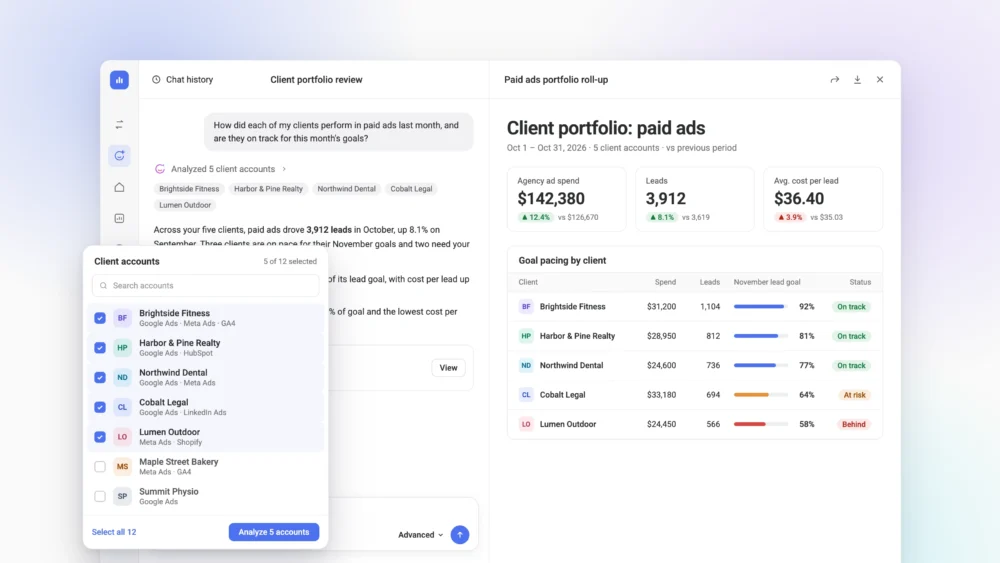
1. Select the client accounts you want to review
From your main agency account, choose the client accounts you want the AI Analyst to use. You can pick a few or include your full portfolio, with no limit on the number of accounts.
2. Ask about performance across your portfolio
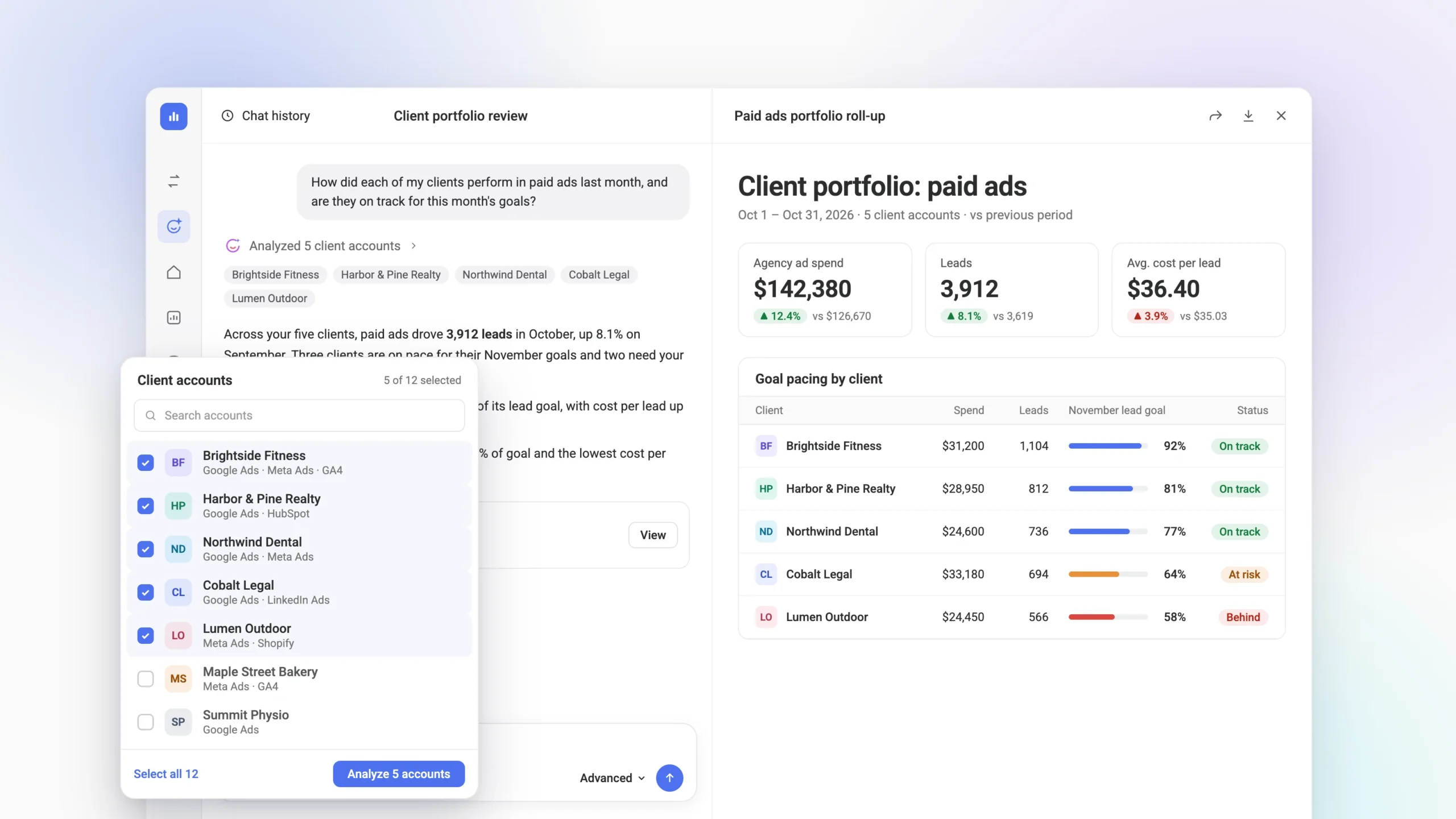
Start with a question about what’s happening across your accounts, for example, whether your clients are on track to hit their goals this month. The AI Analyst queries each selected account and returns the analysis in one response.
When prompting your AI Analyst, make sure to include four things:
- What you want to analyze, such as paid advertising performance.
- The time period, such as last month.
- What to compare against, such as the previous period.
- What you want surfaced, such as the clients falling behind.
From there, ask follow-up questions to dig into any account that stands out.
3. Turn the analysis into a roll-up report
When you have the insight you need, ask the AI Analyst to turn it into an Artifact. It uses the data and context from each client account to build a report that is ready to share.
4. Refine the report
For larger changes, highlight a section and tell the AI Analyst what to adjust, such as switching the chart type. For small edits like a title, edit the report directly.
5. Share the report with your team
Share the Artifact with a link so everyone works from the same view of the portfolio. Your team can use it in internal reviews to agree on which accounts to prioritize, and you can keep updating the report as the analysis changes.
6. Automate the review
If you run this review regularly, you can save the workflow as an skill, so you don’t have to recreate the same analysis each time. You can then add it to a routine and choose when it runs, so your team starts each week with an updated report built on the latest data.
Example prompts
The questions you ask will depend on your clients, goals, and the type of performance your agency manages. These prompts are based on examples from the session and can be adapted to your own metrics and reporting periods.
| What you want to do | Prompt |
|---|---|
| Compare recent performance | How did each of my clients perform in [area, e.g. paid ads] last month compared to the month before? |
| Check progress toward goals | Are they on track to hit the goals I’ve set in Databox for this month? |
| Benchmark clients against each other | How do my clients compare with each other? Benchmark them against one another on [metric 1], [metric 2], and progress toward their goals, and tell me which client is setting the standard and which one is the furthest behind. |
| Create a roll-up report | Create a roll-up report that summarizes performance across all my client accounts, including the agency total, how each client performed last month, their progress toward this month’s goals, and how they compare with each other. |
Spend your time on clients instead of reviews
When a portfolio review takes minutes, your team has more time for the work your clients pay you for. If you already use Databox, try this workflow with your own client accounts in the AI Analyst.
FAQ
FAQs
Can Databox’s AI Analyst analyze multiple client accounts at once?
Yes. You can select multiple client accounts or subaccounts and analyze them in the same conversation. There is no limit on the number of accounts, so you can include your full portfolio.
Can the AI Analyst compare client performance against goals?
Yes. If goals are set in Databox, the AI Analyst compares current performance against them and shows how each client is pacing.
Can I turn the analysis into a report?
Yes. Ask the AI Analyst to turn your findings into an Artifact, such as a roll-up report of your client portfolio, then refine individual sections before sharing it with your team.
Can I automate the same portfolio review each week?
Yes. Save the workflow as an AI skill and add it to a routine that runs on a recurring schedule.