

Rank campaigns by their contribution to the drop, then split each contribution into a rate effect, the campaign’s own ROAS, and a mix effect, its share of spend. Mostly rate means fix the campaign. Mostly mix means fix the budget.
Marketing is the biggest topic people bring to Genie, the AI analyst in Databox, at about 46% of conversations. Within marketing, the question asked most often is about paid ads: spend by campaign, platform against platform, whether the budget is going where it should.
Follow that question far enough and it turns into a harder one: ROAS fell, so which campaign caused it?
The root cause analysis method answers it by calculating each campaign’s contribution to the account change and ranking campaigns by it. That ranking tells you how much each campaign moved ROAS, but it leaves out why. A campaign moves account ROAS in two ways: its own ROAS changes, and its share of the budget changes. Split every contribution into those two parts before you act on the ranking. A campaign whose drop is mostly share is reacting to a budget decision made somewhere else, and fixing it changes nothing.
The second kind of drop shows up whenever one campaign scales. A brand campaign whose ROAS barely moves can rank among the top causes of an account drop, and every metric inside it looks healthy.
TL;DR
- A contribution ranking measures how much each campaign moved account ROAS. It doesn’t say whether the cause sits inside the campaign or in the budget around it.
- Each contribution has two parts. The rate effect is the change in the campaign’s own ROAS, weighted by its share of spend. The mix effect is the change in its share of spend, weighted by how far its ROAS sits from the account average.
- A high-ROAS campaign that loses budget share pulls account ROAS down even when its spend holds steady. Drilling into its CPC and conversion rate finds nothing, because the cause is another campaign’s budget.
- Splitting contributions by hand means exports from every ad platform, a dozen formulas and a reconciliation check, repeated every time ROAS moves. Most of the mistakes happen in the share calculation and in how the results get read.
- Genie runs the split in one conversation, checks that the contributions add up to the account change, separates what a budget decision caused from what the data can’t prove, and turns the result into a report.
A contribution ranking shows how much a campaign moved ROAS. The split shows where to look.
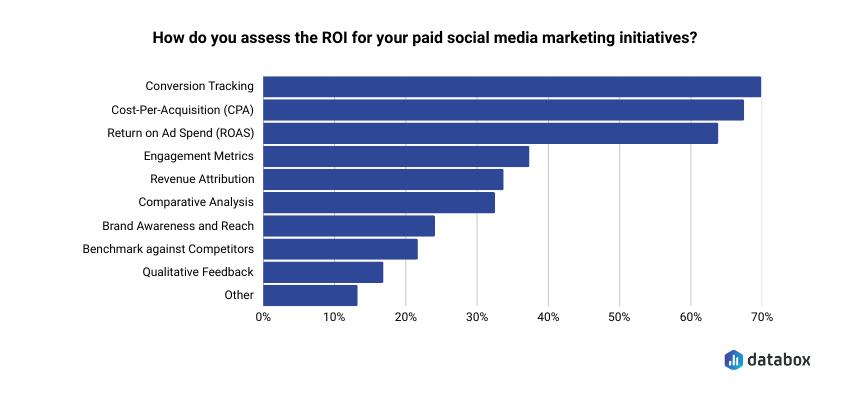
ROAS is the number most teams judge paid media by. In Databox’s Organic vs. Paid Social Media Strategies: Which Are Better for Achieving Marketing Goals? survey, 65.59% of respondents said they assess paid ROI using ROAS.
Account ROAS is total revenue divided by total spend. That makes it an average of campaign ROAS, weighted by how much each campaign spends. When the weights change, the average moves, even if no campaign performs worse. So every campaign’s contribution to a ROAS change splits in two.
The rate effect is the change in the campaign’s own ROAS, multiplied by its average share of spend across the two periods. It measures what happened inside the campaign.
The mix effect is the change in the campaign’s share of spend, multiplied by the gap between its average ROAS and the account’s average ROAS. It measures what happened to the campaign’s weight. A campaign above the account average pulls ROAS down when it loses share. A campaign below the average pulls ROAS down when it gains share.
The split decides where the investigation goes next.
A contribution that is mostly rate points inside the campaign: its CPC, conversion rate, value per conversion and change history. That’s the drill-down the root cause analysis walks through.
A contribution that is mostly mix points at the budget. Brand campaigns are the usual case. Brand Search spends what brand demand allows, so when a prospecting or non-brand campaign scales, Brand Search keeps its spend and loses its share. Its ROAS is often several times the account average, so the lost share costs the account more than any other campaign’s. Ranked by contribution, it looks like a cause. Opened up, it looks fine. The fix sits in the campaign that took the share.
A contribution with both usually belongs to the campaign that scaled. Its own ROAS fell, and its growing share of below-average returns dragged the account down further.
The split also puts a price on a budget decision. The campaign that took the share owns the mix effects it caused elsewhere, on top of its own contribution. That sum is an upper bound. It counts only the campaigns that lost from the shift and ignores the below-average campaigns whose shrinking share lifted ROAS. It also assumes the extra budget caused the campaign’s own ROAS to fall. Extra budget does buy weaker auctions, and so does a bid change, a new match type or a drop in demand. One check helps: if the campaign earned less revenue in total on its bigger budget, something besides the budget changed.
Splitting each contribution by hand takes an afternoon and leaves room for mistakes.
The calculation runs in any spreadsheet. It starts from the same export a root cause analysis uses, and it adds work at every step.
1. Export every platform, both periods. Spend and revenue (or conversion value) by campaign, from Google Ads, Meta and any other platform in the account. Each platform names its columns differently and attributes revenue by its own rules, so the exports need lining up before anything gets calculated.
2. Calculate account ROAS for each period. Sum revenue, sum spend, then divide.
3. Calculate each campaign’s share of spend in each period. Campaign spend divided by total spend across every platform.
4. Calculate the rate effect. Campaign ROAS in the second period minus ROAS in the first, multiplied by the average of the campaign’s two spend shares.
5. Calculate the mix effect. Campaign share in the second period minus share in the first, multiplied by the campaign’s average ROAS minus the account’s average ROAS, both averaged across the two periods.
6. Check the total. Rate plus mix is each campaign’s contribution, and the contributions across all campaigns have to add up exactly to the account ROAS change.
7. Trace the mix. For every campaign whose contribution is mostly mix, find the campaign whose spend grew, and compare that campaign’s revenue across the two periods to see whether its budget or its performance changed.
Seven steps is an afternoon the first time. It’s another afternoon every time ROAS moves, because none of it carries over except the template.
The errors cluster in a few places.
Shares from one platform. A Google Ads export alone gives shares of the Google budget. The contributions then stop adding up to the account change, and any budget that moved between Google and Meta disappears from the analysis.
Averaged ROAS. Averaging campaign ROAS to get account ROAS gives every campaign the same weight. The result matches neither period, and every mix effect built on it is wrong.
Signs on the mix effect. A below-average campaign that gains share hurts the account, and one that loses share helps it. Flip the subtraction in step 5 and the analysis blames the wrong campaigns.
Campaigns that started or stopped. A campaign that ran in only one period drops out of the export for the other. It belongs in both, with zero spend where it didn’t run, or the total won’t reconcile.
Over-reading the result. Adding up only the negative knock-on effects overstates what a budget decision cost. Treating a campaign’s own ROAS drop as caused by its budget, without checking its revenue, overstates it further.
Pasting the exports into a chatbot looks like a shortcut around all of this. The model then does the arithmetic itself, and a dozen formulas across six or more campaigns is exactly the kind of math a language model gets close to and wrong. In Databox’s Using AI You Don’t Trust: How Business Users Actually Run Analytics in 2026 survey, 74% of business users said they had shipped a decision, report or shared output based on an AI-generated number that later turned out to be wrong. Only 23% re-derive AI-produced numbers from the source data.
With Genie, the same analysis is one conversation that ends in a report.
Genie reads the ad data in Databox, writes the query, and lets Databox’s query engine do the calculation. The language model never does the arithmetic. Here is the full analysis as one conversation, run on demo data with six campaigns across Google Ads and Meta.
1. The usual first look
Compare my Google Ads campaigns for May vs April. For each campaign, show spend, share of total spend, ROAS, and the percentage change in ROAS. Sort by ROAS change, largest drop first.
The starting point most reviews stop at: which campaign’s ROAS fell, and by how much.
2. The split
Break the account ROAS change down by campaign. Split each campaign’s contribution into a rate effect, which is the change in its own ROAS weighted by its average share of spend, and a mix effect, which is the change in its share of spend weighted by the gap between its average ROAS and the account’s average ROAS. Rank campaigns by total contribution and check that the contributions add up to the account change.
Steps 2 to 6 in one answer, across both platforms, with the reconciliation check at the end.
3. The campaigns that did nothing wrong
Which campaigns pulled account ROAS down mainly through the mix effect rather than their own ROAS? What spend changes caused those shifts in share?
Step 7: the campaigns that lost share, and the campaign that took it.
4. The cost of the budget decision
Add up the full impact of the Non-Brand Search budget increase: its own contribution plus the mix effects it caused in Brand Search and Retargeting. How much of the account drop does that one budget change explain?
The question invites the overstatement from the list above. Genie answers it, labels it an upper bound, adds back the offsetting effects, and separates the part the budget change explains with certainty from the part the data can’t prove.
5. What the extra spend bought
Non-Brand Search spend rose from April to May. How much revenue did it return in each month, and what did the extra spend return?
The revenue check that tells a budget problem from a performance problem.
6. The deliverable
Turn this into a short report I can send to my team, with a recommendation on the Non-Brand Search budget.
A one-page report with the split by campaign, the recommendation and its caveats, ready to share.
| By hand | Genie | |
|---|---|---|
| Data | Exports from every platform, lined up | Connected sources in Databox |
| Contribution, rate and mix | A dozen spreadsheet formulas | One question |
| Check that contributions add up | Built by hand | Included in the answer |
| Campaigns that lost share, and to whom | Traced row by row | One follow-up |
| Cost of the budget decision | Worked out and easy to overstate | One follow-up, with its limits stated |
| Shareable report | Built in a doc or slides | One request |
| Time | About an afternoon | Minutes |
Conclusion
A contribution ranking answers how much each campaign moved ROAS. The team still has to decide what to change, and the ranking alone sends them into whichever campaign sits near the top. When that campaign is a brand campaign that held its spend while another campaign grew, the investigation finds healthy numbers and ends there.
Splitting each contribution into rate and mix moves the investigation to the right place. Rate sends you into a campaign. Mix sends you to the budget and to the campaign that took the share. By hand, that split is an afternoon of exports and formulas with a mistake waiting at most steps. In Genie, it’s six questions and a report.
FAQ
Why did my account ROAS drop when my best campaign performed the same?
Account ROAS is a spend-weighted average, so it falls when your best campaign’s share of the budget shrinks. If another campaign scales while a high-ROAS campaign such as Brand Search holds its spend, Brand Search’s share drops, and account ROAS falls even though Brand Search performs exactly as before.
What is the difference between the rate effect and the mix effect in ROAS?
The rate effect is the change in a campaign’s own ROAS, weighted by its average share of spend. The mix effect is the change in its share of spend, weighted by the gap between its average ROAS and the account average. Together they equal the campaign’s contribution, and the contributions of all campaigns equal the account ROAS change.
Can a campaign hurt account ROAS by gaining budget?
Yes, when its ROAS is below the account average. A below-average campaign that takes a bigger share of spend lowers the weighted average, on top of any change in its own ROAS.
How do I know whether a budget increase caused a campaign’s ROAS to fall?
Two periods of campaign totals can’t prove it. Compare the campaign’s total revenue across the two periods: if revenue fell while spend rose, something besides the budget changed, such as bids, keywords, match types or landing pages. Check the campaign’s change history for that period.
Should I include Meta and Google Ads campaigns in the same calculation?
Yes, if you want to explain account-level ROAS. Spend shares have to add up to 100% of everything you spend, otherwise the contributions won’t sum to the account change. A Google-only calculation explains Google ROAS and misses budget that moved between platforms.
Does Genie calculate the rate and mix effects itself?
Genie writes the query, and Databox’s query engine does the calculation. It runs the split as one query across connected sources and checks that the contributions add up to the account change.