TL;DR
- APIs allow software applications to exchange data. Analytics platforms use API-based integrations to automatically collect and maintain business data, which can then be organized into consistent metrics for reporting.
- MCP allows AI assistants like Claude and ChatGPT to interact with connected applications. AI can retrieve information and perform supported actions, but what it can access depends on the tools and data exposed by each MCP server.
- For AI analysis and reporting, both approaches have a role. Direct MCP connections can work well for specific questions or accessing pre-calculated metrics. API-based data integrations are useful for maintaining historical data and supporting consistent, recurring reporting. Using both can give AI access to prepared performance metrics and additional information from your business applications.
Businesses have long used APIs to connect their software applications and exchange data. These connections power many of the tools companies rely on for reporting, allowing them to bring information from different systems into one place and keep their reports up to date.
Now, AI assistants like ChatGPT and Claude can connect to those same business applications through MCP (Model Context Protocol), making it easier to access information and perform tasks using natural language.
Both technologies can give you access to business data, but understanding their differences matters when you’re using AI for analysis and reporting.
In this article, we’ll explain how APIs and MCP work, when to use each, and what to consider when choosing how to connect your business data to AI.
What is an API?
An API (Application Programming Interface) is a way for software applications to communicate with each other. It provides a set of rules that define what information an application can request, what actions it can perform, and how that information is exchanged.
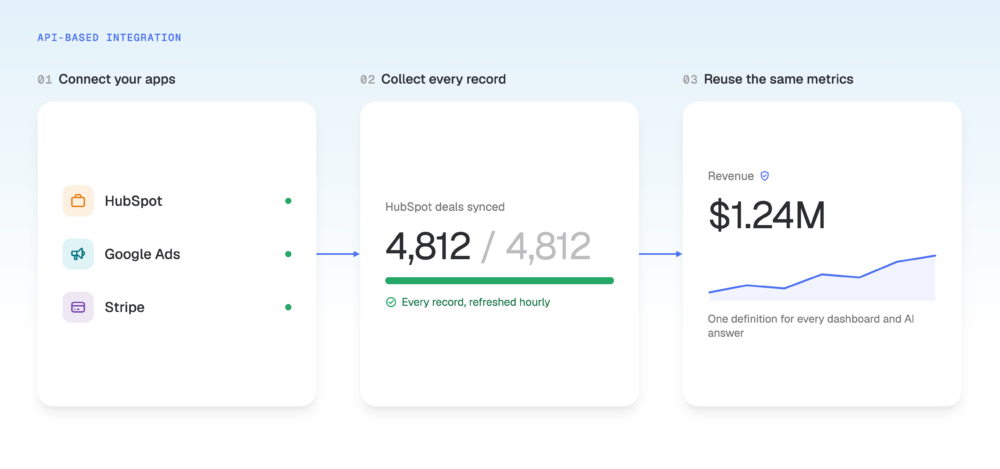
Analytics platforms and reporting tools use APIs to build data integrations, which allow them to automatically collect information from other applications. These integrations determine what data to retrieve, how often to update it, and how to prepare it for reporting.
For example, when you connect HubSpot to an analytics platform, the integration uses HubSpot’s API to request information about your sales deals, such as their values and close dates. HubSpot returns that information in a format the platform can understand and use to calculate your metrics and update your dashboards.
Once configured, the integration repeats this process automatically, keeping your reports up to date without requiring manual exports.
What is MCP?
MCP (Model Context Protocol) is an open standard designed specifically to help AI assistants like ChatGPT and Claude interact with other software applications.
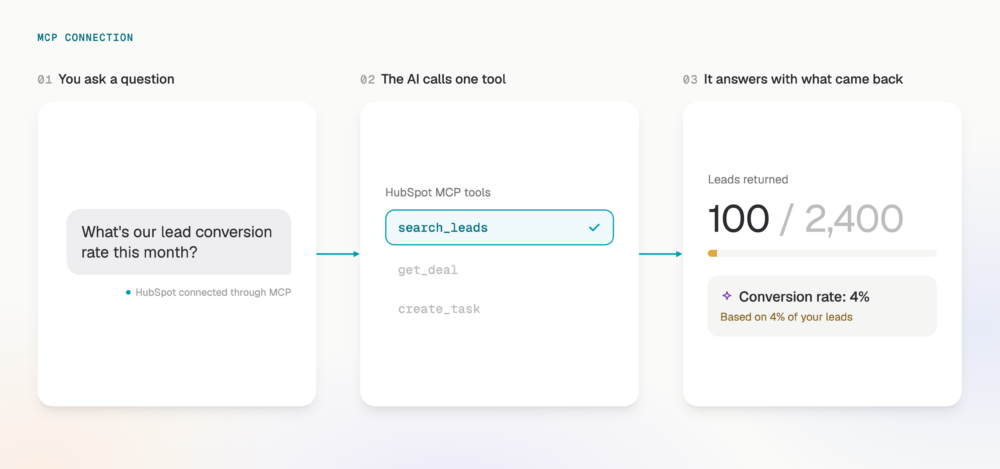
It works through MCP servers, which provide AI assistants with a set of available functions, called tools. Each tool performs a specific task, such as finding sales deals in HubSpot or creating a task in Asana.
When you ask an AI assistant to do something, it can look at the available tools, choose which ones to use, and request the information or action needed to complete your task.
For example, if you connect Claude to HubSpot through MCP, you can ask which deals are expected to close this month. Claude can select an available tool, retrieve the relevant information from HubSpot, and use it to answer your question.
MCP vs. API: What’s the difference?
The main difference is how these technologies allow applications to work with information.
With APIs, software can be programmed to follow a defined process. Developers specify which information to request and what the application should do with it.
With MCP, AI assistants can decide which available tools to use based on your request. This makes it easier to ask different questions or perform tasks through natural language.
Consider a weekly sales report.
An API-based integration can be configured to retrieve all deals closed during the previous week, calculate their total value, and update a dashboard automatically. The integration follows the same instructions each time, so the calculation remains consistent as new data becomes available.
With MCP, you can ask Claude to calculate the total value of deals closed last week using data from HubSpot. Claude chooses which available tools to use and retrieves the information needed to answer your question.
Depending on what the MCP server provides, Claude might receive a total that’s already been calculated, or it might need to retrieve individual deals and calculate that total itself.
This difference matters for reporting because a predefined integration can apply the same calculations every time, while an AI assistant may need to interpret your request and perform calculations using the information it retrieves.
Here’s a comparison of how the two approaches work in practice:
| API-based integration | MCP connection | |
|---|---|---|
| Primary purpose | Connect applications and automate data exchange | Allow AI assistants to access information and perform tasks |
| How it works | Software follows predefined requests and instructions | AI assistants select available tools based on your request |
| How tasks are performed | The integration follows a configured process | AI decides which tools to use, while the MCP server carries out their functions |
| Data access | Can systematically retrieve and maintain large datasets | Access depends on the information and functions exposed by the MCP server |
| Consistency | Can repeat the same processing and calculations | Depends on the available tools and how much processing AI performs |
| Common uses | Data synchronization, recurring reporting, and automated workflows | Answering questions, retrieving information, and performing actions through AI |
Can MCP replace API-based data integrations for AI analysis?
In some cases, yes. If you’re analyzing a limited amount of information or using metrics that an application has already calculated, a direct MCP connection may provide everything you need.
Google Analytics is one example. Its reporting capabilities can return summarized performance metrics, allowing an AI assistant to answer questions about website traffic without processing every individual event.
However, many business applications store information as individual records. A CRM, for example, might contain thousands of deals that need to be collected and calculated before you can accurately report on sales performance.
As the amount of data and complexity of your analysis increase, there are several things to consider.
1. Does MCP give AI access to all the data it needs?
When you connect an AI assistant directly to a business application through MCP, it can retrieve the information made available by that application’s MCP server. However, some servers limit how many records or what information their tools can return.
For example, if your CRM contains thousands of leads but an MCP tool returns only the first 100 records, Claude could calculate your lead conversion rate using incomplete information. The answer might look reasonable, even though many of the relevant records were missing.
With an API-based data integration, an analytics platform can be built to collect the complete dataset before calculating your metrics. It can retrieve records in smaller batches through a process called pagination, manage limits on how often data can be requested, and continue collecting information until all the required records have been retrieved.
The platform can then maintain that data and update it regularly, making it available for reporting without having to retrieve every historical record again.
What this means for your business: When calculating revenue, pipeline value, or conversion rates, you need confidence that all relevant records are included. A data integration designed to collect and verify the required information can reduce the risk of making decisions based on incomplete numbers.
2. Can AI calculate your metrics consistently through MCP?
Accessing business data is only part of what AI needs for accurate analysis. It also needs to understand how your business measures performance.
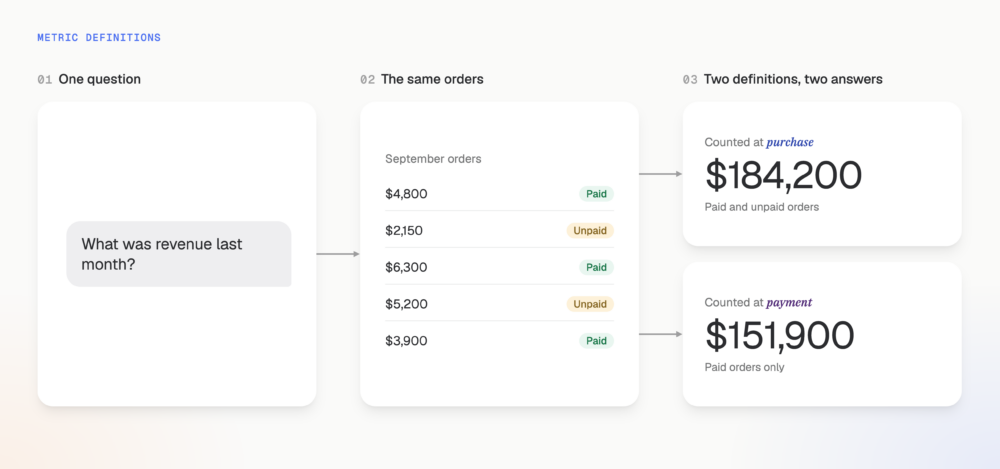
Revenue is a good example. Some businesses recognize revenue when a purchase is completed, while others count it only after payment has been received.
With a direct MCP connection, Claude might retrieve individual transactions and calculate revenue based on the information available. You can provide your metric definitions through prompts or reusable Skills, but if Claude performs the calculations itself, it needs to interpret and apply those instructions correctly each time.
This becomes more complicated when your analysis requires combining information from different applications. Understanding which advertising campaigns generate revenue, for example, may require matching campaign information with customer and sales records from your CRM.
With an API-based data integration, an analytics platform can collect and organize information from those applications before the analysis takes place. It can combine records using predefined rules and calculate metrics according to your business’s definitions.
Once those calculations are established, they can be reused across dashboards, reports, and AI analysis. This means the same metric is calculated consistently, even when different people request it or use it in different reports.
What this means for your business: Your teams can work from consistent metric definitions, compare results over time, and spend less time investigating why different reports show different numbers.
3. How much does recurring MCP analysis cost in time and tokens?
MCP can save time when you need a quick answer from a connected application. However, recurring analysis can become more demanding when an AI assistant needs to retrieve and process large amounts of information.
For example, a weekly sales report might require thousands of individual deal records.
With a direct MCP connection, Claude may need to retrieve those records and calculate the results each time the report runs. Depending on the tools available, this could involve several requests and a substantial amount of information for the AI assistant to process.
AI models process information in units called tokens. Depending on the AI service you’re using, retrieving and analyzing larger amounts of data can increase costs or consume usage limits. Processing more information can also make reports take longer to generate.
With an API-based data integration, an analytics platform can collect new data on a schedule, maintain historical records, and calculate the metrics needed for reporting in advance.
Instead of asking AI to process thousands of individual records every hour, the platform can provide the prepared metrics needed for the report. AI can then focus on analyzing the results rather than repeating the underlying calculations.
What this means for your business: Reusing prepared data can reduce the time needed to generate reports and lower unnecessary AI processing costs, particularly when you’re running the same analysis regularly.
When should you use MCP, API-based integrations, or both?
The right approach depends on the type of information you need and what you want to accomplish with it.
Use MCP when you want AI to retrieve information or perform actions in connected applications. It’s useful for looking up specific records, answering straightforward questions, or completing tasks through natural language. If the application already provides the metrics you need, MCP may also be sufficient for reporting.
Use API-based data integrations when you need to collect, maintain, and analyze performance data regularly. They can support larger datasets, historical comparisons, and consistent calculations, particularly when your reporting requires information from several applications.
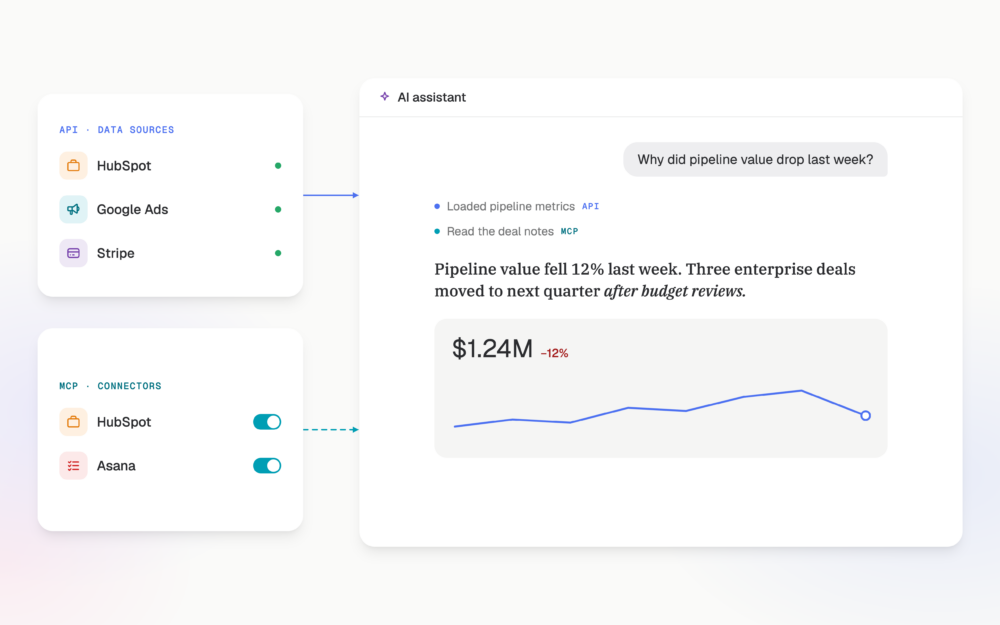
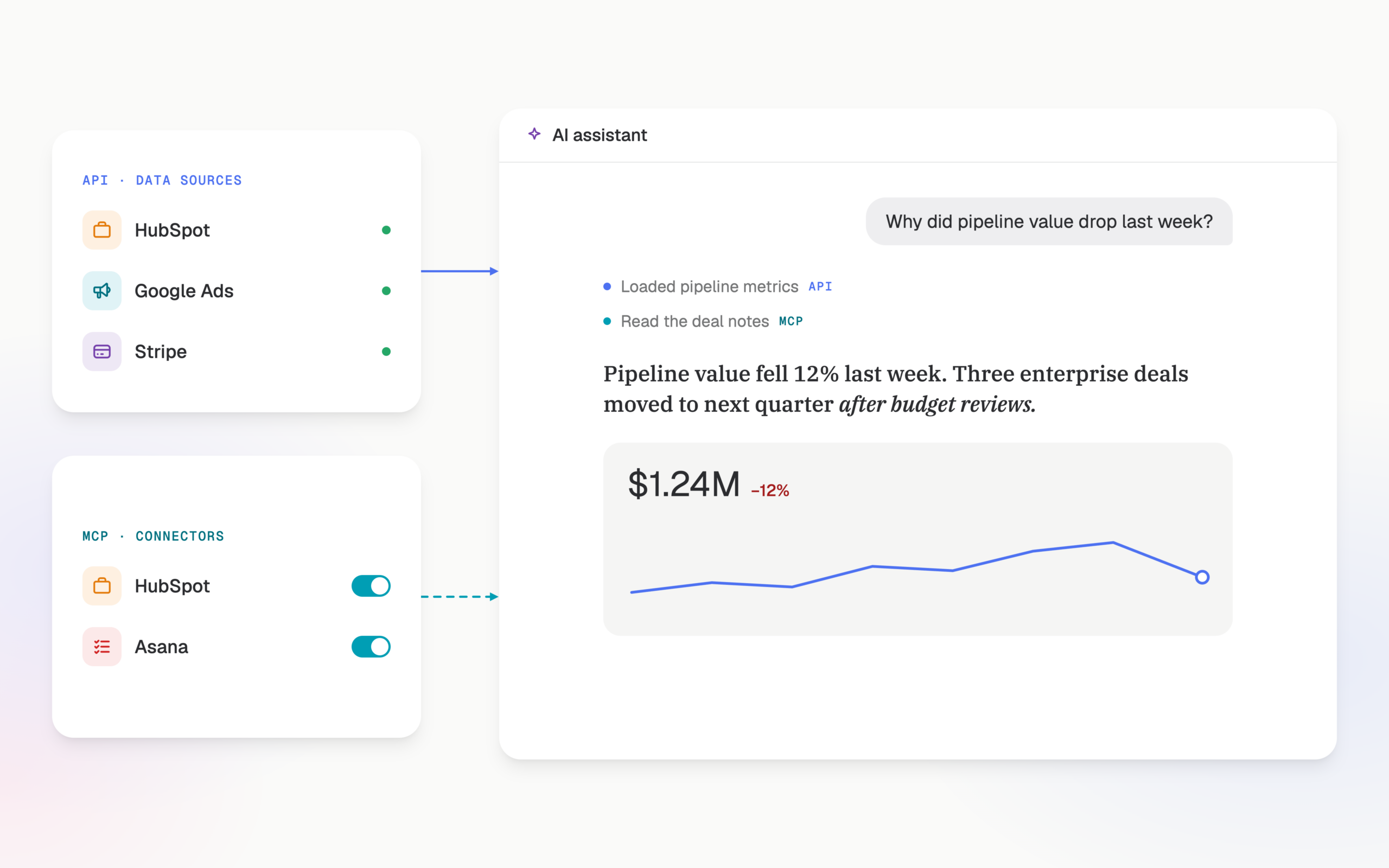
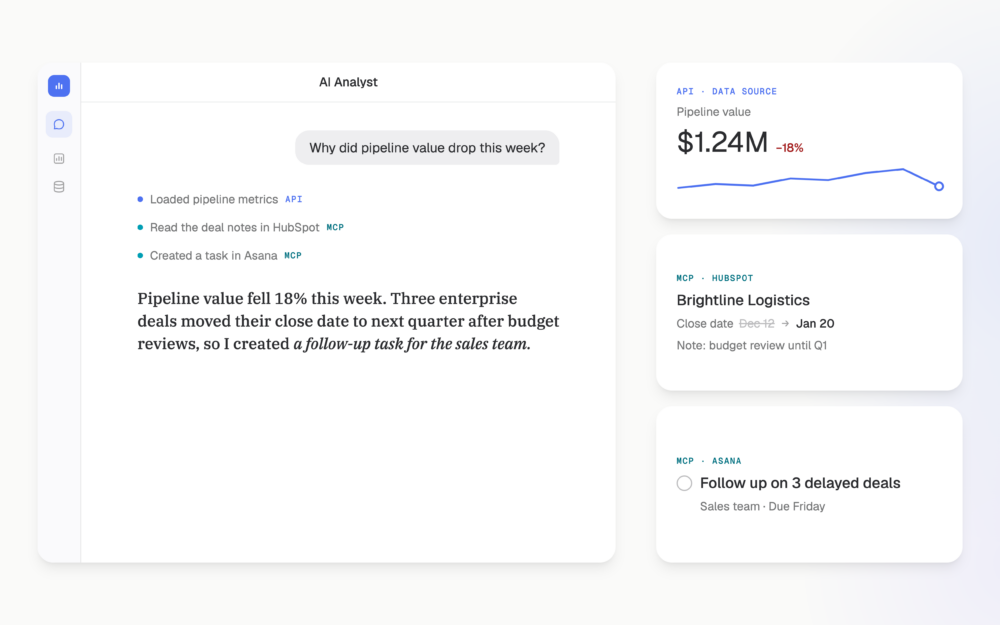
Use both when you want AI to analyze performance and investigate what’s happening behind the numbers. An analytics platform can provide consistent metrics, while MCP gives AI access to additional information and supported actions in your business tools.
For example, your reporting platform might identify a decline in sales pipeline value. An MCP connection could then allow your AI assistant to examine the individual deals behind that change, review relevant notes, and identify possible reasons for the decline.
If the connection supports actions, the assistant could also help create follow-up tasks or update records, subject to your permissions.
Combining these capabilities can make it easier to understand performance changes and follow through on the findings.
How Databox combines API-based data integrations and MCP
Databox uses both approaches to help businesses get more reliable AI analysis.
Data source integrations use APIs to collect data from your business applications. Databox organizes that information into metrics and datasets, maintains historical performance data, and applies consistent calculations so your AI Analyst can work with prepared information.
MCP connectors extend what the Databox AI Analyst can access and do by providing additional information and supported actions from external business applications.
This allows your AI Analyst to combine performance metrics with information from the tools where your team works, helping it investigate results and recommend next steps.
Get more reliable AI analysis with Databox
Databox brings your performance data together, applies consistent metric definitions, and provides the business context AI needs to deliver more reliable analysis.
You can analyze performance directly with the Databox AI Analyst, or connect Databox to Claude through MCP and give it access to the same trusted performance data.
Whether you prefer working in Databox or Claude, you can spend less time preparing data and more time understanding performance and acting on what you find.
FAQ
MCP vs. API questions
Is MCP an API?
MCP (Model Context Protocol) is an open standard that defines how AI applications communicate with external tools and data sources. An API defines how software applications can request information or perform actions in another system.
MCP servers often use existing application APIs to carry out requests from AI assistants. In this setup, MCP provides a standardized way for AI to discover and use available tools, while the API handles communication with the underlying application.
Does MCP replace APIs?
MCP doesn’t generally replace the underlying APIs that business applications use to exchange data. Many MCP servers rely on those APIs to retrieve information or perform actions, although MCP servers can also connect directly to databases and other systems.
For AI analysis and reporting, a direct MCP connection may eliminate the need for a separate data integration in some use cases. However, API-based integrations remain useful when you need to systematically collect and maintain data for recurring reporting.
The right choice depends on what the MCP server provides and the requirements of your analysis.
Is MCP reliable enough for business reporting?
MCP can support reliable business reporting when the connected tools provide complete information and consistently calculated metrics.
For example, when an MCP server returns metrics that an application has already calculated, an AI assistant can work with those results directly.
When the assistant needs to retrieve individual records and calculate metrics itself, accuracy depends on whether it receives all the required information and applies the correct metric definitions.
For recurring reporting, it’s important to verify that the available data and calculations meet your reporting requirements.