
Ask one question with a time range, a metric, a comparison, and a goal. The AI analyst does the gathering. You keep the judgment.
To answer any performance question in minutes, ask Databox’s AI Analyst, Genie, one well-built question that includes: a time range, a metric, a comparison, and a goal. Genie queries the data sources you’ve connected, runs the calculation, and returns the answer with a recommendation attached.
TL;DR
- In Databox’s Time to Insight: What Are the Biggest Roadblocks to Actionable Data? survey, 64% of teams said it typically takes 1 to 3 days to gather the data behind a single business question. Databox’s AI Analyst, Genie, compresses that into minutes.
- A good performance question has four parts: a time range, a specific metric, a comparison, and a threshold or goal. Goals you’ve already set up in Databox get recognized automatically, so you can skip the fourth part.
- Follow-up questions turn a number into a verdict. AI Analyst Genie carries your business context and recommends what to act on this week, which deals to escalate, and which to deprioritize.
- Any answer can become an editable, shareable artifact saved to a library, so next week’s check starts from this week’s answer.
- AI Analyst Genie is included in all Databox plans.
In Databox’s Time to Insight: What Are the Biggest Roadblocks to Actionable Data? survey, 64% of teams said it typically takes 1 to 3 days to gather the data behind a single business question.
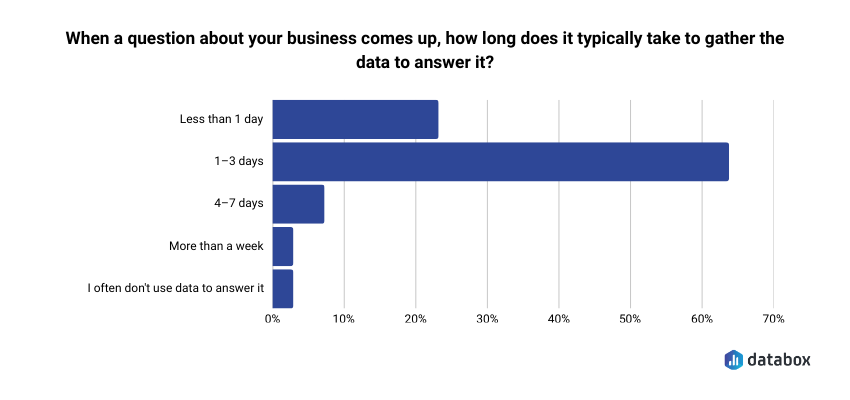
That covers the gathering alone. The thinking starts after, with whatever energy is left.
Emil Korpar, Director of Customer Success at Databox, put the real stakes on that number in a recent webinar. You are the one who has to understand the data, explain it, and stand behind it in front of your team, your leadership, or your clients. That part of the job stays yours. Everything before it, the gathering and the computing, is work you can hand off.
Databox’s AI Analyst, Genie, can take that work. Ask about pipeline, and it queries the actual deals, stages, and definitions in your CRM, so the numbers in its answer are the numbers in your source of truth. Emil demonstrated the full workflow live, and this article walks through it, from the first question to the report you hand your team. The only setup it assumes is one connected data source.
One well-built question replaces the pulling and the computing
Emil’s opening question in the demo was one he’d normally spend half an hour digging for: how is August pipeline value tracking against our target?
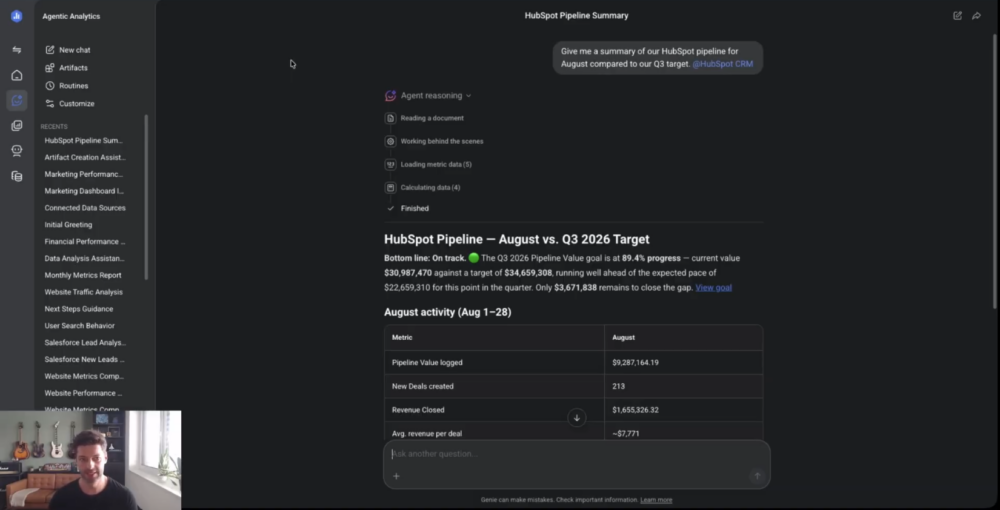
AI Analyst Genie found the HubSpot CRM source, pulled the pipeline data, and compared it against the target. The detail worth pausing on is the target: Emil never told Genie which metric to use or what the goal value was. Databox lets you set a goal for any metric you track, Emil had a pipeline goal saved from before, and Genie matched the metric to it on its own. Context you build into your account once keeps paying out in every answer.
The quality of the answer tracks the quality of the question, and a good performance question has four parts.
A time range. Name it every time: this month, last quarter, or a custom window.
A specific metric. Use one you’ve already created, or describe one you haven’t. “The count of deals created in August and their total value” works even if no such metric exists yet. The analyst finds the right dataset and builds the calculation on top of the raw data.
A comparison. Compare against the previous period, the same period last year, or another metric you suspect is correlated. A number with a point of reference tells you whether performance improved, dropped, or stalled. A number alone tells you very little.
A threshold or goal. The value you’re trying to hit or stay above. If the goal already lives in Databox, AI Analyst Genie reads it without being asked, and you can leave this part out.
You can also pin the source directly. Type @ and select HubSpot, and AI Analyst Genie is locked to the right CRM even if your account has multiple sources or datasets with similar data. Emil’s rule from the demo applies to every question you’ll ask it: the more specific you are, the less back and forth you need.
Follow-up questions turn the number into a verdict
The first answer is a baseline. The useful part starts when you drill in.
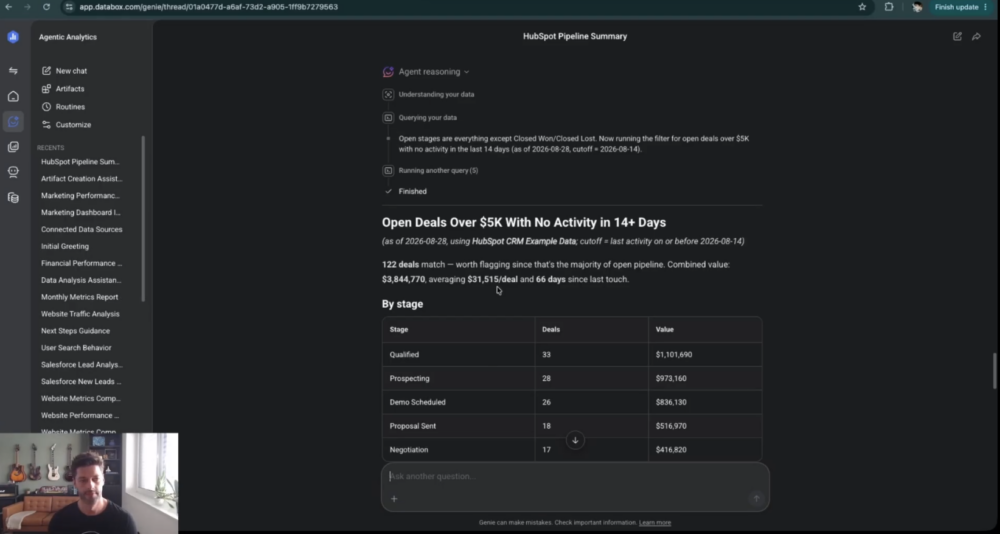
Emil’s second question asked which open deals over $5,000 had no activity in the last 14 days. AI Analyst returned the exact list of deals to worry about, work that used to mean scrolling the CRM and manually sorting by last activity date.
His third question asked for judgment: based on what the data showed, what should the sales team focus on this week to hit the target. Genie came back with a point of view: triage the near-close deals that recently stalled first, escalate the long-dead ones for a decision, check in with specific reps, and deprioritize the low-urgency deals to free up time for the ones that matter.
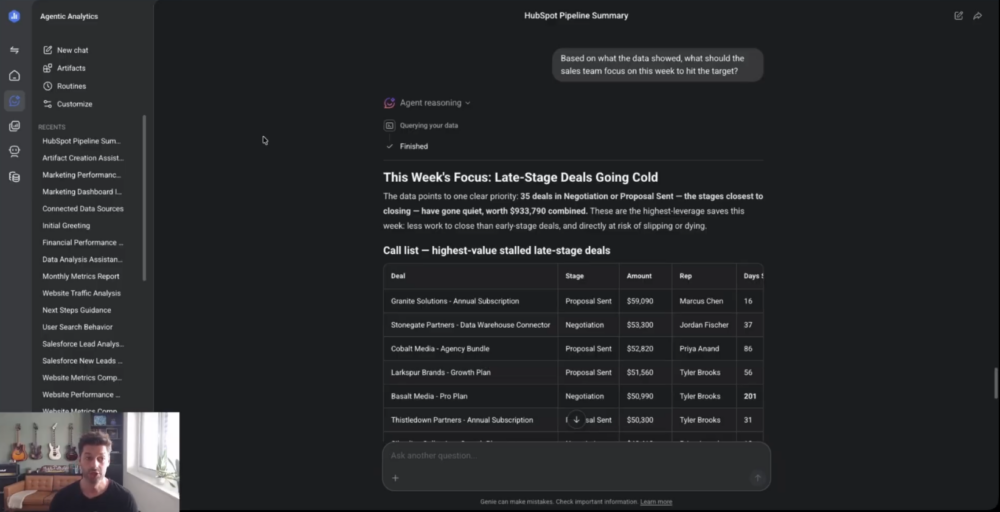
It can answer at that level because it carries the context of the business, the goals and objectives set up in the account. A dashboard shows you what happened. AI Analyst Genie knows your goals, so it tells you where the week should go. You walk into your Monday pipeline review already knowing what happened and what to do about it.
The answer becomes the deliverable
An answer that lives in a chat window disappears under the next twenty chats. Emil’s last prompt asked AI Analyst to turn the pipeline health snapshot into something he could share with his team, and it generated an artifact, a clean summary of the whole conversation in one view.
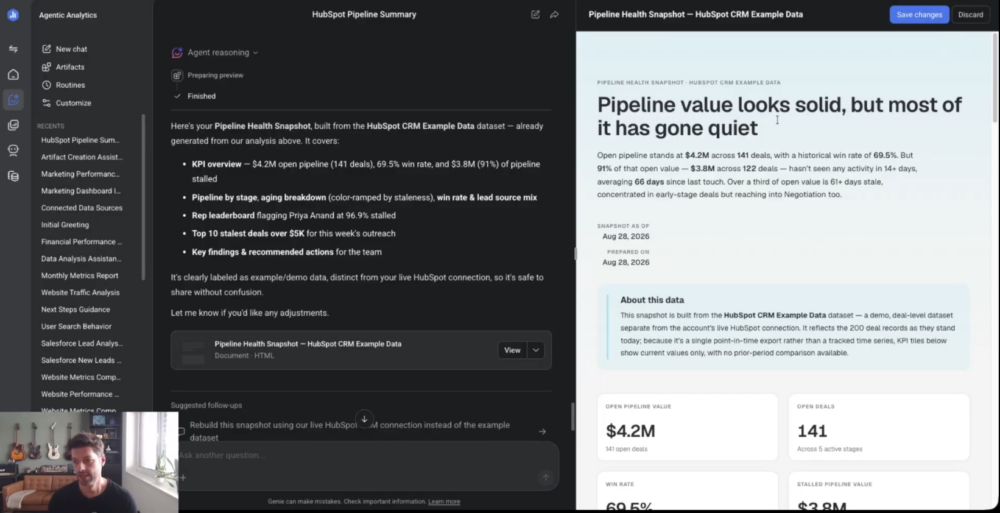
The artifact is an editable HTML file. Small tweaks, like renaming a section to “August review,” you make directly in the document. Bigger changes, like adding a section or another data block, you get by prompting AI Analyst to update it. From there, you can download it, or turn on a public link and hand it straight to your team or your executives. Building a presentation from scratch drops out of the pipeline review entirely.
Every artifact is saved to a library alongside the ones you’ve created before. Next Monday, the same pipeline check starts from this Monday’s answer. Reopen the chat, ask the same question, and see what changed since last week. Or pull up both artifacts side by side and compare.
Context you add once sharpens every answer after it
Everything above works out of the box, with zero setup beyond connected data sources. AI Analyst Genie gets sharper when you tell it about your business.
In Databox’s settings, under Customize and then Personalization, you can set the analyst type: a researcher that goes deep on detail, a consultant that leans toward recommending next steps, or a generalist that balances the two. You can set output length, from concise answers built for fast iteration to thorough ones built for reading. The business context field takes your industry, strategy, and higher-level objectives, so AI Analyst Genie has them in every conversation without you repeating them. You can also list the key metrics that matter most, and it prioritizes them automatically whenever a question touches that area.
AI Analyst Genie computes correctly without any of it. The context is what makes the recommendations yours.
The gathering is AI Analyst’s job now
AI Analyst Genie works with whatever you have connected in Databox: HubSpot, Salesforce, Google Ads, spreadsheets, SQL, and custom sources. Sources stored as raw, row-level data give it the most room to work, since it can filter individual columns and build new metrics on top of them.
What stays with you is the part that was always the actual job: understanding the answer and standing behind it when leadership asks how you know. The 1 to 3 days of gathering that stood between you and that moment is now a question you type.
Frequently Asked Questions
What is an AI analyst?
An AI analyst answers performance questions directly from your connected business data. You ask a question in plain language, and it finds the right data source, runs the calculation, and returns the answer with context, such as how the number compares to your goal. Genie, the Databox’s AI analyst, works this way with every source connected to your account.
Which data sources does an AI analyst work with?
AI Analyst Genie works with everything connected to your Databox account, including HubSpot, Salesforce, Google Ads, spreadsheets, SQL, and custom sources. It gets the most analytical room from datasets that store raw data, because it can filter individual columns and build calculated metrics on top of them.
What do I need before I can use an AI Analyst Genie?
One connected data source, such as your CRM, an ad platform, or a spreadsheet. AI Analyst Genie works from a fresh Databox account with zero further setup. Goals, business context, and key metrics are optional additions that sharpen its answers over time, and each takes minutes to add in the account settings.
What makes a good prompt for an AI analyst?
A good prompt names four things: a time range, a specific metric, a comparison, and a threshold or goal. A question that carries all four is “How did August pipeline value track against our target?” If the goal is already set up in Databox, Genie reads it automatically and you can leave that part out. The more specific the question, the less back and forth you need.
How is asking an AI analyst different from checking a dashboard?
A dashboard shows what happened, and you do the interpreting. AI Analyst Genie answers the specific question you asked, explains how the number compares to your goal, and recommends what to act on. In Databox, both draw on the same connected sources and metric definitions, so Genie’s answer matches what your dashboards report.
Can I share the AI analyst's answers with my team or clients?
Yes. Ask AI Analyst Genie to turn a conversation into an artifact, an editable summary of the analysis in one view. You can edit the text directly, prompt AI Analyst to add sections or data, download the file, or share it through a public link. Every artifact is saved to a library in your account, so next week’s version can be compared against this week’s.