

The pipeline is in the CRM. The forecast isn’t.
TL;DR
- A sales forecast is a cross-tool answer: bookings against billed reality, current pipeline against creation pace, this quarter against last quarter’s shape. A CRM holds one of those inputs.
- Connect an AI to your CRM, even live over MCP, and it answers forecasting questions from the sliver it can see, using definitions it guessed. The number sounds exactly like the truth and still misses.
- The failure has three axes: the model guesses your definitions, it cannot see the tools where revenue reality lives, and CRM APIs serve current state, so the historical comparison a forecast needs does not exist.
- Run the same questions through a query engine that spans your stack and carries your metric definitions, and the answers match the numbers your team already trusts.
- Databox works differently: analytics run on a query engine across every connected source, and the LLM’s only job is language. The LLM never touches your calculations.
Your AI tool is connected to Salesforce. You ask: “What’s our realistic Closed-won revenue for Q3?” The answer comes back in two seconds: a forecast, a confidence range, a breakdown by rep. And it is wrong.
It’s wrong for three reasons that compound: it counted every open opportunity as qualified pipeline, a definition no one on your team uses; it read booked revenue and assumed collected revenue, because the unpaid invoices and the downgrade-at-signature live in your billing tool, which it cannot see, and it compared “pace” against nothing, because the CRM serves current state and the AI has no record of what your pipeline looked like at this point last quarter.
Here is the thesis: a forecast is only as accurate as the data it can see and the definitions it computes on. A CRM-connected AI has neither. The pipeline sits in the CRM. The forecast is built from bookings checked against billing, pipeline checked against marketing’s creation pace, and this quarter checked against the shape of the last four. Ask an AI that sees one tool to produce it, and you get a confident answer to a question it only partially heard.
Same forecasting questions. Two data environments. Two very different answers. The gap between them decides whether your Monday pipeline review starts with a decision or with a 20-minute argument against a spreadsheet.
A forecast is a cross-tool question. Your CRM answers a one-tool question.
Ask a VP of Sales what they actually check before committing a number to the board. Whether the deals marked closed-won turned into invoices that got paid, or if marketing is creating pipeline fast enough to backfill next quarter, or if the current stage distribution looks like the quarters that hit target or the ones that missed. None of that lives in the CRM – it lives in the billing system, the marketing automation platform, and in history the CRM does not keep.
Now look at what “AI for sales forecasting” usually means: an LLM wired to the CRM. The demo is impressive because the interface is. Ask in plain English, get an answer with data. The interface understood your question, but the system behind it can only see a fraction of the answer.
The connection method does not fix the fraction. Wire the AI to your CRM through its MCP server, and the data arrives live, straight from the API. Real progress: no stale exports, and some CRM APIs will even run the aggregation for you. However, there are two things CRM MCP doesn’t deliver. First, your definitions: the LLM authors the query, so which stages count as qualified, which pipeline is in scope, and which weights apply are its guesses, phrased differently tomorrow, computed differently tomorrow. Second, your other tools: the cleanest live connection to the CRM still cannot see an invoice.
“Let me tell you a case where we had a discrepancy. We exported two datasets from a pipeline, and one dataset gave me one number and the other gave me another. So I had to go manually check in Pipedrive to find which number was correct. That kind of manual effort was required, and our time got more expensive because of it.”
– A customer running their sales pipeline in Pipedrive, in a conversation with Databox
That is one tool disagreeing with itself. When your RevOps manager builds the real forecast, she reconciles across four or five tools, applying definitions the team agreed on: which stages count, which deal types are included, what “collected” means versus “closed.” She carries the definitions and crosses the tools. An LLM reading the CRM does neither. It guesses, and it does not flag its assumptions.
Ask a CRM-connected AI a forecasting question, and it answers from the sliver it can see
Three questions a VP of Sales asks every week, and the three different ways a one-tool AI gets them wrong.
“What’s our pipeline coverage ratio for Q3?”
The failure axis: guessed definitions.
The LLM pulls all open opportunities, sums their values, and divides by a target it found in a field or inferred from a prior conversation. Answer: 3.2x.
The real number, computed on the team’s definitions (Stage 2+ only, created after April 1, partner-sourced deals excluded), is 2.1x. Its arithmetic was fine. Its inputs were wrong. At 3.2x, the Director of Sales Operations tells the CRO the quarter is healthy. At 2.1x, she escalates pipeline generation the same day. Same question, same CRM. Different definitions, different decision.
“Are we going to hit the revenue number we’re reporting?”
The failure axis: missing tools.
The LLM reads closed-won: $1.9M this quarter, tracking to target. Forecast confirmed, confidence high.
Finance sees $1.62M. One enterprise deal was signed with a first-year discount that lives in the billing system, not in the deal record. Two invoices from last month are unpaid and aging. A downgrade got processed at contract signature. None of this is in the CRM, so none of it is in the AI’s answer. The forecast is not wrong because the model computed badly. It is wrong because the truth is split across tools, and the model can see one of them.
“I’ve got two CRMs. One is better at tracking lead sources, but the other one tells lies. Not on purpose, but it tells lies about the revenue because it doesn’t discount unpaid invoices.”
– A customer describing their CRM stack, in a conversation with Databox
“How does our weighted pipeline compare to this point last quarter?”
The failure axis: missing history.
The LLM applies default probability weights (10% Discovery, 25% Qualified, 50% Proposal, 75% Negotiation) because the CRM’s probability field is inconsistently populated. And the snapshot it needs does not exist: the CRM’s API serves current state, not what the pipeline looked like ten weeks ago. So it approximates with every deal open during the period. Answer: 12% ahead.
The real comparison, run on the team’s probability model and a true point-in-time snapshot: 4% behind. “12% ahead” and “4% behind” are two different quarters at the executive level. One is confidence. The other is a problem you still have time to fix.
Three questions, three failure axes: definitions the model guessed, tools the model cannot see, history the model does not have. The RevOps manager would have caught all three. She was not in the loop. The problem is not artificial intelligence. The problem is what the AI was given to work with.
Give the AI a governed layer across your stack, and the same questions produce answers you can act on
Now the same three questions, against a layer built for them: a query engine that spans the connected stack and carries the team’s metric definitions, with the language model doing language.
Coverage. The LLM identifies the request and sends it to a computation layer that already holds RevOps manager’s definition of pipeline coverage: Stage 2+, created after April 1, main pipeline only, divided by the Q3 target stored in the Goals module. The query engine computes over every record in scope, on live data, not over whatever fit in a context window. It returns 2.1x, the same number on the Databoard the RevOps team already uses. No reconciliation. The VP reads 2.1x and moves straight to “which segments are underpipelined?”
This is what an agentic platform actually means. The LLM handles language: it knows “pipeline coverage for Q3” means a specific ratio, finds the right governed metric, and presents the answer in context. The LLM never touches your calculations. Every sum, ratio, and comparison runs on a query engine designed for analytics.
The revenue number. The metric layer joins what the CRM books with what the billing system invoices, because both are connected sources with agreed definitions. The answer: “$1.9M closed-won, $1.62M invoiced to date. The gap is one discounted enterprise deal, one processed downgrade, and two aging invoices, listed below.” The forecast conversation stops being an ambush in the finance review. The gap has names before anyone commits a number to the board.
The quarter comparison. The query engine applies the probability model RevOps manager configured and compares true same-day snapshots across quarters, because the layer keeps history even where the CRM does not: “Weighted pipeline is 4% behind the same point last quarter, driven by lower Stage 3 volume in the Enterprise segment.” A real gap, with an attribution, against a segment. The next question is not “is this number right?” It is “what are we doing about Enterprise Stage 3?”
The LLM’s role never changed across the three questions. What changed is what it was given: every connected source instead of one, the team’s definitions instead of guesses, history instead of current state. Those are query engine capabilities, not LLM capabilities. They are what makes an AI sales forecast trustworthy.
This is also the real difference between MCP connections. Over a CRM’s MCP, the model writes the query, so the definitions are the model’s guesses and the scope is one tool. Over Databox’s MCP, the model asks for a metric, and the answer comes back computed on definitions the team already governs, across every source the team connected. Same protocol, opposite division of labor.
Databox’s architecture makes the separation explicit. The platform is an intelligence layer for business data: the LLM interprets, the query engine computes, and the definitions governing every calculation are the same ones on the team’s dashboards, in their Goals, and in their weekly review decks. Data in, answers out. The math is done by infrastructure designed for math, on data from the whole stack.
Once the answers are trustworthy, the leverage moves to asking better questions. We collected the ones that consistently work in pipeline reviews and forecasting calls in Questions to Ask AI About Your Sales Pipeline and CRM Data.
Trustworthy answers turn the pipeline review into a strategy meeting
Everything above lands in one meeting. When the numbers are not trusted, the first 15 minutes of a 45-minute pipeline review go to reconciliation: the AI tool gives one number, the dashboard another, a rep’s spreadsheet a third, and the room debates which deals were included and which source was fresher. By the time everyone agrees on a number, the meeting is half over, and the actual decisions get compressed into what remains or pushed a week.
Databox’s own research, Time to Insight, found that 64% of data leaders need one to three days just to gather the data to answer a business question. That is the cross-tool problem wearing a different costume: the days go to pulling numbers out of systems that do not talk to each other. A pipeline review compresses the same latency into minutes of live arguing.
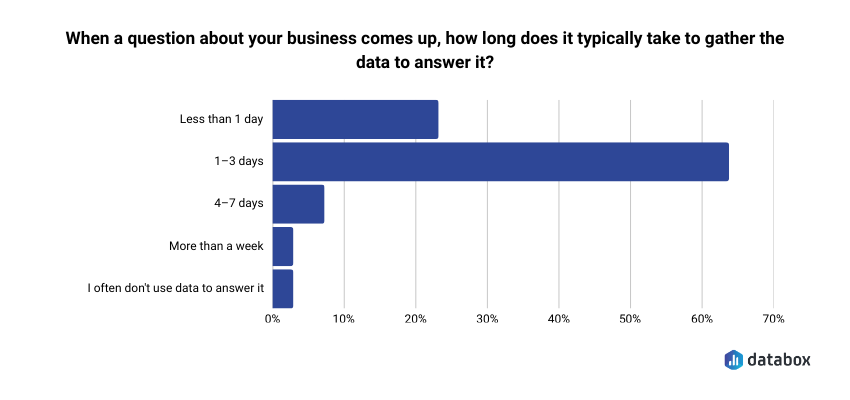
When the AI answer, the dashboard, and the definitions all draw from the same query engine across the same connected sources, the reconciliation step disappears, and the meeting starts at the decision. “Coverage is 2.1x. We need 3x. Enterprise Stage 3 is the gap. What are we doing about it?” The revenue number arrives pre-reconciled against billing. Quarter comparisons hold because they ran on real snapshots.
What changes is not the AI’s ability to answer, but the team’s ability to act. RevOps manager’s governance work (stage definitions, probability models, segmentation rules, historical tracking) stops being ignored by the AI and starts powering it, every week, in every review. And for whoever owns the forecast, that is the difference between a forecast the CFO questions and a forecast the CFO uses. AI sales forecasting is exactly as accurate as the data layer beneath it.
What this means for your pipeline review
You can connect your AI tool to your CRM, but the question is what the AI can see, and whose definitions it computes on.
If it sees one tool and guesses the definitions, the answer will be confident, specific, and unreliable, and you will catch the error 20 minutes into the review or not at all. A live connection does not change this. If a governed query engine does the math, across the stack, with the team’s own logic, the answer matches what the team already trusts. The AI becomes worth asking because the answer is worth acting on.
Databox built the platform around that principle because a forecast computed on a sliver of your data is not an inconvenience. It is a structural reliability problem that erodes trust in AI-generated analytics one wrong number at a time. You cannot build serious business decisions on approximate math, and you cannot build them on partial data either.
The pipeline review deserves better.
Frequently Asked Questions
Why does an LLM connected to a CRM still produce wrong forecast numbers?
Two reasons compound. The LLM does not carry your team’s definitions of what counts as qualified pipeline, which probability weights apply, or which deal types to include, so it computes a correct answer to the wrong question. And the CRM holds only part of a forecast’s inputs: billed revenue, marketing pipeline creation, and historical snapshots live in other systems the CRM-connected AI cannot see. A VP of Sales gets a number that looks precise but reflects one tool’s view and nobody’s definitions.
What data does an accurate sales forecast need beyond the CRM?
At minimum: billing data, to reconcile booked revenue against what was actually invoiced and collected; marketing automation data, to check whether pipeline creation is on pace to support next quarter; and historical pipeline snapshots, to compare this quarter’s shape against quarters that hit or missed. CRMs serve current-state deal records. The rest of the forecast’s inputs live outside it, which is why forecasts built on CRM data alone drift from the numbers finance recognizes.
Does connecting AI to the CRM through an MCP server fix forecast accuracy?
Connecting AI to the CRM through an MCP server fixes freshness: data arrives live from the API instead of from stale exports, and some CRM APIs can run aggregations server-side. It does not fix definitions or scope. The LLM still authors the query, so which stages count and which weights apply remain its guesses, and the connection still reaches one tool. An accurate forecast needs governed definitions applied across every source, which is a property of the data layer, not of the connection protocol.
How does Databox prevent the LLM from doing forecast math itself?
In Databox, the LLM has no access to calculations. Its role is language: understanding the question, identifying which governed metric to query, and presenting the result. All calculations run on a dedicated query engine designed for analytics, across every connected source, using the same metric definitions that appear on the team’s Databoards and in their Goals. The LLM never touches the calculations, which means the answer matches the dashboard the team already trusts.
How long does a typical pipeline review spend on data reconciliation versus decision-making?
When AI-generated pipeline numbers do not match dashboard numbers or rep-level spreadsheets, the first 15 to 20 minutes of a 45-minute review go to figuring out why. Databox research found that 64% of data leaders report needing one to three days just to gather the data required to answer a business question. In a live pipeline review, that latency compresses into minutes of reconciliation. Decisions about deal escalation, pipeline generation, and forecast adjustments get compressed into whatever time remains.
Can AI sales forecasting be accurate without changing the CRM data?
Yes, because accuracy is determined by the layer the AI computes on, not by the CRM records themselves. The same CRM data produces materially different forecasts depending on whether the calculation uses the team’s probability model or defaults, whether it joins billing and marketing sources or reads the CRM alone, and whether it compares true historical snapshots or approximations. A Revenue Operations Manager who moves from a one-tool, LLM-computed forecast to a governed cross-tool computation can see forecast variance drop without changing a single CRM field.