

HubSpot’s MCP connection gives Claude real command of your CRM, from deal lookups to record updates. What it cannot hand over is your business context, and pairing it with Databox MCP closes that gap.
TL;DR
- HubSpot’s official MCP connection puts your CRM in plain language: Claude can read contacts, companies, deals, tickets, engagement history, and even campaigns and landing pages, and can create and update core records with your approval.
- Setup takes minutes and needs no technical work: the HubSpot connector lives inside Claude’s settings (exact steps in the FAQ), a HubSpot admin chooses exactly which permissions Claude gets, and starting read-only is the sensible default.
- The data arrives without the business attached: Claude gets your records but not your metric definitions, targets, metric history, or the rest of your stack, and when a RevOps Manager asks for pipeline coverage, the language model computes it on its own improvised terms.
- Databox MCP is the context layer: definitions consistent with your Databoards, Goals carrying the targets, stored metric history carrying the trends, Benchmarks carrying the peer comparison, and a query engine doing the math, so the LLM never touches your calculations.
- The two connections work best together: HubSpot MCP for working the CRM, Databox MCP for answering how the pipeline and revenue are actually performing, both inside the same Claude conversation.
Connect HubSpot’s MCP to Claude and a RevOps Manager can pull every deal stuck in Negotiation for 30 days, update a deal stage, or summarize a quarter of email threads with one account, all by asking. No filtered views, no exports, no waiting on someone with report-builder permissions. Setup takes minutes; the steps are in the FAQ at the end.
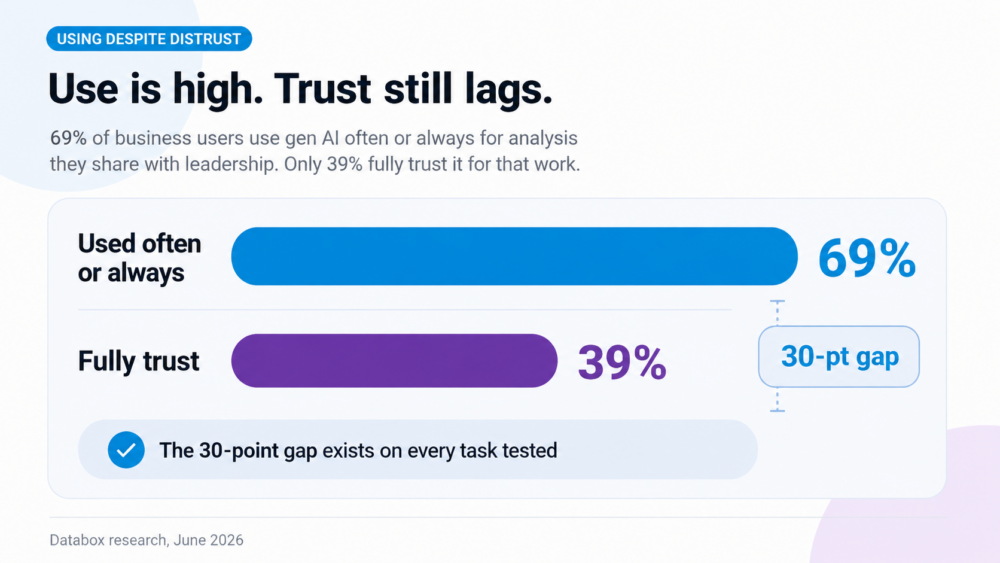
Then comes the question the connection cannot carry: “Is our pipeline healthy?” HubSpot MCP gives Claude your data. It does not give it your business. Claude receives the records stripped of everything that makes a number an answer: what your team counts as marketing-sourced, what the Q3 target is, what coverage looked like in April, what the ad platforms have been doing to top-of-funnel. In Databox’s Using AI You Don’t Trust: How Business Users Actually Run Analytics in 2026 research, 69% of business users say they use gen AI often or always for analysis they share with leadership, their board, or clients, but only 39% fully trust it for that work. The gap between those numbers is a context gap, not a prompting problem.
This article walks through what the HubSpot MCP connection genuinely covers, what goes missing between your CRM and Claude’s answer, and how connecting Databox’s MCP alongside it turns HubSpot questions into numbers a VP of Marketing can defend in a pipeline review.
HubSpot MCP Puts Your CRM in Plain Language, and the Scope Is Wider Than Most Write-Ups Admit
MCP, the Model Context Protocol, is the standard that lets an AI tool like Claude connect to your business data and act on it. HubSpot builds and maintains its own official MCP connection, and for most functional leaders the right route is the HubSpot connector inside Claude’s settings, live in minutes with no technical work. The remote server and the self-hosted developer package exist for engineering teams; all three paths and the connect steps are in the FAQ.
Claude can read and update your core CRM records (contacts, companies, deals, tickets, line items, products) plus the full engagement history of calls, emails, meetings, notes, and tasks, and since April 2026 it can also read campaigns, landing pages, and marketing events. What it cannot reach: custom objects, Sensitive Data properties, workflows, marketing emails as assets, and the reports you have already built in HubSpot. It cannot delete anything, and the connection is one HubSpot account per Claude account, which agencies managing multiple portals should know before promising clients otherwise.
One permission rule covers the rest: start read-only, and when you grant write access, keep the connector set to ask approval before every change, because your pipeline’s validation rules are not applied to edits made through it. Claude proposes, you confirm, and the audit log records both.
What Claude + HubSpot MCP Does Well: Deal Lookups, Record Updates, and Living Inside the Engagement History
Once connected, three categories of CRM work get noticeably faster, and every prompt below can be copied as written.
Pipeline lookups land first. “Show me all open deals in the Enterprise pipeline that have been in Negotiation for more than 30 days.” “Show me all contacts with a lifecycle stage of Lead and no engagement in 60 days.” Each of these maps to a direct CRM query; Claude retrieves the matching records and presents them with names, amounts, and dates. The answers are accurate because Claude is fetching, not figuring.
Record work is the second win. “Update the deal Enterprise Package Q4 to Closed Won.” “Log a note on this ticket summarizing the resolution.” With approval turned on, Claude shows the proposed change, you type yes, and the record updates with the action attributed in the audit log. A Director of Sales Operations clears a half hour of post-call admin in a few exchanges.
Context on a single account is the third. Because Claude can read the full engagement history, “summarize all my emails with this account from the last month and flag anything that might affect the deal closing” works. The answer draws on your real threads, not general knowledge. For a RevOps Manager prepping a deal review, that is the difference between walking in briefed and walking in guessing.
Notice what all three have in common: they are questions about records, and the records carry everything needed to answer. The moment the question is about the business rather than the records, something else has to supply what the records do not contain.
HubSpot MCP Gives Claude Your Data. It Does Not Give It Your Business.
Ask Claude, with a wide-open HubSpot connection, “is our pipeline healthy?” It will retrieve deals and produce an articulate, plausible answer. Now inventory what that answer could not have included, because none of it travels through a CRM connection. None of this is HubSpot’s fault; carrying your business context was never a CRM connection’s job.
Your definitions stay behind. Claude does not know what your company counts as marketing-sourced, which of your four pipelines is “the” pipeline, or whether coverage runs on weighted or raw amounts. It improvises a definition, answers on it, and does not mention the choice. Ask for win rate on Monday and again on Thursday, and you can get two different numbers built on two different improvised definitions, both delivered with equal confidence. In HubSpot, your team settled these definitions years ago; in the records Claude retrieves, the settlement is invisible.
The target is not attached. “Open pipeline is $4.2M” is trivia. Against what quota, what pace for this point in the quarter, what seasonality? A number without a target is a fact, not an answer, and no CRM record carries the target.
The past has to be rebuilt, not retrieved. HubSpot keeps history: revision logs on records, snapshot reports in its analytics. But the MCP connection does not expose the reporting engine, so when a RevOps Manager asks “what was coverage on April 1 versus today?”, Claude cannot look the April number up. It has to reconstruct it from current records, working backward through stage dates while missing amount changes and deleted deals. The report that answers correctly sits one tab away in HubSpot, unreachable through the connector. A trend question, the core question of every pipeline review, turns from a retrieval into a rebuild.
The rest of your stack is invisible. The CRM can say pipeline looks fine while Meta and Google Ads say top-of-funnel fell off a cliff three weeks ago. Marketing-sourced revenue needs spend data that lives outside HubSpot entirely. Claude answering from one system does not know what the other systems know.
And the math is Claude’s own. When Claude counts lifecycle transitions, averages deal sizes, or multiplies 53 deal amounts by stage probabilities to weight a pipeline, the arithmetic happens inside a language model, not on a math engine. Sometimes it writes itself a quick script instead, and the fair objection “but it can write code” deserves a direct answer: sometimes it does, you never know when, and a throwaway script is math nobody defined, nobody validated, and Claude may not repeat the same way next week. HubSpot’s own connector documentation says this plainly: Claude can make mistakes, fact-check the outputs, and never rely on AI outputs alone for important decisions. The article you are reading is just taking that honesty seriously.
Stack the five up and the pattern is one sentence: the number arrives naked: no definition, no target, no history, no surrounding stack, no accountable computation. A better prompt dresses it up; it cannot supply what the connection never carried. You cannot build serious business decisions on approximate math, and you cannot build them on context-free math either. The conclusion is not to disconnect HubSpot MCP. It is to stop asking a CRM interface to carry the business, and to give Claude a second connection that does.
Databox MCP Is the Context Layer: The Number Arrives Wearing Its Definition, Target, Trend, and the LLM Never Touches Your Calculations
Databox is an agentic platform built as an intelligence layer for business data, and the phrase earns its meaning here point by point, against exactly what the previous section showed going missing.
The definition comes from your workspace, not from improvisation. The same metric definitions that drive your dashboards and reports answer the Claude conversation through Databox MCP. When a Marketing Operations Manager asks for marketing-sourced pipeline, the answer uses the definition your team agreed on, and the number in the thread matches the number in Monday’s dashboard. Two people asking get one answer.
The target is in the system. Databox Goals carry your quota, your pace, your quarter. “Coverage is 3.1x” comes back as “3.1x against a 3.5x goal, tracking eight days behind pace,” which is the difference between a fact and a verdict.
The past is a lookup, not a rebuild. Databox has been recording your metrics since the day the integration connected, so “coverage on April 1 versus today” is retrieved from stored history, the same way Claude retrieves a deal record. It also pulls 2 years of historical data, depending on the plan. Trend questions stop being reconstruction jobs.
The rest of the stack is in the same answer. Databox’s 130+ native integrations pull HubSpot in alongside Google Ads, Meta Ads, Google Analytics, and the rest, so when a VP of Marketing asks about campaign-to-revenue attribution, the system holds every input rather than one source and a guess.
And the math runs on a query engine. Every calculation, from pipeline coverage to weighted pipeline to month-over-month trend, is computed the same way every time on infrastructure built for analytics. The LLM never touches your calculations. Inside Databox, Genie, the AI analyst, works this way natively: it turns the question into a query, the engine computes, Genie explains. Data in, answers out, where an answer means a number wearing its context.
Databox’s MCP brings all of that into Claude. Connect it alongside HubSpot MCP and the two do different jobs in the same conversation: “update the Enterprise Package deal to Closed Won” runs through HubSpot MCP, and “what did that do to our Q3 coverage against goal?” runs through Databox MCP, answered from your definitions, your targets, your stored history, and a query engine’s arithmetic. No tab-switching, and no language model improvising what your business means.
For the RevOps or Marketing Ops leader running HubSpot alongside ad platforms and analytics, the working setup is both connections side by side. HubSpot MCP works the CRM: lookups, updates, tasks, engagement summaries. Databox MCP carries the business: definitions, targets, trends, benchmarks, and computation. Each does the job it was built for.
Frequently Asked Questions
What are the three ways to connect the HubSpot MCP, and which one should I use?
The HubSpot connector for Claude is the right path for most teams: it lives inside Claude’s settings, needs no technical setup, and a HubSpot admin controls its permissions. The remote MCP server at mcp.hubspot.com suits teams connecting HubSpot to AI tools beyond Claude or managing access through their own identity provider. The self-hosted developer package runs locally and is for engineering teams that want full control. Functional leaders should use the connector.
How do I connect the HubSpot MCP to Claude?
A HubSpot Super Admin (or a user with App Marketplace permissions) connects first: in Claude, open Settings → Connectors → Browse connectors, choose HubSpot, connect, log into the HubSpot account, and select the permissions to allow. The admin then grants other users access from HubSpot’s Connected Apps page, and each user connects their own Claude account the same way. You need a paid Claude plan. To confirm it works, ask Claude to show your 10 most recently created deals; real deal names and dates mean the connection is live.
Does the HubSpot MCP give Claude access to Marketing Hub data?
Partially, and the boundary matters. Since the April 2026 update, Claude can read campaigns, landing pages, website pages, blog posts, and marketing events, so questions like “which campaign generated the most revenue last month” work. It cannot reach workflows, marketing emails as assets, custom objects, or the reports you have built in HubSpot, and page performance data requires naming the campaign and date range in your prompt.
Can Claude accurately calculate pipeline coverage or win rate from HubSpot data?
Treat those numbers as directional, not decision-grade. Claude retrieves the records accurately, but it improvises the metric definition and performs the aggregation inside a language model rather than on a math engine, and HubSpot’s own connector documentation recommends fact-checking outputs and never relying on AI outputs alone for important decisions. For metrics that carry financial consequence, route the question through a computation layer with agreed definitions, such as Databox’s MCP, and let Claude present the result.
Can an agency connect Claude to multiple HubSpot portals?
One HubSpot account per Claude account at a time. To work with a different portal, you disconnect the current one and reconnect the other; there is no cross-portal view through a single connection. Agencies managing several clients should plan on switching per engagement or giving each client team its own connected Claude workspace.
Why connect both HubSpot MCP and Databox MCP to Claude instead of one or the other?
Because they carry different things. HubSpot MCP carries your records: deal lookups, record updates, tasks, and engagement summaries in natural language. Databox MCP carries your business context: metric definitions consistent with your dashboards, Goals with your targets, stored metric history for trends, Benchmarks for peer comparison, and a query engine fed by 130+ data sources doing the math. Together they cover working the pipeline and understanding it in one conversation.