
Four capabilities, what each one requires from your data, and the test that tells you whether you can act on the output.
TL;DR
- An AI agent connected to your customer data can interrogate health scores, flag renewal risk early, monitor onboarding across every account, and answer per-account performance questions on demand. Task automation (summaries, drafting, data entry) works too, but it’s table stakes, not the shift.
- Every capability has a data requirement. A health score answer is only as good as the metric definition behind it; a churn flag is only as early as the freshest source feeding it. The agent’s model matters less than what it reasons from.
- Each use case comes with a test. For every output, ask: could someone re-derive this number from source data? In Databox’s Using AI You Don’t Trust survey, 86% of business users say they verify AI analysis. Only 23% actually re-derive the numbers.
- The capabilities compound when every agent reads one governed layer. Only 9% of business users have a unified data layer their AI can query freely. That layer, not a better model, is what turns four separate tricks into an operating system for CS.
An AI agent connected to your customer data can do four things a CS team actually feels: answer why an account’s health score moved, flag renewal risk before the QBR instead of after it, watch onboarding milestones across every account at once, and answer per-account performance questions in the tools your team already works in. It will also summarize calls, draft follow-ups, and fill in CRM fields, and if that’s all it does, you’ve bought a very literate intern.
Adoption is already mainstream. Gainsight’s 2024 State of AI in Customer Success report found 52% of CS organizations using AI. What separates the teams getting leverage from the teams getting summaries isn’t the model or the vendor. It’s what the agent reasons from. Every capability below has the same anatomy: what the agent does, what data it needs to do it, and how you know the output is right. The third beat is the one the category roundups skip, and it’s the one that decides whether a VP of Customer Success can act on the answer or has to audit it first.
What a CS agent can do is decided by the data underneath it, not the model on top
The default deployment connects an agent to the CS platform’s own data, maybe a CRM integration, and lets it answer from what it can reach. The failure mode isn’t access. It’s that the sources don’t share definitions: “health score” in the CS platform is computed differently from the signals feeding the sales forecast, ticket severity maps differently across the help desk integration, and nobody has written down what “activation” means.
McKinsey’s research on scaling agentic AI names the dependency directly: agentic systems need a steady flow of high-quality data, and their success depends on a data architecture that can support increasing levels of autonomy, coordination, and real-time decision-making. The agent is downstream of the architecture. Keep that in view as you read the use cases, because each one works exactly as well as its weakest data source.
Four things an AI agent can do for a CS team today
1. Answer why a health score moved, not just that it moved.
What it does. Dashboards show the drop. An agent interrogates it. Asked “what’s driving the decline for this account?”, the agent reads the health score’s contributing signals and returns the driver, the magnitude, and the timing: which signal changed, by how much, starting when. What this looks like in practice: an answer naming a 3x rise in ticket volume and a 40% drop in login frequency dated to the week the account’s primary user changed roles. That’s an answer a CS leader takes into a QBR, not a chart someone still has to explain.
What it needs. One canonical definition of health score, composed from authenticated sources tied to the same account ID: product usage, ticket velocity, NPS, billing status. If the agent computes the score on the fly from whatever it reaches, you get a different answer than the CRM gives the sales team.
How you know it’s right. The answer should cite which signals moved. If the agent can’t attribute the change to named sources, it’s inferring, and you’re trusting a guess with good grammar.
2. Flag churn and renewal risk while there’s still time to act.
What it does. This is the proactive CS promise, and it’s real when the inputs are. The agent watches leading indicators across every account (usage decline, support escalations, sentiment turning in tickets and call transcripts, champion departure signals from the CRM) and surfaces risk ranked by renewal date and revenue. Sentiment analysis earns its place here, as one input among several rather than a capability of its own.
What it needs. Fresh, complete inputs. A churn flag is only as early as the stalest source feeding it. If product usage batches nightly through a warehouse and the help desk integration syncs only open tickets, the flag fires on day 14 instead of day 9, and by then the champion is evaluating alternatives.
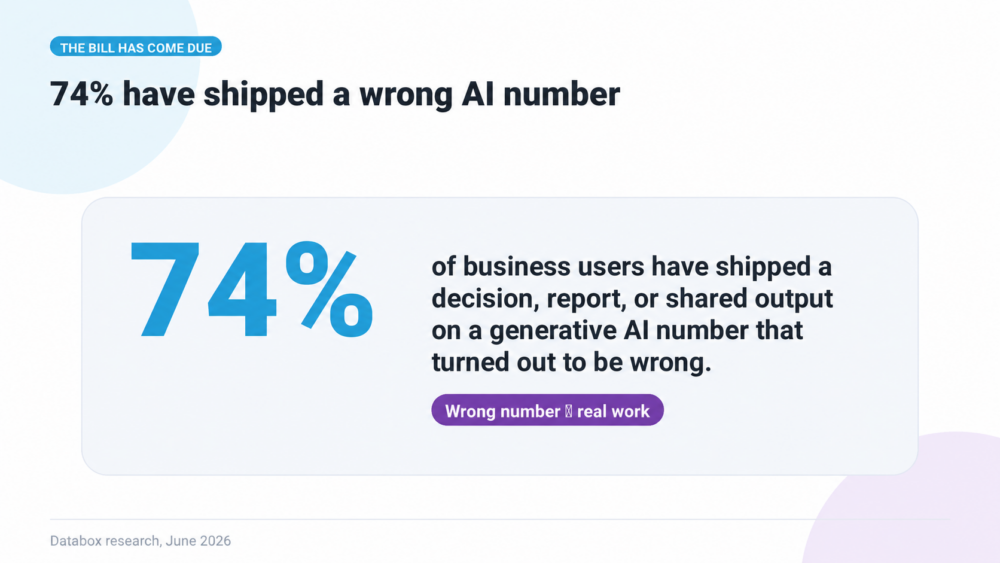
How you know it’s right. Early plus wrong is worse than late, because it burns the team’s trust in every future flag. Track the flags: how many were real, how many were noise. In Databox’s Using AI You Don’t Trust survey, 74% of business users have based a decision, report, or shared output on a gen AI number that later turned out to be wrong. A logged error rate is what keeps your team out of that statistic.
3. Monitor onboarding across every account at once.
What it does. A CSM with 40 accounts cannot manually check whether each new customer hit its milestones. The agent can: feature activation rate, first-value-moment timestamp, ticket count in the first 14 days, benchmarked against accounts that renewed. It flags deviations with context (which milestone slipped, by how many days) and lets the playbook fire while the customer is still reachable. The same data personalizes onboarding: accounts resembling your fastest activators get the light-touch track, the strugglers get a human.
What it needs. Defined milestones. “First value moment” has to be a written definition with an owner, not something the agent infers from login frequency. Undefined metrics make the flag unverifiable by construction.
How you know it’s right. Spot-check one flag per week against raw activation data. Twenty minutes, and within a month you know exactly where your onboarding data lies to you.
4. Answer per-account performance questions where your team already works.
What it does. The unglamorous capability that changes daily operations most: “what did we deliver for this client last month?”, answered on demand, scoped to the right account, in Slack or your own platform. This is the one use case here running in production rather than in a walkthrough. One agency built an AI agent on Databox’s MCP and let clients query their own performance data directly:
“Clients can just ask it in our own platform that we built. They can ask something like how [their] performance [is], for example, on Facebook, and it will use the Databox MCP to pull that data from their own account.”
What it needs. Per-account scoped authentication. The agent must query this client’s connected account, not an aggregated view, and the metrics must carry standardized definitions so the answer matches what the client sees in their own reporting.
How you know it’s right. The client checks. That’s the beauty and the brutality of this use case: the verification is built into the audience. A ROAS answer of 3.2x meets the client’s own dashboard reading 2.7x exactly once before the trust is gone.
The test that applies to all four: could someone re-derive the number?
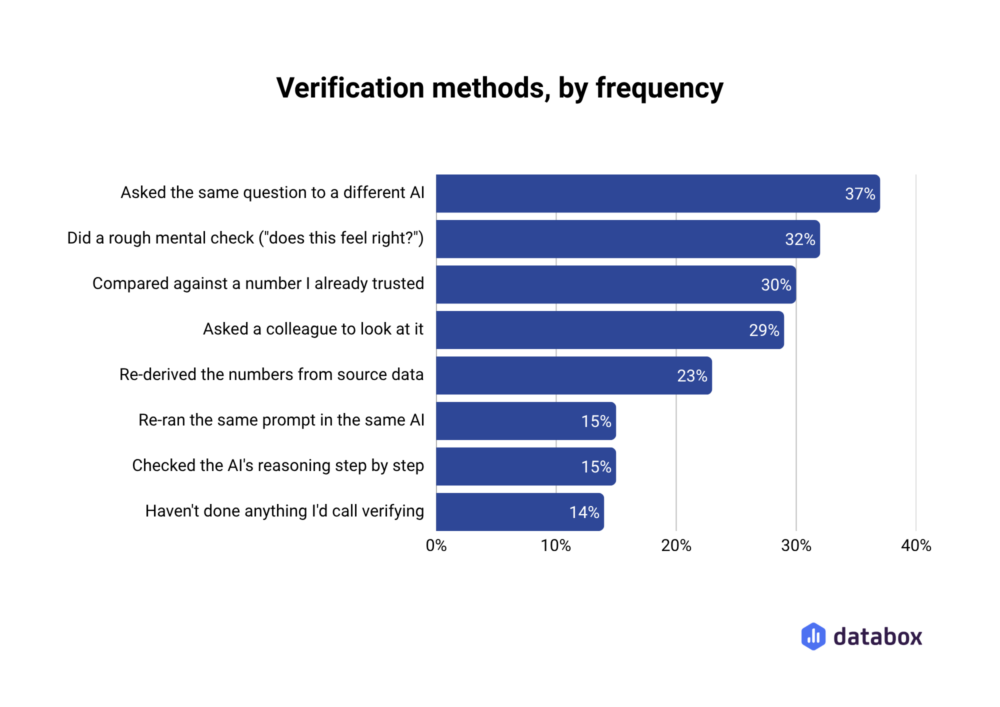
Run every agent output through one question: if a customer challenged this number, could someone on the team rebuild it from source data? In the Databox survey, 86% of business users say they verify their AI analysis, but only 23% re-derive numbers from the source. The rest are checking plausibility, and plausibility is a feeling. The trust gap shows up in the same data: 69% use gen AI often or always for analysis they share with leadership or clients, while only 39% fully trust it for that work.
The re-derivation test is cheap to run and diagnostic either way. If the answer is yes, your agent is reasoning from governed data and you can act on its outputs directly; the capability list above is your roadmap. If the answer is no, the gap isn’t in the agent. Somewhere a metric has no canonical definition, a source is stale, or an integration is scoped wrong, and every capability above will underdeliver until that’s fixed. Buying a second AI tool doesn’t fix it. 37% of surveyed users “verify” by asking a different AI the same question, and two models reasoning from the same broken inputs agree on the same wrong answer.
The capabilities compound on a shared data layer, and that’s the actual unlock
Each use case above works alone. The shift happens when they stop being separate deployments. The health score the CS agent interrogates, the renewal forecast the sales agent reads, the campaign data the marketing agent reports: when every agent queries one governed layer, the numbers agree, and the Head of CS Operations stops spending Monday mornings reconciling them.
This is what Databox is built as. Metric definitions live in the semantic layer, on the datasets themselves, so “health score” and “activation” mean one thing no matter which agent or human asks. Verification marks canonical metrics and reports, and agents prioritize verified assets over lookalikes. Access is scoped per account, the activity log makes every answer auditable back to its source, and the MCP are the query paths any agent can use to read the layer. Databox is the intelligence layer for business data: not just a place to check metrics, but a system that understands your business and lets every agent in the stack reason from the same source of truth. That’s what an agentic platform means in practice.
Few teams have this today. Only 9% of business users have a unified data layer their AI can query freely; 66% still feed AI through paste-and-upload or one-tool-at-a-time connections. Which is the quiet good news for a CS leader reading a capability roundup like this one: the four use cases above are available to everyone, but the compounding version is available to almost no one’s competitors yet.
Conclusion
What can AI do for a customer success team? Interrogate health scores, flag renewal risk early, watch onboarding at full portfolio scale, and answer account questions where the team already works. All four are real, and none of them are model features. They’re data features wearing a chat interface.
So the buying question isn’t “which CS AI tool has the best agent.” It’s “what will our agents reason from.” Teams that answer with a governed, shared data layer get the four capabilities plus the compounding. Teams that don’t get the literate intern, and a growing pile of numbers someone should have re-derived.
The capability list is public. The data layer is the moat.
Frequently Asked Questions
What can an AI agent actually do for a customer success team?
Four things beyond task automation: explain why an account’s health score moved by attributing the change to named signals; flag churn and renewal risk from leading indicators across every account; monitor onboarding milestones at portfolio scale and trigger playbooks when accounts deviate; and answer per-account performance questions on demand, scoped to each account’s own connected data.
Is AI for customer success just churn prediction and health scoring?
Churn prediction and health scoring are the most common uses, but the differentiating question is reliability rather than capability. A churn flag is only as early as the stalest data source feeding it, and a health score answer is only as good as the metric’s canonical definition. Two teams with the same AI tool get very different results depending on the data layer beneath it.
How do I know whether I can trust my CS agent's outputs?
Apply the re-derivation test: if a customer challenged the number, could someone rebuild it from source data? In Databox’s Using AI You Don’t Trust survey, 86% of business users say they verify AI analysis but only 23% re-derive numbers from the source. If nobody can re-derive your agent’s output, the problem is usually an undefined metric or a stale source, not the model.
What data does an AI agent need to work well for customer success?
Canonical metric definitions (one written meaning for health score, activation, and milestone metrics), fresh and complete sources (product usage, support tickets, billing, CRM, sentiment), authentication scoped to the right account, and shared definitions across teams so the CS agent’s numbers match the sales and marketing agents’ numbers.
Do CS teams need a unified data layer before deploying AI agents?
You can deploy without one, and most teams do: only 9% of business users have a unified data layer their AI can query freely. But without it, each capability underdelivers (late flags, unattributable health score answers, numbers that contradict other teams’ agents), and verification stays manual. The unified layer is what makes the capabilities compound instead of merely coexist.