
Databox vs Domo
Skip The Dataflows With The Easiest Domo Alternative
Domo can do a lot, but most of that power only shows up after your team builds out dataflows, models the data, and keeps an eye on a consumption meter that never really stops running. With Databox, you connect your data and get a dashboard live the same day, at a flat rate you can actually plan around.
Try It Free Explore DemoOver 20,000 Agencies and Businesses worldwide get their business performance analyzed with Databox.



Yes
Yes
$64/mo (1 user)
No
$159/mo (unlimited users)
Custom
$399/mo (unlimited users)
Custom
Contact Sales
Custom
3 reasons to choose Databox as your Domo alternative

A Dashboard Today, Not A Data Engineering Sprint
Domo can do a lot — but most of that power comes from dataflows, ETL, and ongoing data modeling that usually needs a dedicated data person to build and keep running. Databox skips that part: with 4,000+ pre-built metrics and 130+ native integrations, you connect your data and have a dashboard live the same day.

AI That Knows Your Business
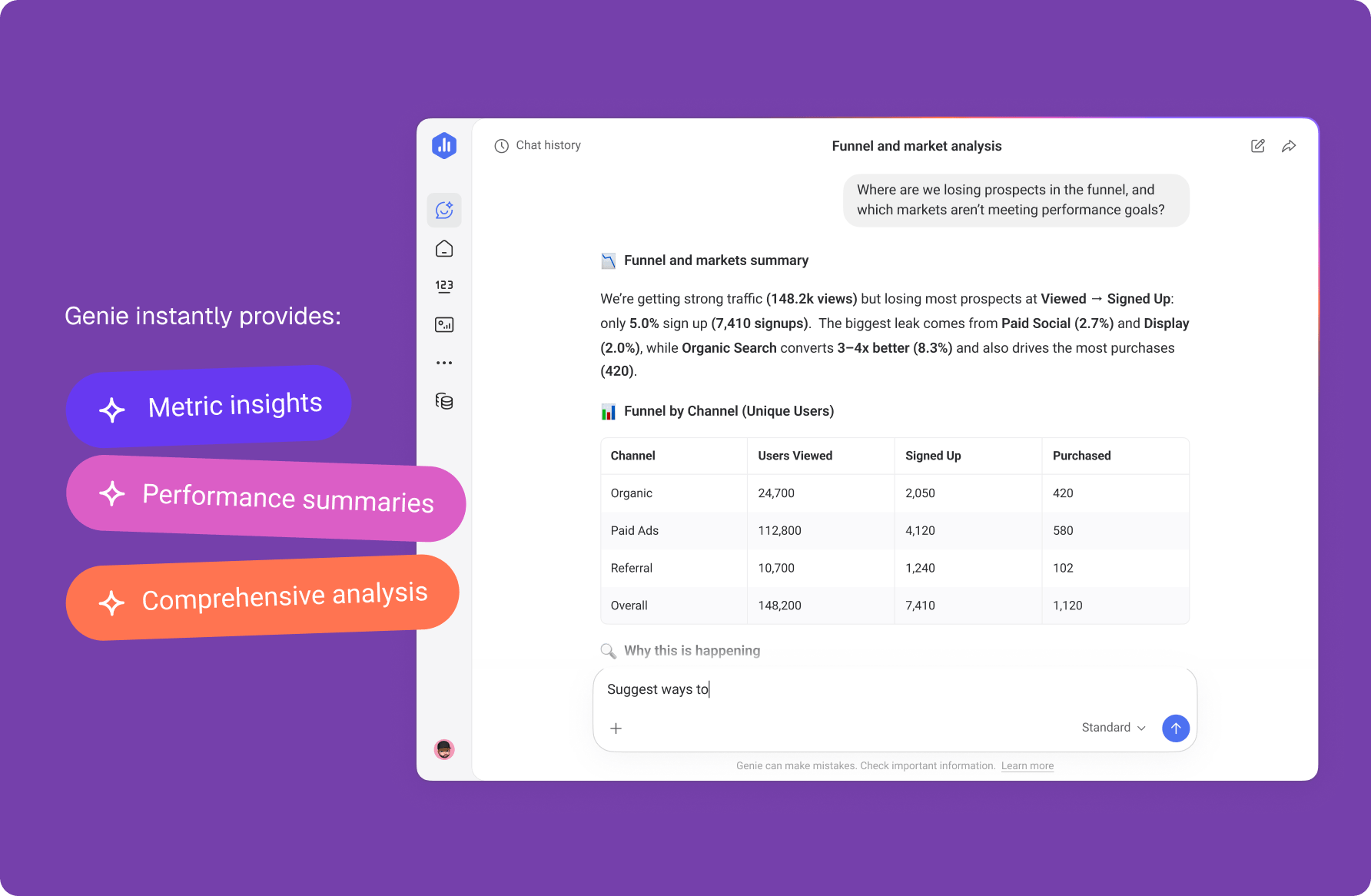
Domo’s AI works with whatever you’ve modeled into your datasets, and the business context behind those numbers stays in your team’s heads. Databox keeps your goals, priorities, and strategy docs next to your data, so Genie’s answers reflect how your business actually works and you never explain the business twice.
Built To Prove Results, Not Just Show Data
Databox pairs your dashboards with Goals, Scorecards, Alerts, and Genie, an AI analyst that tells you what changed and why, not just what the numbers are. If you’re reporting to clients, white-labeling, account templates, and scheduled delivery mean you’re not rebuilding the same report from scratch every month.
Domo’s AI works with whatever you’ve modeled into your datasets, and the business context behind those numbers stays in your team’s heads. Databox keeps your goals, priorities, and strategy docs next to your data, so Genie’s answers reflect how your business actually works and you never explain the business twice.
Databox vs Domo at a Glance
Easily compare Databox and Domo to choose the best analytics platform for your business. Explore the top 6 features.

Easy to create, customize, and share dashboards
Databox is easy. You can choose from 140+ dashboard templates or start from scratch using simple drag-and-drop actions. Just drag any visualization or pre-set metric onto your dashboard canvas and build a custom view in minutes! Once done, easily share your insights using a link. The best part is, anyone with a link can access the dashboard – you don’t need to have a Databox account.
Customizable dashboards but demands a significant time investment and know-how
Highly customizable, but building complex dashboards (“Domo cards”) typically requires more setup time and Domo-specific know-how. Viewer access can require a Domo account/license.
Automated, connector-led data prep with scheduled syncs
With Datasets, Databox becomes your no-code data prep layer—standardize and merge sources, filter into clean tables, add calculated columns, and reuse across metrics, dashboards, and reports (CSV export included). 130+ native connectors and 4,000+ predefined metrics get you started instantly with scheduled syncs (15-min on Premium), so most GTM stacks don’t need separate ETL or a warehouse.
Requires data modeling
Dataflow/ETL-style prep (Magic ETL, SQL, Beast Mode calculations) — flexible and powerful, but built for users comfortable with data modeling, not a marketing or agency team on day one.
4,000+ pre-defined metrics and easy-to-use Metric Tools
As soon as you connect your first Data Source, you’ll be able to browse a library of 4,000+ pre-defined metrics. If you can’t find the metric you need, you can create additional custom and calculated metrics using the Metric Builder and Metric Calculations tools. With the Metric Builder, you can add advanced filters, discover new metrics, and segment data using a simple dropdown menu.
No pre-defined metrics
No pre-defined metric library — most metrics are custom-built (“Beast Mode” calculated fields), which gives flexibility but requires more manual definition work.
130+ integrations, Excel, Google Sheets, SQL database, and more options to cover your data needs!
Connect your data to Databox using any of our 130+ native integrations. Databox connects with the most popular platforms for every department, including marketing, finance, sales, and more. Go beyond what’s natively available by connecting SQL Databases, spreadsheets, and Custom API integrations. Or push data into Databox using the Rest API.
Connects with warehouses
1,000+ connectors via the Domo App Store — broader raw coverage, oriented more toward enterprise/warehouse data sources; several individually require setup and mapping work.
Create presentation-style reports and automate your processes
Creating monthly or weekly reports is easy. You can choose to either use a Report template or create one from scratch using the different slide types (text, image, Data Stories, side-by-side, and dashboard). Using Report Automation, you can then schedule your Reports to automatically export your data daily, weekly, monthly, or quarterly – without sacrificing quality!
No report builder
No dedicated presentation-report builder; sharing is primarily dashboard- and card-based.
Proactively monitor your performance with Goals and Notifications
Use Goals, Scorecards, and custom Alerts to keep your metrics and goals under control. Using Goals and Alerts, you’ll be able to set targets, track your progress over time, and receive tailored notifications to stay informed on your performance. With Scorecards, you can receive performance updates of your top metrics via email, push notification, or Slack.
Alerts are tied to dashboard logic
Alerts available but generally tied to building out the underlying dataflow/dashboard logic first.
Predict the future with Metric forecasts and more
Forecasts, anomaly detection, metric drill-downs with row-level detail, dashboard-level filtering by dimensions, and AI-powered performance summaries.
AI-assisted analysis
Domo.AI / Agent Catalog offers AI-assisted analysis and app-building, aimed more at technical users building AI-powered “data apps.”
Don’t just take our word for it

-
Ease of use

Domo: 8.3
-
Ease of setup
Domo: 7.8
-
Ease of admin

Domo: 8.1
-
Meets requirements

Domo: 8.4
What makes Databox so great?
Okay, we admit it – we might be biased. But don’t take our word for it! Here’s what our amazing customers have to say about why they love using Databox.

 4.8 out of 5 stars

“We like the style of Databox. It doesn’t look dated and has been very impressive to our clients. We also love the variety of data connections and ease of set-up”
“There are so many things I love about Databox. First, it’s very intuitive. You don’t need to be a data expert. You can integrate data seamlessly from different resources. I have tried Power BI, Tableau, and Google Data Studio. And I prefer Databox.”
Make the right choice
Databox and Domo can both turn your data into decisions — they’re just built for different starting points. Domo is a deep, developer-extensible platform for teams ready to invest in data engineering. Databox gets any team, technical or not, from raw data to a dashboard you can trust and share, fast. Databox will be the perfect tool for you if…
- You want an AI analyst (Genie) that explains what changed and why, not just a chart.
- You want a working dashboard in minutes, without a data engineer or dedicated BI admin.
- You’d rather have predictable, flat pricing than a usage meter you can’t forecast.
- You report to multiple clients or stakeholders and need white-labeling, templates, and scheduled delivery.
- You’d rather connect to marketing, sales, and RevOps tools out of the box than build your own data pipelines.

Give Databox a try
No dataflows to build, no consumption meter to watch. Connect your data and see your first dashboard today.
Explore DemoIs Databox a good alternative to Domo?
Yes. Databox is a strong Domo alternative for teams that want a dashboard live the same day they connect their data. It ships 130+ native integrations and 4,000+ prebuilt metrics, so there are no dataflows to build before reporting starts. Paid plans are a flat monthly rate, with unlimited users from the Pro plan up.
What’s the difference between Databox and Domo?
Domo is a developer-extensible data platform where teams model data with Magic ETL and build custom metrics with Beast Mode calculations. Databox ships prebuilt metrics and native integrations, so a marketing or agency team can connect a source and report the same day. Domo bills on consumption, while Databox charges a flat monthly rate you can plan around.
Is Databox or Domo better for marketing, sales, and RevOps teams?
Databox is built for marketing, sales, and RevOps teams. It connects the tools those teams already use, like HubSpot, GA4, and Salesforce, and pairs dashboards with Goals, Alerts, and Genie, an AI analyst that explains what changed and why. Domo fits better when a dedicated data team manages large enterprise warehouse data.
Is Databox cheaper than Domo?
Usually, yes. Databox paid plans run from $64 to $399 per month, and plans from Pro up include unlimited users, so the price stays flat as your team grows. Domo prices on consumption through custom quotes, and the bill moves with dashboards, queries, and connectors, which makes Databox the easier cost to forecast.
How hard is it to switch from Domo to Databox?
Most teams switch in a day. Connect your data sources, pick from 4,000+ prebuilt metrics, and rebuild your key dashboards from templates, with no dataflows or data models to migrate. A free 14-day trial lets you run Databox alongside Domo and compare the same numbers before you cancel anything.
Can I try Databox before I commit?
Yes. Databox offers a free 14-day trial with no credit card required, plus a Free plan that stays free for one user after the trial ends. Connect a data source and see your own metrics in a dashboard the same day, so you can judge the fit with real numbers.